Click here to Skip to main content
Licence 
First Posted 30 May 2002
Views 1,077,440
Bookmarked 336 times

Command Prompt Explorer Bar

By | 10 Jun 2002 | Article
This tool extends explorer with functionality of a command prompt. Implemented as a band object completely in C#. Demonstrates COM Interop and P/Invoke, windows hooking and API interception. Finally you can run all these .Net SDK tools and ‘Hello World!’ programs without leaving explorer shell.

Introduction

The Command Prompt Explorer Bar is a small tool that extends Windows Explorer.

Version 1.1 is now available.

Ever tried to run one of those console programs ("Hello World!" to name a few), .BAT, .VBS or .JS scripts just to see black window popping up and disappearing? I did. Especially after I started using .Net framework I find myself doing this more often. No wonder - with all this ALs , NGENs and TLBIMPs. So if you are like me then this tool is right for you. Next time you need to run a program without GUI, just press the 'Ctrl+M' key combination in your explorer. A command prompt will start and appear automatically. Its current directory will be exactly the same as the current path you are browsing. And better yet the console will appear inside your explorer window - like any other explorer bar does - 'History', 'Favorites', 'Folders' etc. Now you can have the best of both worlds combined together - easy and fast navigation of explorer and power of batch processing of the command prompt. Or should I say Command Prompt Explorer Bar:
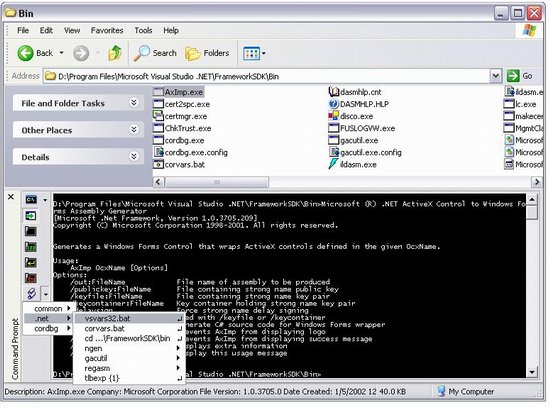
Well, that is how it looks like. Isn't it a beauty?

You may have noticed a toolbar on the left of the console window. I tried to put some nice timesaving features there. The most powerful is a button with a 'Script' icon on it. It has a drop down menu where you can select a command you like to be executed. It even knows how to substitute '{0}' for the name of the current files selected in explorer. Here is when it can be useful. Let's say you want to install your assembly into a 'Native Images Cache'. With Command Bar it is as simply as selecting your assembly in explorer and clicking on 'ngen {1}' menu item. It also works just fine for multiple selected files (use {0} instead). Now you can compile your .cs or .vbs files without leaving a comfortable explorer shell. And yes, you can change this menu and scripts the way you like them. It is as simple as editing a text file in a Notepad.

And here is another (besides pressing 'Ctrl+M') way of starting this tool:

I hope you'll enjoy this little tool. Send me your comments, requests and bug reports to PavelZolnikov@yahoo.com.

History

  • 5/31/2002, 1.0 - original version.
  • 6/11/2002, 1.1 - bug fixes. NOTE: if you were using version 1.0 and have customized macro.xml file, you might want to save its backup version somewhere before uninstalling.
    • New setup. Hopefully without issues like in previous version. Thanks to Michael Dunn for his tip.
    • Fixed an issue with CMD.EXE failing to start. CreateProcess interception is now scoped by instances of Folder Windows and enabled only if CommandBar is visible. 'Launch folder windows in a separate process’ is no more required.
    • Integrated keyboard focus with explorer. Now Command Prompt window is reachable through Tab and Shift+Tab keys.

License

This article has no explicit license attached to it but may contain usage terms in the article text or the download files themselves. If in doubt please contact the author via the discussion board below.

A list of licenses authors might use can be found here

About the Author

Pavel Zolnikov

Web Developer

United States United States

Member


Sign Up to vote   Poor Excellent
Add a reason or comment to your vote: x
Votes of 3 or less require a comment

Comments and Discussions

 
You must Sign In to use this message board. (secure sign-in)
 
Search this forum  
 FAQ
    Noise  Layout  Per page   
  Refresh
GeneralMy vote of 5 Pinmemberim_chc21:23 17 May '12  
Questioncrash Pinmemberello_cc16:36 19 Feb '12  
Questionnot working on Win 7 PinmemberWrangly20:48 4 Jul '11  
GeneralError on windows 7 Pinmemberaldo hexosa21:00 4 Oct '10  
AnswerRe: Error on windows 7 PinmemberCédric Bourgeois7:23 28 Feb '11  
GeneralNow thats nice ... Pinmemberstixoffire6:39 26 Feb '10  
QuestionNot working on Vista 64 but?? Pinmemberingoklemm0:36 4 Oct '09  
GeneralWorks well with QT Tab bar too! Pinmemberim_chc15:04 20 Sep '09  
GeneralWindows 7 Pinmemberneuwirthe21:45 26 Aug '09  
GeneralJust a size glitch Pinmembergabrielmaldi4:35 4 Apr '09  
GeneralPerfect idea! Pinmembermichaelogical9:59 9 Mar '09  
GeneralWin XP SP3 x86 edition on 64 Bit Hardware - Crashes Explorer Pinmembergutharius17:26 9 Jan '09  
GeneralWorks in IE but not Explorer when installing on Windows XP 64-bit Pinmemberpashleb0:26 8 Jan '09  
GeneralRe: Works in IE but not Explorer when installing on Windows XP 64-bit PinmemberRuss McMackin8:33 19 Feb '09  
GeneralXP x64 problem. Pinmemberoleg639:57 2 Oct '08  
QuestionWhat a nice and nicer idea!!!! Pinmemberrahulja2:59 10 Sep '08  
QuestionVista Installation Issues - Error Code 2869 and Error 1304: Error writing to file zcommon.dll Pinmemberpicardo10:21 29 Aug '08  
AnswerRe: Vista Installation Issues - Error Code 2869 and Error 1304: Error writing to file zcommon.dll PinmemberMember 41183883:50 26 Oct '08  
QuestionControlling Sidebar from BHO PinmemberAlex Shneyder17:24 9 Oct '07  
QuestionHow to display Explorer Bar Pinmembervikrant kpr10:50 7 Sep '07  
AnswerRe: How to display Explorer Bar Pinmembertoonen2611:29 17 Oct '07  
Press Control-M to toggle it Smile | :)
GeneralNeed drag and drop Pinmembersinbao19:05 18 Jul '07  
GeneralCauses WinMerge to fail. PinmemberUKCodeMonkey23:25 16 Jul '07  
GeneralBest Power toy ever! Pinmemberkerneljag18:38 23 Jan '07  
QuestionPowerShell Support Pinmemberirishjd5:05 13 Dec '06  

General General    News News    Suggestion Suggestion    Question Question    Bug Bug    Answer Answer    Joke Joke    Rant Rant    Admin Admin   

Use Ctrl+Left/Right to switch messages, Ctrl+Up/Down to switch threads, Ctrl+Shift+Left/Right to switch pages.

Permalink | Advertise | Privacy | Mobile
Web04 | 2.5.120529.1 | Last Updated 11 Jun 2002
Article Copyright 2002 by Pavel Zolnikov
Everything else Copyright © CodeProject, 1999-2012
Terms of Use
Layout: fixed | fluid
