Table of Contents
In this article I want to demonstrate the technique of creation of a list box
control that draws a small image to the left of each item's text (see Fig.1).
This control exposes the Items collection
property containing custom items which may be edited by means of
Visual Studio's collection editor.
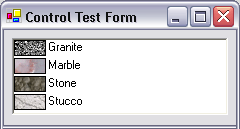
Fig.1 Control appearance at run time
There are several articles devoted to the same problem, as for
example ListBox with Icons by nhgiang.
But none of these implement a control having the Items property
that may be edited by means of the Visual Studio's Windows Forms Designer.
They use some manually created code fragments like:
Programmatically adding items - as in C++, no Visual C# advantage.
imageListBox.Items.Add(new ImageListBoxItem("Text 1", 0));
imageListBox.Items.Add(new ImageListBoxItem("Text 2", 1));
imageListBox.Items.Add(new ImageListBoxItem("Text 3", 2));
The control which implementation is described in present article
provides visual editing opportunity that speeds up the development process.
But, of course, it still supports the programmatic way of managing items.
Visually added items - you do not have to keep in mind what index
is associated with an image in the image list. All the editing is done in the
collection editor and you don't need to touch the code (see Fig.2).

Fig.2 Collection editing at design time
In the following paragraphs I will shortly describe the problems I had
encountered. For implementation you better look at the code - it speaks for
itself.
Using the control in your project
If you want to try first the demo project, please do not
forget to compile it first (at least the ImageListBox control
library), or otherwise the control won't appear in the test form at design
time.
Fig.3 Principal properties of the control
If you want to use the ImageListBox on your form,
please also add the ImageList control to your form, fill it with
images, then set the ImageListBox's ImageList property
and then start adding the items to Items property (see Fig.3).
Control class
There's not much to say about the control class. The ImageListBox
is inherited from standard ListBox control. We should implement
the ImageList property that will allow to provide the source for
images to be drawn in the list box. Another step will be overriding the ListBox's
Items property. The only important thing is to set the
[DesignerSerializationVisibility(DesignerSerializationVisibility.Content)]
attribute to inform the designer that we want to serialize the contents of the
collection, not the collection itself during design time. The DrawMode
property is set to OwnerDrawFixed value and then is hidden from
property browser by the [Browsable(false)] attribute. The drawing
is made in the OnDrawItem protected method and there's nothing
complex to be described.
There are several ways of implementing the collection,
as internal or nested class, or somehow else. In this
demonstration we will use the base class Items collection to store
the object of our collection, so it will be better to implement the collection
as a nested class to allow access to control's private members. The collection
class should implement the IList, ICollection and IEnumerable
interfaces. We can't use in this case CollectionBase inheritance
since there's more complex behavior than just simple item storage. I recommend
you to look the code for the details of implementation. Another important issue
is to implement this[int index] property for the collection class
that will allow to access the collection members.
Item class implementation. Method I
Implementing item class from scratch (no base class)
First we need to implement at least two constructors for the item class. The
first is parameterless that allows the Collection editor to create an "empty"
item with all properties set to default. Another constructor is the one with
the largest number of parameters needed to fully reconstruct all editable
properties of the item object. In our case this is
ImageListBoxItem(string
Text, int ImageIndex)
.
The item class implements the ISerializable and ICloneable
interfaces (I am not sure whether the ICloneable is needed, but
this simply copies the set of interfaces implemented by ListViewItem).
The ISerializable interface is employed by the Collection editor to
allow item properties to be set in the editor. Each item serializes two
properties: Text (string) and ImageIndex (integer).
These properties appear in the property grid on the right-hand part of
Collection editor (see Fig.4)
Fig.4 ImageListBoxItem properties. Method I.
Another noticeable problem is to get the Collection editor to display correct values
(as well as thumbnail images) for the ImageIndex
property. We'll do this in three steps:
- Add
ImageList read-only property to the item class.
Hide it from property browser by [Browsable(false)] attribute.
This property is used by the UITypeEditor assigned to ImageIndex
property and it is the image list from which this value editor takes the images
to be displayed in the combobox.
- Add
[TypeConverter(typeof(ImageIndexConverter))] attribute
before the implementation of ImageIndex property. This
tells the editor that it needs to take the indexes from the ImageList
associated with an item.
- Add
[Editor("System.Windows.Forms.Design.ImageIndexEditor",
        typeof(UITypeEditor))]
attribute before the implementation of ImageIndex
property. This tells the Collection editor to use standard UI editor for the properties
that are image indexes.
Fig.5 Combobox with images from the control's ImageList
And voilа! Here is the combobox filled with images as desired (see Fig.5).
As a final stroke, we need the Windows Form Designer to automatically add the
code to our form's InitializeComponent() function like the one
that follows:
this.listBox1.Items.AddRange(
    new Controls.Development.ImageListBoxItem[] {
    new Controls.Development.ImageListBoxItem("Granite", 0),
    new Controls.Development.ImageListBoxItem("Marble", 1),
    new Controls.Development.ImageListBoxItem("Stone", 2),
    new Controls.Development.ImageListBoxItem("Stucco", 3)
    }
);
This is performed by implementing the type converter class that inherits
from the TypeConverter. We will use the ExpandableTypeConverter
(as Microsoft does for ListViewItem) to lessen the amount of
functions to override. The only functions we should override are CanConvertTo
and ConvertTo. We should convert only to InstanceDescriptor
type used by the Windows Form Designer. The ConvertTo function
bulds the InstanceDescriptor object by providing the ConstructorInfo
for the constructor that will appear in the code added by the designer (
ImageListBoxItem(string
Text, int ImageIndex)
in our case). Then we associate this converter class with the
ImageListBoxItem by means of
[TypeConverter(typeof(ImageListBoxItemConverter))]
attribute. Now the control is ready to be edited by the designer.
Pluses and minuses of Method I
Pluses:
- The class does not have any base classes (except
System.Object).
You can fully control the class you have created.
Minuses:
- The localization is not straightforward and yet unimplemented
- You need to implement type converter class
Item class implementation. Method II (Localizable!)
Another solution is to derive the collection item class from the System.ComponentModel.Component.
In this case you won't need to implement the type converter class, neither the
serializability. All other methods and attributes will be the same. The
Collection editor appearance will be different in this case (see Fig.6) as well
as the code generated.
Fig.6 ImageListBoxItem properties. Method II.
The code that is added automatically, will be split in two parts. First, the
member variables for all the items are added to your form class. Then in form's
class InitializeComponent method the constructors are called for
items, the items are added to listbox and then their properties are set.
private Controls.Development.ImageListBoxItem graniteItem;
private Controls.Development.ImageListBoxItem marbleItem;
private Controls.Development.ImageListBoxItem stoneItem;
private Controls.Development.ImageListBoxItem stuccoItem;
...
private void InitializeComponent()
{
...
members this.graniteItem = new
Controls.Development.ImageListBoxItem();
this.marbleItem = new
Controls.Development.ImageListBoxItem();
this.stoneItem = new
Controls.Development.ImageListBoxItem();
this.stuccoItem = new
Controls.Development.ImageListBoxItem();
...
this.listBox1.Items.AddRange(
new Controls.Development.ImageListBoxItem[] {
this.graniteItem,
this.marbleItem,
this.stoneItem,
this.stuccoItem});
...
...
this.graniteItem.ImageIndex = 0;
this.graniteItem.Text = "Granite";
...
}
Pluses and minuses of Method II
Pluses:
- The most noticeable plus of this approach along with implementation simplicity
is that now the control may be localized by means of Windows Forms
Designer
- No type converter class needed
- The class implementation is simpler than in Method I
Minuses:
- The only minus is that the items become a little bit heavy weighted since they
are derived from
Component class
This article demonstrates the method of exposing the collection as a property.
This technique may be useful for a bunch of other controls (bands for
OutlookBar, column and row headers for custom grid controls, etc.). If you
spend a couple of days in implementing a set of classes as described in this
technique, this will gain you time in the projects where you are going to use
the designed controls. Instead of adding lines of code, simply click, type and
enjoy. I already did.
Problems
The principal problem that remains unresolved, is the localization for Method I.
I use the [Localizable(true)] attribute for all members I
want to be localizable, but this doesn't seem to work in a proper manner. When
I set the Localizable property for the form to true and
then try to switch between the languages, the ImageListBox contents
remain invariant. If anyone has already solved such a problem, please contact me
if possible. I have noticed that almost the same problem is encountered
for ListView control.
- Thanks to James T. Johnson, now the toolbox bitmap is displayed correctly. I
have added an embedded bitmap resource (ImageListbox.bmp) that
appears in the Visual Studio's toolbox. The name of the resource must match
the control's name (minus name of the project default namespace).
- Another method of implementing the item class that supports localization has been added.
I currently work in Moscow, Russia for Boeing company.
MCSD and MCAD.NET



 General
  News
News  Suggestion
  Question
  Bug
Bug  Answer
  Joke
Joke  Praise
  Rant
Rant  Admin
Admin 


 Submit an article or tip


 )
)


