Introduction
When I first started with .net, I was pretty disappointed that both the
ListBox and
ComboBox didn't have multi-column support. More accurately the
ListBox didn't implement it the way I was expecting (each Item stacks horizontally rather than vertically). I had heard Windows Forms had a rich set of Controls yet they didn't have as much functionality of Microsoft Forms 2.0 (ActiveX Library used by Office VBA). However now that I've really worked with .net and Windows Forms I'm glad the MS developers spent less time writing fancy controls and more time making it easier for other people to do so.
This is an Owner Drawn ListBox inherited from System.Windows.Forms.ListBox. Its primary function is to format each Item into multiple columns. Secondly, the client should be able to
retrieve the contents of any column in any row easily. I decided the best way to do this would be to mimic the drawing of the standard
DataGrid. The side effect to this is it has to be bound to a DataSource.
Features
- Multiple Columns with configurable widths
- Automatic calculation of
HorizontalExtent based on the # of columns and their width
ColumnCount Property to quickly limit the # of columns without modifying the
DataSource
- 2 new Events,
MeasureSubItem
and
DrawSubItem
for client code to take ownership of Painting
ValueMember now corresponds to MultiColumnListBox.Value (instead of Text). Also a
TextMember Property has been added that corresponds to MultiColumnListBox.Text
ValueIndex and TextIndex properties can be set so that Column positions can be used instead of column names
MatchEntryStyle enumerated property extends typed character matching for case sensitivity and complete string matching (with configurable timeout)
FindString() and FindStringExact() overriden to take columns into account.
GetItemAt() method to quickly obtain an object at a specified row and column (4 Overloads)
- Reflection is used to determine if an object can be drawn as an Image. This includes Image Bitmap and
byte[]
(if it really is an image that is)
- Included is a helper object
DataArray with a single static method ToDataSet
which converts a 1-3 dimension (Non-Jagged) array into a DataSet.
Usage
using System;
using System.Drawing;
using System.Windows.Forms;
using System.Data;
using AsYetUnnamed;

public class Form1 : System.Windows.Forms.Form
{
    private DataSet ds;
    private MultiColumnListBox listBox1;
    public Form1()
    {
        ds = DataArray.ToDataSet(new object[,]{
                    {"Row0, col0",  "Row0, col1" ,1},
                    {"Row00, col0", "Row1, col1" ,new object()},
                    {"Row1, col0",  "Row2, col1" ,"Some String"},
                    {"Row1a, col0", "Row3, col1" ,Rectangle.Empty},
                    {"row1aa,col0", "Row4, col1" ,1},
                    {"row0, col0",  "Row5, col1" ,1},
                    {"pow0, col0",  "Row6, col1" ,1},
                    {"Row7, col0",  "Row7, col1" ,new ExampleClass()},
                    {"Row8, col0",  "Row8, col1" ,Image.FromFile("StopLight.gif")}
                    });

        listBox1 = new MultiColumnListBox();
        listBox1.Parent = this;

        listBox1.DataSource = arr;
    }
    class ExampleClass
    {
        Public override string ToString()
        {
            return "Hello from ExampleClass!!";
        }
    }

}
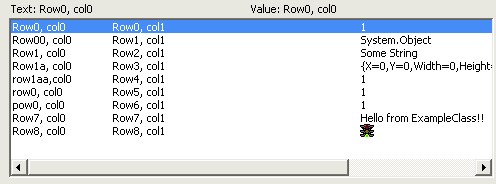
Will produce something similar to the above screenshot. The demo project demonstrates more features.
Challenges
Probably the biggest challenge was figuring out how Complex Databinding works on WinForms. As it turns out, anything that implements
IList is enumerated to get the list of rows. The difference between ListBox and DataGrid are as follows:
ListBox: Calls
oString() on each Item contained in the IList. If DisplayMember is set, it instead calls
IList[index].DisplayMember.ToString()
DataSet: Instead of calling ToString() on every Item contained in the
IList, it uses Reflection to find every public readable property the object exposes. It displays each one of these in a column.
However if the DataSource impliments ITypedList, it uses the property definitions supplied by
ITypedList instead. When used in conjunction with an object that impliments ICustomTypeDescriptor, the
ITyped list can supply non-existant properties of an object to the
DataGrid.
Fortunately the DataSet, or rather DataView object
implements this for you. And the DataManager already provided with ListBox has the ability to query for these Interfaces automatically.
One other annoying thing was working with SelectionMode.MultiExtended. When in this mode setting SelectedIndex on an Item that is already selected but doesn't have focus will not give focus to that Item. Also, calling ClearSelected() when in MultiExtended mode clears the Selection then Selects Item 0. I spent hours trying to figure out how to set a Mutually Exclusive Selection without forcing a repaint and without Item 0 flashing.
\\TODO:
This is definitely a work-in-progress. Aside from no designer code, lack of documentation, severe lack of code comments, and too many eaten exceptions I want to
implement the following:
- Replace
ColumnWidths with ColumnStyles which in addition to width also specifies
Font, Color, BackColor, maybe even a Delegate to perform single column Painting without going full-blown OwnerDraw.
- Any thoughts on Mouse-based column Resizing? Is this exceeding the purpose of a list box?
- RE:
DataArray.ToDataSet() I would like to actually make an object that
Implements ITypedList and ICustomTypeDesriptor that interprets calls to a contained Array rather than just Looping through and copying elements to a
DataSet.
- I really need to come up with a namespace....
Conclusion
Hopefully this fulfills somebody's needs besides just my own... I
really appreciate any feedback, comments, suggestions, bug findings, etc.
This member has not yet provided a Biography. Assume it's interesting and varied, and probably something to do with programming.



 General
  News
News  Suggestion
  Question
  Bug
Bug  Answer
  Joke
Joke  Praise
  Rant
Rant  Admin
Admin 


 Submit an article or tip


 I want to create dictionary software.
