Background
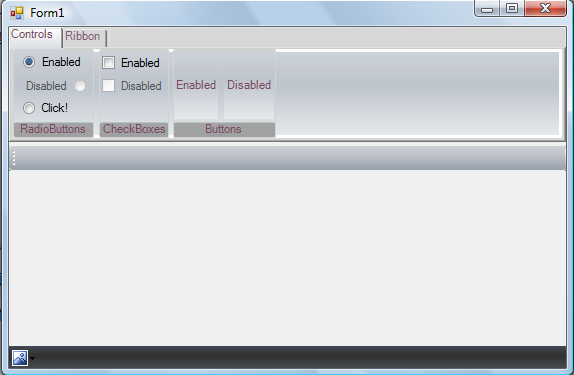
Hello! This is my first article, and I'm a medium-level beginner in C#. I had nothing to do one day so I thought it would be nice to create a basic Office 2007 Style Ribbon with all 3 styles. I hope you enjoy this. I can't seem to render some of the ribbons though, and it usually flickers when you mess with it. This contains a couple of controls, so I'll walk you through some of them.
The CharCheckBox
The CharCheckBox was an easy control to render. To create the DarkBlue outline when it is hovered on, we need to guess the X and Y coordinates of the checkbox itself. We also need to guess the width and height of the checkbox. The example in code 1 does this. Code 2 gives us an 'orangish' effect when we hover over the control as well.
Pen p = new Pen(Color.MidnightBlue);
Rectangle rect = new Rectangle(0, 1, 12, 12);
g.DrawRectangle(p, rect);
p.Dispose();
LinearGradientBrush HLin = new LinearGradientBrush(
new Point(1, 0),
new Point(0, 1),
Color.FromArgb(59, Color.Orange.R, Color.Orange.G, Color.Orange.B),
Color.FromArgb(59, Color.OrangeRed.R, Color.OrangeRed.G, Color.OrangeRed.B));
Graphics g = this.CreateGraphics();
Rectangle HRect = new Rectangle(0, 1, 12, 12);
g.FillRectangle(HLin, HRect);
This is very similar to the CharCheckBox. Except this time, we have to draw our 'radiobutton'. The source code in code 3 takes care of this.
Graphics g = this.CreateGraphics();
g.SmoothingMode = SmoothingMode.AntiAlias;
if (this.Checked)
{
Pen BrPen = new Pen(Color.FromArgb(74, 107, 150));
g.FillEllipse(BrPen.Brush, 2, 4, 7, 7);
BrPen.Dispose();
}
The RibbonPanelTab
This is where things get cool. We have an enum called "Style". This enum takes care of all three styles for us, which include: Office2007Black, Office2007Blue & Office2007Silver. To do this is simple, all we do is make a switch containing each style, and 3 float and Color arrays for our style blend (LinearGradientBrush lg is our target to blend). The code below shows how this works:
Color[] Silvercol = new Color[] {
Color.FromArgb(238, 241, 246), Color.FromArgb(226, 229, 234),
Color.FromArgb(238, 244, 244) };
float[] Silverpos = new float[] { 0.0f, 0.4f, 1.0f };
Color[] SBlue = new Color[] {
Color.FromArgb(205, 210, 217), Color.FromArgb(190, 196, 204),
Color.FromArgb(228, 234, 235) };
float[] Bluepos = new float[] { 0.0f, 0.4f, 1.0f };
Color[] col = new Color[] {
Color.FromArgb(220, 231, 244), Color.FromArgb(204, 220, 238),
Color.FromArgb(216, 232, 245) };
float[] pos = new float[] { 0.0f, 0.4f, 1.0f };
ColorBlend blend = new ColorBlend();
if (Style == e_Style.Office2007Blue)
{
blend.Colors = col;
blend.Positions = pos;
}
if (Style == e_Style.Office2007Black)
{
blend.Colors = SBlue;
blend.Positions = Bluepos;
}
if (Style == e_Style.Office2007Silver)
{
blend.Colors = Silvercol;
blend.Positions = Silverpos;
}
LinearGradientBrush lg = new LinearGradientBrush(
this.ClientRectangle, Color.White, Color.White, (float)90, false);
lg.InterpolationColors = blend;
e.FillRectangle(lg, this.ClientRectangle);
To get our arc shape, we simply draw our round rectangle as a GraphicsPath (see below).
float radius2 = new float(); radius2 = (float)2;
float X2 = new float(); X2 = 0;
float Y2 = new float(); Y2 = this.Height / 2 + this.Height / 2 - 15;
float width2 = new float(); width2 = this.Width - 1;
float height2 = new float(); height2 = 15;
GraphicsPath gp3 = new GraphicsPath();
gp3.AddLine(X2 + radius2, Y2, X2 + width2 - (radius2 * 2), Y2);
gp3.AddArc(X2 + width2 - (radius2 * 2), Y2, radius2 * 2, radius2 * 2, 270, 90);
gp3.AddLine(X2 + width2, Y2 + radius2, X2 + width2, Y2 + height2 - (radius2 * 2));
gp3.AddArc(X2 + width2 - (radius2 * 2), Y2 +
height2 - (radius2 * 2), radius2 * 2,radius2 * 2, 0, 90);
gp3.AddLine(X2 + width2 - (radius2 * 2), Y2 + height2, X2 + radius2, Y2 + height2);
gp3.AddArc(X2, Y2 + height2 - (radius2 * 2), radius2 * 2, radius2 * 2, 90, 90);
gp3.AddLine(X2, Y2 + height2 - (radius2 * 2), X2, Y2 + radius2);
gp3.AddArc(X2, Y2, radius2 * 2, radius2 * 2, 180, 90);
gp3.CloseFigure();
and then Fill it:
Pen arcpen = new Pen(Color.Transparent);
switch (this.Style)
{
case e_Style.Office2007Blue:
LinearGradientBrush Styleblue = new LinearGradientBrush(
this.ClientRectangle,
Color.FromArgb(194, 216, 240),
Color.FromArgb(194, 217, 240), (float)90, false);
arcpen.Brush = Styleblue;
break;
case e_Style.Office2007Black:
LinearGradientBrush StyleBlack = new LinearGradientBrush(
this.ClientRectangle,
Color.FromArgb(184, 185, 185),
Color.FromArgb(158, 160, 160), (float)90, false);
arcpen.Brush = StyleBlack;
break;
case e_Style.Office2007Silver:
LinearGradientBrush StyleSilver = new LinearGradientBrush(
this.ClientRectangle,
Color.FromArgb(222, 226, 238),
Color.FromArgb(197, 201, 211), (float)90, false);
arcpen.Brush = StyleSilver;
break;
}
e.FillPath(arcpen.Brush, gp3);
The CharStatusStrip
Almost the same as the ribbonPaneltab, except we ain't drawing an arc, and we are using different blend colours.
The End
Yeah, there's the ribbon I could discuss but it's basically the same as ribbonPaneltab, but with a tabcontrol and we are rendering tabs. I hope you've enjoyed this, it is free to edit, contribute and add controls to the control collection.
History
This member has not yet provided a Biography. Assume it's interesting and varied, and probably something to do with programming.



 General
  News
News  Suggestion
  Question
  Bug
Bug  Answer
  Joke
Joke  Praise
  Rant
Rant  Admin
Admin 


 Submit an article or tip

