Click here to Skip to main content

Insert, Update, Delete with Gridview ... Simple Way

By , 4 Mar 2008
 

InsertingWithGridView/3.gif

Introduction

This is a simple way to display, Update, Delete and Insert through a single page.

Using the Code

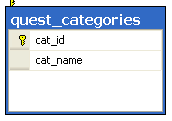
Many of us may be encountered with Update and Delete operations with GridView. I’m explaining this with more functionality that is Inserting record through the GridView. There could me more way to achieve this functionality but I think it’s a very simple way to achieve this. I’m taking a very simple table named "quest_categories"
InsertingWithGridView/Table.gif

CREATE TABLE [dbo].[quest_categories](
    [cat_id] [int] IDENTITY(1,1) NOT NULL,
    [cat_name] [varchar](150) COLLATE SQL_Latin1_General_CP1_CI_AS NOT NULL,
 CONSTRAINT [PK_quest_categories] PRIMARY KEY CLUSTERED 
(
    [cat_id] ASC
)WITH (IGNORE_DUP_KEY = OFF) ON [PRIMARY]
) ON [PRIMARY]

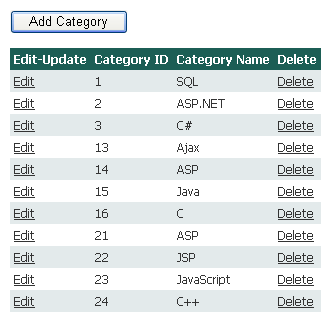
Here is the GridView that is going to perform the operation for Insert, Update and Delete the Data. Here I’ve added a Button "Add Category" for inserting a new record.
InsertingWithGridView/1.gif

Here is the Code for "Add Category"

    protected void btnAdd_Click(object sender, EventArgs e)
    {
        SqlConnection con = new SqlConnection(ConfigurationManager.ConnectionStrings["exam_moduleConnectionString"].ConnectionString);
        SqlDataAdapter da = new SqlDataAdapter("SELECT cat_id, cat_name FROM quest_categories", con);
        DataTable dt = new DataTable();
        da.Fill(dt);

        // Here we'll add a blank row to the returned DataTable
        DataRow dr = dt.NewRow();
        dt.Rows.InsertAt(dr, 0);
        //Creating the first row of GridView to be Editable
        GridView1.EditIndex = 0;
        GridView1.DataSource = dt;
        GridView1.DataBind();
        //Changing the Text for Inserting a New Record
        ((LinkButton)GridView1.Rows[0].Cells[0].Controls[0]).Text = "Insert";

    }

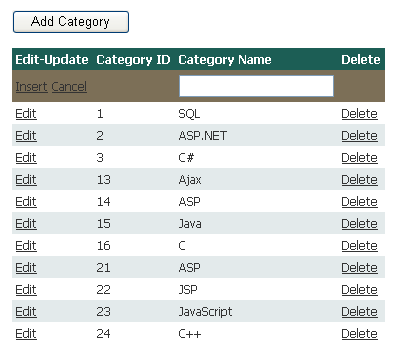
After Clicking on "Add Category" the GridView will diplay like this. InsertingWithGridView/3.gif

And according to Text Diplays we’ll do further processing as "Update" or "Insert" record.

Here is the code for "RowUpdating" event.

protected void GridView1_RowUpdating(object sender, GridViewUpdateEventArgs e)
    {

        if (((LinkButton)GridView1.Rows[0].Cells[0].Controls[0]).Text == "Insert")
        {
            SqlConnection con = new SqlConnection(ConfigurationManager.ConnectionStrings["exam_moduleConnectionString"].ConnectionString);
            SqlCommand cmd = new SqlCommand();
            cmd.CommandText = "INSERT INTO quest_categories(cat_name) VALUES(@cat_name)";
            cmd.Parameters.Add("@cat_name", SqlDbType.VarChar).Value = ((TextBox)GridView1.Rows[0].Cells[2].Controls[0]).Text;

            cmd.Connection = con;
            con.Open();
            cmd.ExecuteNonQuery();
            con.Close();
        }
        else
        {
            SqlConnection con = new SqlConnection(ConfigurationManager.ConnectionStrings["exam_moduleConnectionString"].ConnectionString);
            SqlCommand cmd = new SqlCommand();
            cmd.CommandText = "UPDATE quest_categories SET cat_name=@cat_name WHERE cat_id=@cat_id";
            cmd.Parameters.Add("@cat_name", SqlDbType.VarChar).Value = ((TextBox)GridView1.Rows[e.RowIndex].Cells[2].Controls[0]).Text;
            cmd.Parameters.Add("@cat_id", SqlDbType.Int).Value = Convert.ToInt32(GridView1.Rows[e.RowIndex].Cells[1].Text);
            cmd.Connection = con;
            con.Open();
            cmd.ExecuteNonQuery();
            con.Close();
            
        }


        GridView1.EditIndex = -1;
        BindData();
    }

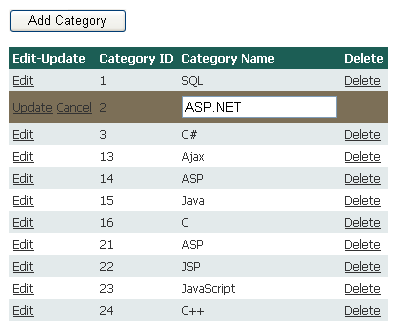
Rest operations are same as you might have done before so I’m not explaining it further.
InsertingWithGridView/2.gif

License

This article, along with any associated source code and files, is licensed under The Code Project Open License (CPOL)

About the Author

rahul_bit
Web Developer
India India
Member
No Biography provided

Sign Up to vote   Poor Excellent
Add a reason or comment to your vote: x
Votes of 3 or less require a comment

Comments and Discussions

 
You must Sign In to use this message board.
Search this forum  
    Spacing  Noise  Layout  Per page   
GeneralMy vote of 5memberMonjurul Habib2 Mar '11 - 9:20 
nice for beginners.5
GeneralMy vote of 5memberdwyman17 Feb '11 - 11:48 
Clean Neat and it works
GeneralFor Select,Insert,Update and Delete in GridView without writting C# or Vb Codemembervijay_vignesh26 Jan '11 - 1:24 
Just try this link
http://vijayvigneshonflex.blogspot.com/p/how-to-do-insertupdatedelete-and-select.html[^]
GeneralMy vote of 1membersang15th525 Nov '10 - 5:59 
zxxd
GeneralRow updation in a grid view [modified]memberrekha bothiraj15 Oct '10 - 4:22 
thaks a lot.
i am beginner,learning .net.ur post helped me lot
 

protected void GridView1_RowUpdating(object sender, GridViewUpdateEventArgs e)
{
 
string txtID = ((TextBox)GridView1.Rows[e.RowIndex].Cells[5].Controls[0]).Text;
string txtstartDate = ((TextBox)GridView1.Rows[e.RowIndex].Cells[1].Controls[0]).Text;
string txtEndDate = ((TextBox)GridView1.Rows[e.RowIndex].Cells[2].Controls[0]).Text;
string txtAdvertiser = ((TextBox)GridView1.Rows[e.RowIndex].Cells[3].Controls[0]).Text;
string AdvertisingMessage = ((TextBox)GridView1.Rows[e.RowIndex].Cells[4].Controls[0]).Text;
DATA.Update( Convert.ToInt16(txtID),Convert.ToDateTime(txtstartDate),Convert.ToDateTime(txtEndDate), txtAdvertiser, AdvertisingMessage);
GridView1.EditIndex = -1;
RefreshGrid();
}
 
private void RefreshGrid()
{
GridView1.DataSource = DATA.GetTable();
GridView1.DataBind();
}
public static Update(int ID, DateTime startDate, DateTime endDate, string Advertiser, string advertisingmessage)
{
SqlCommand Updatecommand = new SqlCommand("Sp_UPdateProcedure", GetConnection());
Updatecommand.CommandType = CommandType.StoredProcedure;
Updatecommand.Parameters.Add("@ID", SqlDbType.Int).Value = ID;
Updatecommand.Parameters.Add("@Startdate", SqlDbType.DateTime).Value = startDate;
Updatecommand.Parameters.Add("@EndDate", SqlDbType.DateTime).Value = endDate;
Updatecommand.Parameters.Add("@Advertiser", SqlDbType.Char).Value = Advertiser;
Updatecommand.Parameters.Add("@AdvertisingMessage", SqlDbType.Char).Value = advertisingmessage;
Updatecommand.ExecuteNonQuery();

 
}

modified on Friday, October 15, 2010 10:29 AM

GeneralMy vote of 4membervnkb5 Aug '10 - 20:27 
i like this it is very usefull to me
Generalthrown errormemberkanimozhi.A1 Jun '10 - 20:04 
i cant run ur table n my query analyser.it thrown error. plz let me help out
GeneralThank's a lotmemberrudyswardani3 Apr '10 - 0:42 
Thanks a lot, simple exemple but very clear to understand
GeneralI can't execute your examplemembertroy7118 Mar '10 - 15:32 
Server Error in '/GridInsert' Application.
--------------------------------------------------------------------------------
 
Login failed for user 'Administrator'. The user is not associated with a trusted SQL Server connection.
Description: An unhandled exception occurred during the execution of the current web request. Please review the stack trace for more information about the error and where it originated in the code.
 
Exception Details: System.Data.SqlClient.SqlException: Login failed for user 'Administrator'. The user is not associated with a trusted SQL Server connection.
 
Source Error:
 

Line 28: SqlDataAdapter da = new SqlDataAdapter("SELECT cat_id, cat_name FROM quest_categories", con);
Line 29: DataTable dt = new DataTable();
Line 30: da.Fill(dt);
Line 31: GridView1.DataSource = dt;
Line 32: GridView1.DataBind();

 
Source File: d:\application c#\GridInsert\QuestionCategories.aspx.cs Line: 30
GeneralThaks A LotmemberAbinash Bishoyi12 Jan '10 - 20:13 
It really help me in my project.

General General    News News    Suggestion Suggestion    Question Question    Bug Bug    Answer Answer    Joke Joke    Rant Rant    Admin Admin   

Permalink | Advertise | Privacy | Mobile
Web02 | 2.6.130523.1 | Last Updated 4 Mar 2008
Article Copyright 2008 by rahul_bit
Everything else Copyright © CodeProject, 1999-2013
Terms of Use
Layout: fixed | fluid
