
Introduction
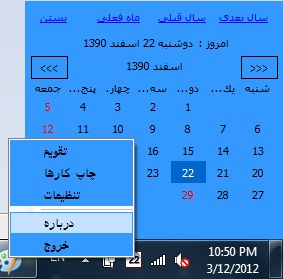
In this article, I will teach you how to build a simple application that creates a tray icon and shows a simple menu. Also in this article, you'll learn how to hide the main form of your application. If you are Persian, you can find codes that convert the date of a system to Hejri Shamsi and show the date in a tray icon.In new version add many new feature including showing the calendar,scheduling tasks and also printing tasks.Please download the new version.
Using the Code
To create a program that shows a tray icon, you should add a notify icon control to your form from the toolbox. Notify icons have some properties:
Some important properties are:
Icon: changes the icon that shows in a tray icon Visible: sets if the icon is shown or not ContextMenu: sets a menu for your tray icon Text: sets the tool tip of a tray icon
I set all of these properties in a constructor of form:
public Form1()
{
InitializeComponent();
string s = strDay + " " + Convert.ToString(dd) + " " +
strMonth + " " + Convert.ToString(yy);
s += "\n" + d1.ToLongDateString();
notifyIcon1.Text = s;
m_menu = new ContextMenu();
m_menu.MenuItems.Add(0,
new MenuItem("Exit", new System.EventHandler(Exit_Click)));
notifyIcon1.ContextMenu = m_menu;
notifyIcon1.Visible = true;
}
In this project, I want a to hide my main form. For this, I did the following:
- Set the
ormWindowState property of the form to Minimized - Set the
Opacity property of the form to 0 - Set the
ShowInTaskbar property to false - Add an event handler for
VisibleChanged and add the below code:
private void Form1_VisibleChanged(object sender, EventArgs e)
  {
      this.Visible = false;
  }
So, this program just shows a tray icon and the main form is not displayed. Therefore, for exiting from the program, I create a menu for the tray icon with an exit item. When the user clicks on the exit item, the program ends.
protected void Exit_Click(Object sender, System.EventArgs e)
  {
      Close();
  }
My program changes the tray icon related the date in Hejri Shamsi. For doing this, I created 31 icons and added them to the resource of my project. I created an array of form icons.
Icon[] Icon_ar = new Icon[32];
Icon_ar[1] = global::mytray.Properties.Resources.icon1;
Icon_ar[2] = global::mytray.Properties.Resources.icon2;
Icon_ar[3] = global::mytray.Properties.Resources.icon3;
Icon_ar[4] = global::mytray.Properties.Resources.icon4;
Icon_ar[5] = global::mytray.Properties.Resources.icon5;
Icon_ar[6] = global::mytray.Properties.Resources.icon6;
Icon_ar[7] = global::mytray.Properties.Resources.icon7;
Icon_ar[8] = global::mytray.Properties.Resources.icon8;
Icon_ar[9] = global::mytray.Properties.Resources.icon9;
Icon_ar[10] = global::mytray.Properties.Resources.icon10;
Icon_ar[11] = global::mytray.Properties.Resources.icon11;
Icon_ar[12] = global::mytray.Properties.Resources.icon12;
Icon_ar[13] = global::mytray.Properties.Resources.icon13;
Icon_ar[14] = global::mytray.Properties.Resources.icon14;
Icon_ar[15] = global::mytray.Properties.Resources.icon15;
Icon_ar[16] = global::mytray.Properties.Resources.icon16;
Icon_ar[17] = global::mytray.Properties.Resources.icon17;
Icon_ar[18] = global::mytray.Properties.Resources.icon18;
Icon_ar[19] = global::mytray.Properties.Resources.icon19;
Icon_ar[20] = global::mytray.Properties.Resources.icon20;
Icon_ar[21] = global::mytray.Properties.Resources.icon21;
Icon_ar[22] = global::mytray.Properties.Resources.icon22;
Icon_ar[23] = global::mytray.Properties.Resources.icon23;
Icon_ar[24] = global::mytray.Properties.Resources.icon24;
Icon_ar[25] = global::mytray.Properties.Resources.icon25;
Icon_ar[26] = global::mytray.Properties.Resources.icon26;
Icon_ar[27] = global::mytray.Properties.Resources.icon27;
Icon_ar[28] = global::mytray.Properties.Resources.icon28;
Icon_ar[29] = global::mytray.Properties.Resources.icon29;
Icon_ar[30] = global::mytray.Properties.Resources.icon30;
Icon_ar[31] = global::mytray.Properties.Resources.icon31;
In the above code, I retrieve Icons from the resource of the assembly. Retrieving has the advantage that, at run time, your EXE files have icons inside and don't need external files.
notifyIcon1.Icon = Icon_ar[dd];
Conclusion
In this simple project, you can find the solution for the problems of creating tray icons, creating menus and retrieving icons from resources.
I hope this is useful.
I had worked as programmer,project manager,web developer for more than 3 years, and have worked on programming personaly for more than 10 years.
I have worked in university as a teacher for 8 years.
my favorite langueges are : VC++,C#,ASP.NET,PHP



 General
  News
News  Suggestion
  Question
  Bug
Bug  Answer
  Joke
Joke  Praise
  Rant
Rant  Admin
Admin 


 Submit an article or tip


