Introduction
I'm trying to learn about CustomDraw. Since MFC ListView lacks color :), I wrote this little class that will let you set color of any row, column, cell by extending CListCtrl.
Additionally you can set the 'Grid Mode' with any two colors which automatically colors the view. There is one more 'Alternate row mode' which lets you auto set colors of alternate rows. There are a few more functions like 'text mask mode' which lets the text color to be auto set based on the background color of the cell by inverting colors.
One more feature that people might find useful is that the color of the row/cell doesn't change even if new rows are inserted or existing rows are deleted. That means that deleting row 2 doesn't make row 3 to be displayed in row two's color. Though that sounds like expected behavior, half of the code went for tracking rows and cells :(.
I needed all this functionality for my 'pet' project. Since I could not find any, I'm forced to write this class. (Is MFC dead or what :(, I could hardly find new articles these days.)
Comments/suggestions other than asking me to improve my coding standards :) are welcome.
Background
We need to capture NM_CUSTOMDRAW notification to be able to set the background color or text color. In the item prepaint stage of painting, we need to request for sub item painting. This part was simple when compared to the grunt work needed to keep track of item colors.
The objective of this article isn't to explain NM_CUSTOMDRAW in detail, but to give out an easy to use class. If you want to learn about custom draw in detail, go through this article.
Using the Code
The following are the new methods that can be used. The names hopefully are self explanatory. 'Clr' is for 'clear'. So ClrRowColor() clears the row color if already set. ResetColors() will reset everything back to normal:
void SetRowColor(COLORREF cf, long row);
void SetColColor(COLORREF cf, long col);
void SetCellColor(COLORREF cf, long row, long col);
void ClrRowColor(long row);
void ClrColColor(long col);
void ClrCellColor(long row,long col);
void SetGridMode(bool TurnOn,COLORREF x=0,COLORREF y=0);
void SetTextMask(bool TurnOn);
void SetAltRowColors(bool TurnOn,COLORREF x=0,COLORREF y=0);
void ResetColors(void);
For SetGridMode() and SetAltRowColors, you may need to experiment with x and y values to make the view look good.
You must keep in mind that column color will be painted over row color. And cell color will have precedence over both row, column color. GridMode and AltRowMode will have least precedence with respect to row/column/cell color. You can try and see what I mean.
To use the code include "CColorListCtrl.h" and use CColorListCtrl class instead of CListCtrl.
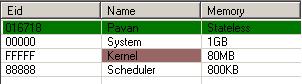
To get the above effect, I have used:
m_list1.SetRowColor(RGB(0,120,0),0);
m_list1.SetCellColor(RGB(153,102,102),2,1);
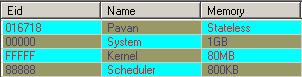
To get the above effect, I have used:
m_list1.SetGridMode(true,RGB(0,255,255),RGB(153,153,102));
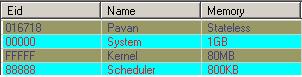
To get the above effect, I have used:
m_list1.SetAltRowColors(true,RGB(0,255,255),RGB(153,153,102));
Examples two, three have been run with 'MaskMode' on and the first with mask mode off. You can clearly note the difference. To set the mask mode, you have to use:
m_list1.SetTextMask(true);
Points of Interest
The most annoying part was that OnPaint()/UpdateWindow() methods don't seem to update ListView control. So I had to resort to RedrawWindow() method (found about this in one of the articles). Also, I haven't tested my code with sorting option turned on. So you may have to find that out.
History
- 05 Mar 2008: Initial release
One of the many obscure programmers dreaming at their desks.



 General
  News
News  Suggestion
  Question
  Bug
Bug  Answer
  Joke
Joke  Praise
  Rant
Rant  Admin
Admin 


 Submit an article or tip


 . Play around with the values a bit.
 .
.