Click here to Skip to main content

Adding week numbers to ASP.NET Calendar Control

By , 7 Mar 2008
 

Introduction

This is a simple way to add an extra column to the asp.net calendar control that shows the
week number for each row like illustrated below.
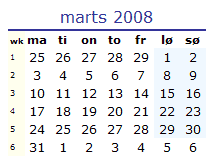
CalWithWeeks.gif

Background

In some contries week numbers is often used and the standard calendar control does not
include the option to show week numbers.

After having experimented with different events of the control I discovered that using javascript
the column could be added very simpel, all though I would have preffered a code-behind
solution.

In my search for a solution I found many request for this, but no sutable solution.

Using the code

The code is simple. I use a javascript function "addWkColumn" to manipulate the table that is
created by the calendar control.

function addWkColumn(tblId, wkStart)
{
    var tbl = document.getElementById(tblId);
    var tblBodyObj = tbl.tBodies[0];
    for (var i=0; i<tblBodyObj.rows.length; i++) 
    {
        // Month Header
        if (i==0)
        {
            // Add extra colspan column
            tblBodyObj.rows[i].cells[0].colSpan=8;
        }
        // Week Header
        if (i==1)
        {
            // Add week column headline
            var newCell = tblBodyObj.rows[i].insertCell(0);
            newCell.innerHTML = 'wk';
            newCell.style.fontSize= '8px';
            newCell.style.fontWeight= 'bold';
            newCell.style.verticalAlign= 'bottom';
            newCell.style.backgroundColor = '#ffffee';
        } 
        // Normal row
        if (i >= 2 )
        {
            // Add the weeknumbers 
            var newCell = tblBodyObj.rows[i].insertCell(0);
            newCell.innerHTML = wkStart;
            wkStart += 1;
            newCell.style.fontSize= '8px';
            newCell.style.backgroundColor = '#ffffee';
        }
    }
}

Now all you have to do is to call the javascript function with the table id for the calendar table.

To do this I use the ClientScript.RegisterStartupScript from code behind, to ensure the correct
clientid name and to find the week number for the first week in the shown month.

private void addWeekNumberColumn()
{
    // Get the date shown in the calendar control
    DateTime curMonth = Calendar1.VisibleDate;

    // Find first day of the current month
    curMonth = Convert.ToDateTime(curMonth.Year.ToString() + "-" + curMonth.Month.ToString() + "-01");
    
    // Build javascript
    string jscript = "<script type='text/javascript'> addWkColumn('" + Calendar1.ClientID + "', " + getISOWeek(curMonth).ToString() + ");</script>";
    
     // Add script to page for execution of addWkColumn javascript function
    Page.ClientScript.RegisterStartupScript(this.GetType(), "AddWeeknumbers", jscript);
}
// Helper function to find ISO week
private int getISOWeek(DateTime day)
{
    return System.Globalization.CultureInfo.CurrentCulture.Calendar.GetWeekOfYear(day, System.Globalization.CalendarWeekRule.FirstFourDayWeek, DayOfWeek.Monday);
}

Now all you have to do is to call the addWeekNumberColumn() function from the page_load
event of the page.

Points of Interest

Please note that the javascript function should only be called with a reference to a calendar
control created tableID, as it references cell numbers directly. This is no problem unless you call
it with a different table.

Happy coding!

History

Version 1.0

License

This article, along with any associated source code and files, is licensed under The Code Project Open License (CPOL)

About the Author

TDunk
Chief Technology Officer TimeMap ApS
Denmark Denmark
Member
No Biography provided

Sign Up to vote   Poor Excellent
Add a reason or comment to your vote: x
Votes of 3 or less require a comment

Comments and Discussions

 
You must Sign In to use this message board.
Search this forum  
    Spacing  Noise  Layout  Per page   
GeneralThanks for the example...membersimpa6 May '11 - 6:30 
Hey i have just developed calender and use some of this code...
 
But i have found an error wile getting wweek number from getisoweek method
 
2 line of javascript solved it:
 
                                 newCell.innerHTML = wkStart;
                                    wkStart += 1;
                                    if (wkStart == 53) { <--this and
                                          wkStart = 1;      <--this
                                    }
 
once again tak tor the example... Big Grin | :-D
GeneralInstead of inserting a new columnmemberTattarn23 Jul '08 - 1:55 
First of, thanks for this article, it sure helped me with solving the problem with week-numbers not showing.
I used your solution but reworked it slightly so that you can still choose weeks, and also fixed the problem with using VisibleDate since it wont be set when a single day is selected in the calendar.
 
Instead of inserting a whole new column, I use the SelectWeekText to show some selectortext for the weeks.
This text I set to something that can be easily found and replaced for instance SelectWeekText="replaceWeekText".
 
Then I changed the javascript to:
 
function addWkColumn(tblId, wkStart)
{
    var tbl = document.getElementById(tblId);
    var tblBodyObj = tbl.tBodies[0];
    for (var i=0; i<tblbodyobj.rows.length;>
    {
        // Normal row
        if (i >= 2 )
        {
            // Add the weeknumbers 
            tblBodyObj.rows[i].cells[0].innerHTML = tblBodyObj.rows[i].cells[0].innerHTML.replace(/replaceWeekText/g,'v ' + wkStart);
            wkStart=wkStart+1;
        }
    }
}
 
This way the weeks will still be selectable and also show the correct weeknumber.
 
There was also a problem with only using VisibleDate since it is set to DateTime.MinDate when a day is selected.
 
So, on PageLoad (and !IsPostBack) I use DateTime.Now to get the weeknumber, and on event VisibleMonthChanged; e.NewDate is used instead.
When they are used, I store that date in a HiddenField so that when the event SelectionChanged is called (single day selected) and
VisibleDate therefore cant be used, the value from the HiddenField is used instead (using selecteddate is not an option since it can be a date from previous or next month).
 
Doing it this way, it will show correct weeks, which also will be selectable and the weeks will be correct at all times.
 
Hope this helps someone Smile | :)
GeneralRe: Instead of inserting a new columnmembernilsreuvers2 Sep '08 - 2:37 
The above code is incomplete and the tblbodyobj could not be found because its correct name is tblBodyObj. Beneath, you'll find the corrected code.
 
function addWkColumn(tblId, wkStart) {
            var tbl = document.getElementById(tblId);
            var tblBodyObj = tbl.tBodies[0];
            for (var i=0; i<tblBodyObj.rows.length; i++) {
                if (i >= 2 ) {
                    tblBodyObj.rows[i].cells[0].innerHTML = tblBodyObj.rows[i].cells[0].innerHTML.replace(/replaceWeekText/g,wkStart);
                    wkStart=wkStart+1;
                    }
             }
         }
 
I do have one issue with the calendar. For the month september 2008, it shows me incorrect weeknumbers. This is because the first week in the calendar object, is actually August 25 - 31. So the above code makes that week, week 36, but it really is week 35. When I click to August 2008, the weeks are shown correctly.
 
Does anyone know how I can tune the calendar object to only show weeks that have days in the current/selected month?
GeneralRe: Instead of inserting a new columnmembernilsreuvers2 Sep '08 - 3:28 
OK. Since I couldn't find a setting for the calendar object to exclude "othermonths", I created an extra javascript function and modified addWkColumn.
 
function getDayNumber(strHTML) {
            var startPos = 0;
            var endPos = 0;
            
            startPos = strHTML.indexOf(">");
            endPos = strHTML.lastIndexOf("<");
            
            
        return strHTML.substr(startPos + 1, endPos - startPos - 1);
        
        }
        function addWkColumn(tblId, wkStart) {
            var tbl = document.getElementById(tblId);
            var tblBodyObj = tbl.tBodies[0];
            var gtDay = new String;
            
            for (var i=0; i<tblBodyObj.rows.length; i++) {
                if (i >= 2 ) {
                    gtDay = getDayNumber(tblBodyObj.rows[i].cells[7].innerHTML);
                    if ((parseInt(gtDay)>28) && (i==2)) {
                        wkStart = wkStart-1;
                    }
                    tblBodyObj.rows[i].cells[0].innerHTML = tblBodyObj.rows[i].cells[0].innerHTML.replace(/replaceWeekText/g,wkStart);
                    wkStart=wkStart+1;
                    }
             }
         }
 
There you have it.
GeneralRe: Instead of inserting a new columnmemberwoodz19 Dec '08 - 9:28 
And here is a solution to allow correct year changes (CW not grater 52), tested until year 2031
function getDayNumber(strHTML)
	{
		var startPos = 0;
		var endPos = 0;
		            
		startPos = strHTML.indexOf(">");
		endPos = strHTML.lastIndexOf("<");
		            		            
		return parseInt(strHTML.substr(startPos + 1, endPos - startPos - 1));
	}
	
	function HopInWeek(row)
	{
	    for(var i=1; i < (row.cells.length - 1); i++)
	    {
	        if(getDayNumber(row.cells[i + 1].innerHTML) < getDayNumber(row.cells[i].innerHTML))
	            return true;
	    }
	    return false;
	}
 
	function addWkColumn(tblId, wkStart)
	{
		var tbl = document.getElementById(tblId);
		var tblBodyObj = tbl.tBodies[0];
		var gtDay = new String;
		            
		for (var i=0; i<tblbodyobj.rows.length;>		{
		    if(i == 1)
		        tblBodyObj.rows[i].cells[0].innerHTML = "W";
			else if (i >= 2)
			{
				gtDay = getDayNumber(tblBodyObj.rows[i].cells[7].innerHTML + " ");
				if ((gtDay > 28) && (i==2))
				{
					wkStart = wkStart-1;
				}
				
				if((wkStart > 51 && HopInWeek(tblBodyObj.rows[i])) || wkStart > 52)
				    wkStart=1;
				if(wkStart < 1)
				    wkStart=52;
				tblBodyObj.rows[i].cells[0].innerHTML = tblBodyObj.rows[i].cells[0].innerHTML.replace("&gt;",wkStart);
				wkStart=wkStart+1;
			}
		}
	}

GeneralRe: Instead of inserting a new columnmemberwoodz19 Dec '08 - 9:32 
And of course CW not zero.
QuestionIs it working properly?memberebbehundborg27 Mar '08 - 23:37 
Very cool - thanks. I don't know if I'm using your stuff right, though. But it shows different week numbers for the same date. When my calendar is displaying August 2008 it shows the first week of September as the bottom most row having September 1st in the first column. Your code displays the week number 36 (which is correct by my paper calendar). But when I skip to the next month (via the links in the calendar header) September 1st is now in week 37. Can you help.
 
Regards
AnswerRe: Is it working properly?memberTDunk28 Mar '08 - 0:13 
Hi
 
Sounds strange. Works perfect here. Could you please send your code?
 
It might be related to the date that you are calling the javacript function with.
 
Try this in page_load event:
 
curMonth = Convert.ToDateTime(DateTime.Today.Year.ToString() + "-09-01");
Calendar1.VisibleDate = curMonth;
addWkColumn('" + Calendar1.ClientID + "', " + getISOWeek(curMonth).ToString() + @");

 
Where getISOWeek looks like this:
 
public int getISOWeek(DateTime day)
{
return CultureInfo.CurrentCulture.Calendar.GetWeekOfYear(day,System.Globalization.CalendarWeekRule.FirstFourDayWeek, DayOfWeek.Monday);
}

 
Hope it helps!
 
Best rgds
GeneralISO week of the year numbersmemberPIEBALDconsult7 Mar '08 - 5:13 
What about ISO week of the year numbers?
This is week 10 of 2008.
GeneralRe: ISO week of the year numbersmemberTDunk7 Mar '08 - 7:19 
You should change the "System.Globalization.CalendarWeekRule.FirstFourDayWeek" argument of the GetWeekOfYear function to you country setting.
 
"System.Globalization.CalendarWeekRule.FirstFourDayWeek" is used for most european countries.
GeneralRe: ISO week of the year numbersmemberPIEBALDconsult7 Mar '08 - 11:40 
Yes, but can you show how to put the value in the calendar?
GeneralRe: ISO week of the year numbersmemberTDunk7 Mar '08 - 21:08 
After adding the javascript function to your page, you only have to call addWeekNumberColumn(); from page_load.
 
Please download the example source code - it shows a complete working example.
 
Rgds

General General    News News    Suggestion Suggestion    Question Question    Bug Bug    Answer Answer    Joke Joke    Rant Rant    Admin Admin   

Permalink | Advertise | Privacy | Mobile
Web03 | 2.6.130523.1 | Last Updated 7 Mar 2008
Article Copyright 2008 by TDunk
Everything else Copyright © CodeProject, 1999-2013
Terms of Use
Layout: fixed | fluid
