Click here to Skip to main content

Multiple File Upload User Control

By , 28 May 2008
 

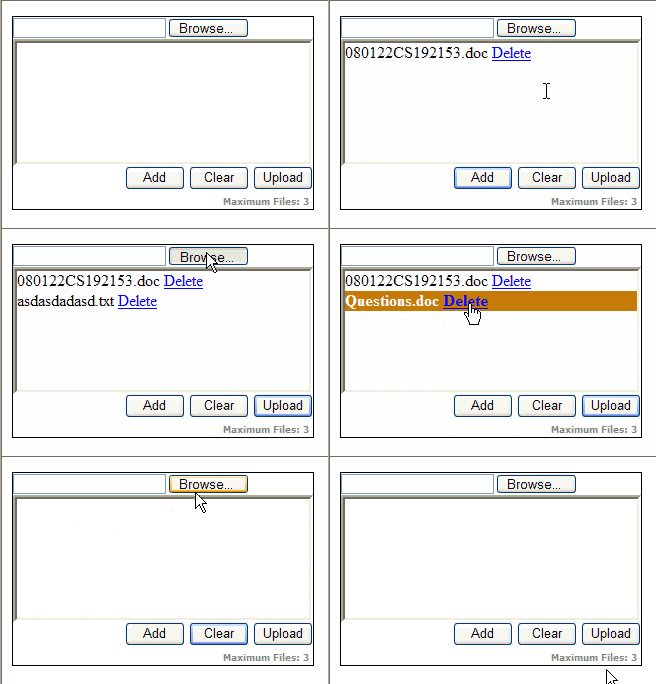
MultifileUploadUserControl.gif

Introduction

As we know, an input file element allows you to select only one file at a time, i.e., you can upload only one file at a time using an input file element. If you want to upload multiple files at a time, then you have to add as many file input elements as the number of files you want to upload. The reason behind this is you can only store the file upload information in an input file element. You can not set the value directly for an input file element programmatically, due to security reasons.

Now, I am going to present here an ASP.NET User Control that can be used to upload multiple files at once. I have named it ‘Multiple File Upload User Control’. This doesn’t mean that this user control can upload multiple files using a single file input element. Actually, in this control, an input file element gets hidden after selecting a file, and a new file input element is added in its place. Now, since this phenomenon happens so quickly, it'd seem that there is only one file input element. Hiding a selected file input element and creating a new file input element is done using JavaScript.

Appearance of the User Control

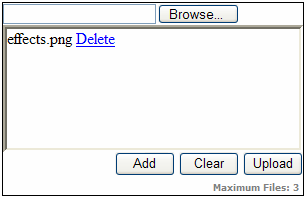
This user control consists of an input file element, a ListBox and three Buttons. A brief description of each is given below:
Description1.png

  • Input file element: Used to select a file.
  • ListBox: Used to display the selected files.
  • Add button: Used to add a selected file into the ListBox.
  • Clear button: Used to remove all selected files from the ListBox.
  • Upload button: Used to upload all the selected files to the server.
  • Delete link: This appears at the right hand side of the each selected file. By clicking on it, you can remove it from selected files list.

Properties of the User Control

This User Control has two public properties.

  • Rows: Used to set/get the number of visible rows to display. The default value for this is 6.
  • UpperLimit: Used to set/get the maximum number of files to upload.

Events of the User Control

This User Control has only one server-side event.

  • Click: Fires when the upload button is clicked. The delegate that represents the Click event signature for the MultipleFileUpload control is given below:
public delegate void MultipleFileUploadClick(object sender, FileCollectionEventArgs e)

I will discuss about it later. The second argument is a FileCollectionEventArgs class that gives useful information about the posted files. This class has following readonly public properties:

  • PostedFiles: Gives the HttpFileCollection of all posted files.
  • Count: Gives the total number of posted files.
  • HasFiles: Gets the value indicating whether this user control contains any posted file or not.
  • TotalSize: Gives the total size in KB of all posted files.

Using the User Control

Drag and drop the user control into an ASPX page and set values for the Rows and UpperLimit properties. The HTML code for this user control looks like:

<uc1:MultipleFileUpload ID="MultipleFileUpload1" runat="server" UpperLimit="4" Rows="6" />

Next, create an event handler for the Click event for this user control:

protected void MultipleFileUpload1_Click(object sender, FileCollectionEventArgs e)
{
   ...
}

Now, wire up the event handler in the control tag by adding the prefix On in front of the event name. Now, the HTML code will look like:

<uc1:MultipleFileUpload ID="MultipleFileUpload1" OnClick="MultipleFileUpload1_Click"
                        runat="server" UpperLimit="4" Rows="6" />

Uploading the Posted Files using the User Control

Finally, select the necessary files and click on the Upload button of the user control to upload the posted files. The code for uploading the posted files is given below:

protected void MultipleFileUpload1_Click(object sender, FileCollectionEventArgs e)
{
   HttpFileCollection oHttpFileCollection = e.PostedFiles;
   HttpPostedFile oHttpPostedFile = null;
   if (e.HasFiles)
   {
      for (int n = 0; n < e.Count; n++)
      {
         oHttpPostedFile = oHttpFileCollection[n];
         if (oHttpPostedFile.ContentLength <= 0)
            continue;
         else
            oHttpPostedFile.SaveAs(Server.MapPath("Files") + "\\" + 
               System.IO.Path.GetFileName(oHttpPostedFile.FileName));
      }
   }
}

The above code is straightforward and self-explanatory.

User Control HTML

The HTML of this user control is very simple.

<asp:Panel ID="pnlParent" runat="server" Width="300px" 
           BorderColor="Black" BorderWidth="1px" BorderStyle="Solid">
   <asp:Panel ID="pnlFiles" runat="server" Width="300px" HorizontalAlign="Left">
      <asp:FileUpload ID="IpFile" runat="server" />
   </asp:Panel>
   <asp:Panel ID="pnlListBox" runat="server" Width="292px" BorderStyle="Inset">
   </asp:Panel>
   <asp:Panel ID="pnlButton" runat="server" Width="300px" HorizontalAlign="Right">
      <input id="btnAdd" onclick="javascript:Add();" 
             style="width: 60px" type="button" runat="server" value="Add"/>
      <input id="btnClear" onclick="javascript:Clear();" 
             style="width: 60px" type="button" value="Clear" runat="server"/>
      <asp:Button ID="btnUpload" OnClientClick="javascript:return DisableTop();" 
           runat="server" Text="Upload" Width="60px" OnClick="btnUpload_Click"/>
      <br />
      <asp:Label ID="lblCaption" runat="server" Font-Bold="True" 
           Font-Names="Verdana" Font-Size="XX-Small" ForeColor="Gray">
      </asp:Label> 
   </asp:Panel>
</asp:Panel>

There are three Panels in this user control. The file panel [ID="pnlFiles"] is for the input file elements, the ListBox panel [ID="pnlListBox"] is for listing the selected files and the Button panel [ID="pnlButton"] has three buttons: two for the client side events and one for the server side. Both the Add button [id="btnAdd"] and the Clear button [id="btnClear"] have client-side onclick events. The server side button [ID="btnUpload"] has a client side OnClientClick event as well as a server side OnClick event. The Label [ID="lblCaption"] is used here to display the upper limit for this user control.

I have used the FileUpload control [ID="IpFile"] of ASP.NET 2.0 in the File panel instead of using an input file element. The reason behind this is it automatically adds enctype="multipart/form-data" to the page's <form> element.

User Control Code

The user control class has following definition for its Click event.:

public event MultipleFileUploadClick Click;

The delegate that represents the Click event signature is given below:

public delegate void MultipleFileUploadClick(object sender, FileCollectionEventArgs e);

FileCollectionEventArgs is an event argument class that contains the basic information about the posted files. I will discuss it later. The Click event for this user control is fired in the click event of the Upload button.

protected void btnUpload_Click(object sender, EventArgs e)
{
   // Fire the event.
   Click(this, new FileCollectionEventArgs(this.Request));
}

The user control class has a private method GetJavaScript(). This method generates the necessary client side JavaScript for this user control. This is registered in Page_Load event of the user control using the RegisterStartupScript method.

Now, let's discuss the FileCollectionEventArgs class that represents the second argument of the Click event.

public class FileCollectionEventArgs : EventArgs
{
    private HttpRequest _HttpRequest;
    public HttpFileCollection PostedFiles
    {
        get
        {
            return _HttpRequest.Files;
        }
    }
    public int Count
    {
        get { return _HttpRequest.Files.Count; }
    }
    public bool HasFiles
    {
        get { return _HttpRequest.Files.Count > 0 ? true : false; }
    }
    public double TotalSize
    {
        get
        {
            double Size = 0D;
            for (int n = 0; n < _HttpRequest.Files.Count; ++n)
            {
                if (_HttpRequest.Files[n].ContentLength < 0)
                    continue;
                else
                    Size += _HttpRequest.Files[n].ContentLength;
            }
            return Math.Round(Size / 1024D, 2);
        }
    }
    public FileCollectionEventArgs(HttpRequest oHttpRequest)
    {
        _HttpRequest = oHttpRequest;
    }
}

The FileCollectionEventArgs class is derived form the EventArgs base class. The constructor for the FileCollectionEventArgs class takes an HttpRequest object as an argument. The FileCollectionEventArgs class has four public properties as discussed earlier. The files property of the HttpRequest class has all the posted files as a HttpFileCollection class. The rest of the properties are easy to understand.

Limitations

The maximum size that can be uploaded to the server using this user control is around 4MB, i.e., the sum of sizes of all the files to be uploaded should be less than 4MB. You can not upload anything that is larger than 4MB. If you want to upload more than 4MB, then you have to make some changes in the web.config file; e.g., if you want to upload around 10MB, then make the following change in the <httpRuntime> node of the system.web section of the web.config file.

<httpRuntime maxRequestLength="102400" executionTimeout="275"/> 

You can find more information regarding this on the MSDN website [^].

Conclusion

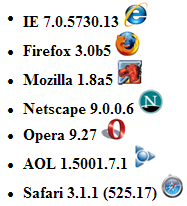
I have tried my best to make this user control code error free. I will most welcome suggestions for further improvement in this user control. I have tested this user control on various browsers and it works fine. The list of browsers along with versions is given below:
Browsers.png

License

This article, along with any associated source code and files, is licensed under The Code Project Open License (CPOL)

About the Author

Samir NIGAM
Team Leader
India India
Member
SAMIR NIGAM is a CodeProject MVP, a Microsoft Certified Technology
Specialist (MCTS)
as well as a Microsoft Certified Professional Developer (MCPD)
in C# for web-based applications. He is an insightful IT professional with
results-driven comprehensive technical skill having rich, hands-on work experience
in web-based applications using ASP.NET, C#, AJAX, Microsoft
Enterprise Library
, MS SQL Server 2005.
He has earned his master degree (MCA) from U.P. Technical University, Lucknow,
INDIA, his post graduate dipoma (PGDCA ) from Institute of Engineering and
Rural Technology, Allahabad, INDIA and his bachelor degree (BSc - Mathematics)
from University of Allahabad, Allahabad, INDIA.
He has good knowledge of Object Oriented Programming, 3-Tier Architecture
and Algorithm Analysis & Design as well as good command over cross-browser
client side programming using JavaScript.
Awards:


Sign Up to vote   Poor Excellent
Add a reason or comment to your vote: x
Votes of 3 or less require a comment

Comments and Discussions

 
You must Sign In to use this message board.
Search this forum  
    Spacing  Noise  Layout  Per page   
AnswerHaha finaly for those of you who had a problem implementing this control read this.membera4amyli6 Feb '13 - 2:31 
Object reference not set to an instance of an object
 
Put this code in your code behind page
protected void MultipleFileUpload1_Click(object sender, FileCollectionEventArgs e)
      {
            HttpFileCollection oHttpFileCollection = e.PostedFiles;
            HttpPostedFile oHttpPostedFile = null;
            if (e.HasFiles)
            {
                  for (int n = 0; n < e.Count; n++)
                  {
                        oHttpPostedFile = oHttpFileCollection[n];
                        if (oHttpPostedFile.ContentLength <= 0)
                              continue;
                        else
                              oHttpPostedFile.SaveAs(Server.MapPath("Files") + "\\" + System.IO.Path.GetFileName(oHttpPostedFile.FileName));
                  }
            }
      }
 
'lblCaption' does not exist in the current context ETC
On visual studio click File>New>Website Now you can just copy the user control and it should work.
But if you select File>New>New Project this will not work. I am not sure why but after a long research I finaly got atleast what I was looking for.
 
Thanks
Happy Copy Paste Coding
QuestionThe name 'lblCaption' does not exist in the current context whymembera4amyli6 Feb '13 - 0:58 
The name 'lblCaption' does not exist in the current context why
QuestionI am getting Object reference not set to an instance of an object.when drag and drop to another aspx page. Please helpmembera4amyli28 Jan '13 - 0:03 
I am getting Object reference not set to an instance of an object. when drag and drop to another aspx page. Please help
QuestionI am getting Object reference not set to an instance of an object.membera4amyli28 Jan '13 - 0:01 
I am getting Object reference not set to an instance of an object. when drag and drop to another aspx page. Please help
QuestionHow to select all files together rather then selecting once by one is it possible?memberAnurag11116 Sep '12 - 22:43 
How to select all files together rather then selecting once by one is it possible?
QuestionHow to persist data on postbackmemberHiteshMenghani9 Jul '12 - 2:44 
I have added few files using this control.
before uploading files to server i have to do some validation and in case if validation fails i have throw some error.However, during this scenario, posted files get lost.
Need to know how to persist data on postback also
fgfg

GeneralMy vote of 4membernaveen Tiwari Ji19 Apr '12 - 11:19 
I have required this for my project.
GeneralMy vote of 2memberVasanthjai10 Apr '12 - 20:51 
user control HTML does not contain list box and input file element,instead of it having Fileupload control
GeneralMy vote of 5membercarlabongiovani2 Nov '11 - 10:11 
It's useful
GeneralMy vote of 5membersanjaygour198610 Sep '11 - 1:47 
its good post
GeneralMy vote of 5memberkrakoss08039622 Aug '11 - 17:16 
Many thanks - your multiple file upload will be used for our website
GeneralMy vote of 5memberMd. Touhidul Alam Shuvo22 Jun '11 - 18:56 
thanks. It will help us
QuestionNew to user controls: Getting compile errorsmemberBradley Amodeo20 Jun '11 - 4:26 
Hi,
 
First of all, your control looks great, and is exactly what I need! I have never developed a user control before. I am trying to compile the downloaded code but am getting the following errors:
 
------ Rebuild All started: Project: MultifileUploadUserControl, Configuration: Debug Any CPU ------
D:\Documents and Settings\bamodeo\My Documents\Visual Studio 2010\Projects\Personal\MultifileUploadUserControl\MultifileUploadUserControl\UserControl\MultipleFileUpload.ascx.cs(49,9): error CS0103: The name 'lblCaption' does not exist in the current context
D:\Documents and Settings\bamodeo\My Documents\Visual Studio 2010\Projects\Personal\MultifileUploadUserControl\MultifileUploadUserControl\UserControl\MultipleFileUpload.ascx.cs(50,9): error CS0103: The name 'pnlListBox' does not exist in the current context
D:\Documents and Settings\bamodeo\My Documents\Visual Studio 2010\Projects\Personal\MultifileUploadUserControl\MultifileUploadUserControl\UserControl\MultipleFileUpload.ascx.cs(51,9): error CS0103: The name 'pnlListBox' does not exist in the current context
D:\Documents and Settings\bamodeo\My Documents\Visual Studio 2010\Projects\Personal\MultifileUploadUserControl\MultifileUploadUserControl\UserControl\MultipleFileUpload.ascx.cs(77,85): error CS0103: The name 'pnlFiles' does not exist in the current context
D:\Documents and Settings\bamodeo\My Documents\Visual Studio 2010\Projects\Personal\MultifileUploadUserControl\MultifileUploadUserControl\UserControl\MultipleFileUpload.ascx.cs(78,87): error CS0103: The name 'pnlListBox' does not exist in the current context
D:\Documents and Settings\bamodeo\My Documents\Visual Studio 2010\Projects\Personal\MultifileUploadUserControl\MultifileUploadUserControl\UserControl\MultipleFileUpload.ascx.cs(79,83): error CS0103: The name 'btnAdd' does not exist in the current context
 
Compile complete -- 6 errors, 0 warnings
========== Rebuild All: 0 succeeded, 1 failed, 0 skipped ==========
 
I see that the objects that are reported as not existing are in the .ascx page.
 
How do I compile this so I can run the Demo.aspx page.
 

Thanks for your help!
 
Brad
QuestionUsing many instance of the control in the same pagememberch3oul7 Apr '11 - 5:43 
Hi,
 
First i want to thank you for the User Control.
I've got a problem when using this uc many times in the same ASPX page.
When i select a document in the second FileUpload and i press Add, the message "Please select a file to add" appears.
I think that the problem is that in the control, the fileUpload and the other controls have the same ID.
 
What do i have to edit to fix this?
 
Thank you
GeneralNice Post..With a small probmemberrams2hari3 Nov '10 - 9:44 
First of all it was a simple and very good control for Multiple file uploads. I found a small problem while playing with it.
 
if two files(with long filenames) are added to listbox then delete link for first filename is missing.I've screenshot which depicts it but i don't know who to attach it in the post.
 
If you already know bout it, ignore my comments..
Anyway it was a nice post..
 
Thanks..
Ram
The Beginer..

GeneralError : Object reference not set to an instance of an object.memberMandar4412 May '10 - 1:37 
I got following error
Object reference not set to an instance of an object.
 
at following lines
{
// Fire the event.
Click(this, new FileCollectionEventArgs(this.Request));
}
 
It showed error for lblCaption and other controls but I continued ...
 
the line "Click(this, new FileCollectionEventArgs(this.Request));" executed once but got error next time (even while uploading 1 file).
 
Kindly provide solution ...
Mandar
GeneralNice Articlememberdennisjose19 Apr '10 - 0:56 
Nice article Samir!! Thanks.
 
Can i integrate a textbox field alone with each file items added in the file upload control?. Expecting your replay.Thanks in advance..
GeneralNice ArticlememberAnurag Gandhi16 Feb '10 - 3:00 
Nice article Samir!!
Thanks for sharing it with us.
Anurag Gandhi.
http://www.gandhisoft.com
Life is a computer program and every one is the programmer of his own life.

GeneralRe: Nice ArticlememberSamir NIGAM21 Feb '10 - 21:28 
Thanks boss!
Samir NIGAM
My Articles

QuestionHow to Implement this User Control with One FilememberHamed Bagherzadeh16 Jan '10 - 23:20 
Hi
i see your great work
 
user controls inherits from TemplateControl Class, so when we use user Controls, we need to file, 1- cs file that C# Code is written and 2- ascx file that reperesent Template of control
 
but I want that Implement this User Control by One Cs File without Ascx file
Can you help me??
Thx
QuestionIs It Possible To Use Validation Controls On This [modified]memberNuNn18 Nov '09 - 5:53 
I seem to be having an issue when I am trying to implement this control with the client side validation controls. Are there any steps I need to take to be able to account for these?
 
modified on Wednesday, November 18, 2009 2:41 PM

GeneralCoolmemberHighCommand9 Nov '09 - 23:04 
Good work samir
GeneralUsing the Control in a ModalPopUpExtendermemberthegameplays20 Oct '09 - 3:36 
Hello,
 
When I try to use the user control in the ModalPopUpBoxExtender, it does not work.
 
In the sense, the file content length in the Button click event on the aspx page shows -2.
 
I would appreciate, if anyone could help me out in this regard.
QuestionHow do you resize the File Input (IpFile) control length?memberbooth_troy23 Sep '09 - 8:54 
I am mystified as to why you are adding a new File Input (IpFile) control everytime the use initiates some functionality (Add, Clear). I am unable to find a way to keep the control at a given size. Do you know how this would be solved.
QuestionRe: How do you resize the File Input (IpFile) control length?memberbooth_troy24 Sep '09 - 1:30 
Anyone?

General General    News News    Suggestion Suggestion    Question Question    Bug Bug    Answer Answer    Joke Joke    Rant Rant    Admin Admin   

Permalink | Advertise | Privacy | Mobile
Web02 | 2.6.130523.1 | Last Updated 28 May 2008
Article Copyright 2008 by Samir NIGAM
Everything else Copyright © CodeProject, 1999-2013
Terms of Use
Layout: fixed | fluid
