Introduction
Traditionally, I have noticed that we use BTSNTSvc.exe.config to store various BizTalk configuration settings. Storing configuration information in files is hard to maintain, manage and modify. In this article, I would like to present a new and easier method to store configuration settings.
What is Enterprise Single Sign-On (SSO) Database?
BizTalk uses single sign on database for various purposes and to store its internal configuration information. It essentially consists of a credential database, a master secret server, and one or more Single Sign-On servers. For more information, refer to MSDN Reference.
How Do I Use SSO DB to Store BizTalk Configuration?
The basic idea is to create an application record in the table [SSODB].[dbo].[SSOX_ApplicationInfo].
Step 1: Install BizTalk Control Center (BCC)
BizTalk Control Center (BCC)
Step 2: Use Speedcode '502' to Create a New SSO Configuration Application (Click 'SSOConfiguration' tab)
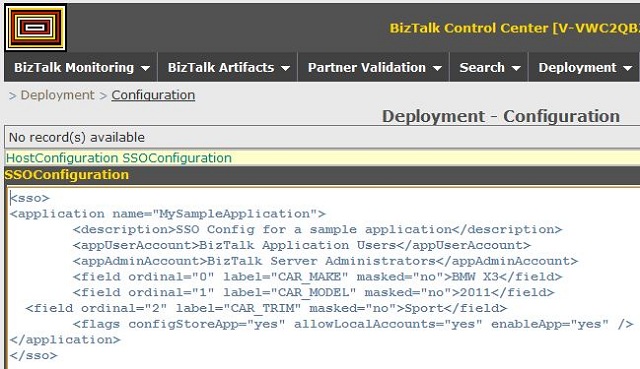
Carefully spend time to edit the XML and define your configuration fields. Note that you can always add new items later.
NOTE: If you add new fields to an existing SSO application, the BCC system always drops and creates a new application. Always leave the <flags /> at their default values.

Step 3: Use Speedcode '211' to Check the Values Created for Your New Application
Step 4: (Optional) For Other Users to View your Application in Speedcode '211', the User must Add the SSO Application Name to their Profile.
Use speedcode '603' to make those changes.
How Do I Use SSO DB Values Within my BizTalk Orchestration?
Step 1: Create an Expression Shape
Add the code in step 2.
Step 2: Invoke Using the Following Line of Code
carMake = SsoConfigHelper.Instance.Read("MySampleApplication","CAR_MAKE");
Step 3: Use the Class SSOConfigHelper.cs from the Zip File
Points of Interest
- BizTalk Control Center (BCC) can be used to create and update SSO config values.
SSOConfig helper class has the methods to access the values in the orchestration.
Reference
History
- 19th August, 2011: Initial post
Naveen has done his Masters (M.S.) in Computer science, has started his career programming the mainframes and now has more than a decade of programming, development and design experience. Naveen has a sharp eye and keen observation skills. Naveen has worked for several companies and strived hard to build large scale business applications and bringing better solutions to the table.
Quite recently Naveen has built a fairly complex integration platform for a large bank. His hobbies include training, mentoring and research. Naveen spends his free time visiting National Parks nationwide.
Naveen has developed the BizTalk Control Center (BCC)
http://biztalkcontrolcenter.codeplex.com



 General
  News
News  Suggestion
  Question
  Bug
Bug  Answer
  Joke
Joke  Praise
  Rant
Rant  Admin
Admin 


 Submit an article or tip


