Click here to Skip to main content
Licence CPOL
First Posted 25 Mar 2008
Views 83,091
Downloads 1,193
Bookmarked 45 times

JavaScript to Show Session Timeout Counter

By | 25 Mar 2008 | Article
To display the remaining minutes as a counter for a Session to timeout on the Webpage

Introduction

This article shows how to display the remaining minutes as a counter for a session to timeout on the Webpage that will change after every minute and a message will be displayed when the session timeout will be equal to 0 (zero).

One thing to keep in mind is that the code provided will neither timeout the session or is it responsible for any session related activity. It will just show the timeout counter on the screen depending on the session timeout set within the application. If any additional things are required, additional code has to be written.

Background

It might be possible that in some applications, a developer wants to display the time left for the session to be over or timeout. That will enable the user to save the entered information or it can be used for any other purpose depending on the requirement.

The JavaScript code that will be used to achieve this is as follows:

<script type="text/javascript">
        var sessionTimeout = "<%= Session.Timeout %>";
        function DisplaySessionTimeout()
        {
            //assigning minutes left to session timeout to Label
            document.getElementById("<%= lblSessionTime.ClientID %>").innerText = 
                                                                        sessionTimeout;
            sessionTimeout = sessionTimeout - 1;
            
            //if session is not less than 0
            if (sessionTimeout >= 0)
                //call the function again after 1 minute delay
                window.setTimeout("DisplaySessionTimeout()", 60000);
            else
            {
                //show message box
                alert("Your current Session is over.");
            }
        }
</script>

The code on page load event to register the JavaScript method on startup is as follows:

protected void Page_Load(object sender, EventArgs e)
    {
        if (!IsPostBack)
        {
            //set DisplaySessionTimeout() as the startup script of this page
            Page.ClientScript.RegisterStartupScript(this.GetType(),
                "onLoad","DisplaySessionTimeout()", true);
        }
    }

Screenshots
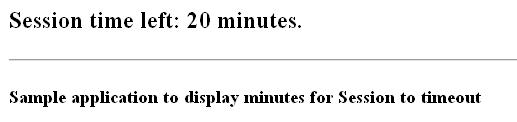
Figure 1: When the application starts.

Figure 2: After 1 minute.

Figure 3: When session counter comes to 0, the message box will be displayed.

History

  • 26th March, 2008: Initial post

License

This article, along with any associated source code and files, is licensed under The Code Project Open License (CPOL)

About the Author

farazsk11

Web Developer

United Arab Emirates United Arab Emirates

Member

Faraz is working as a Senior Software Engineer for a company located in Sharjah, UAE. He likes developing new applications with the latest technologies. Mostly reponsible for web applications using Microsoft.Net. He has done MCPD so far. Other than work play guitars, sing and play PSP.


Sign Up to vote   Poor Excellent
Add a reason or comment to your vote: x
Votes of 3 or less require a comment

Comments and Discussions

 
You must Sign In to use this message board. (secure sign-in)
 
Search this forum  
 FAQ
    Noise  Layout  Per page   
  Refresh
QuestionHas nothing to do with session state when page is ajaxified Pinmembersomealiasname6:51 20 Apr '12  
AnswerRe: Has nothing to do with session state when page is ajaxified PinmemberTHEGAFF5:44 26 Apr '12  
Questionquick question Pinmembericelated20:04 13 Mar '12  
AnswerRe: quick question PinmemberTHEGAFF5:40 26 Apr '12  
QuestionWorking in IE only PinmemberDorababu74322:33 25 Sep '11  
AnswerRe: Working in IE only PinmemberTHEGAFF5:36 26 Apr '12  
GeneralMy vote of 5 PinmemberPankaj Deharia23:40 27 Jul '11  
QuestionHow to use this in a user control PinmemberMember 8122050:21 7 May '10  
GeneralTime format question Pinmembersmcirish3:33 4 Mar '10  
GeneralNince, easy to read Article [modified] Pinmembercesar_boucas6:53 5 Mar '09  
GeneralThank u Pinmemberjamartinezac10:18 5 Jan '09  
Generaldoubt Pinmemberjomet21:07 5 Jun '08  
GeneralRe: doubt Pinmemberfarazsk1118:51 6 Jun '08  
Well you can show the alert 2 minutes earlier if you change the if statement like this.
 
if (sessionTimeout >= 2)
 
Secondly if your session time out is set to 120 minutes it will automatically start from 120 minutes you don't have to do any thing extra.
 
If you are talking about showing the count down in an alert or confirm alert, I don't that would be very feasable.
 
Faraz Shah Khan
MCP, MCAD.Net, MCSD.Net
Blog

GeneralGood Article Pinmembersrinath g nath19:22 14 May '08  
Generalnice try, but this can't really work... Pinmemberhenk5360223:58 28 Mar '08  
GeneralRe: nice try, but this can't really work... Pinmemberfarazsk110:07 29 Mar '08  
GeneralYou got my 5 stars Pinmemberjohnegbert8:25 27 Mar '08  
GeneralRe: You got my 5 stars Pinmemberfarazsk1115:24 27 Mar '08  
GeneralSession is blank Pinmemberobinna_eke0:21 27 Mar '08  
GeneralRe: Session is blank Pinmemberfarazsk1115:28 27 Mar '08  
Generalits useful !! PinmemberNiiiissssshhhhhuuuuu7:33 26 Mar '08  
GeneralHelpful Pinmemberinetfly1232:35 26 Mar '08  
GeneralRe: Helpful Pinmemberfarazsk1115:26 27 Mar '08  

General General    News News    Suggestion Suggestion    Question Question    Bug Bug    Answer Answer    Joke Joke    Rant Rant    Admin Admin   

Use Ctrl+Left/Right to switch messages, Ctrl+Up/Down to switch threads, Ctrl+Shift+Left/Right to switch pages.

Permalink | Advertise | Privacy | Mobile
Web02 | 2.5.120529.1 | Last Updated 26 Mar 2008
Article Copyright 2008 by farazsk11
Everything else Copyright © CodeProject, 1999-2012
Terms of Use
Layout: fixed | fluid