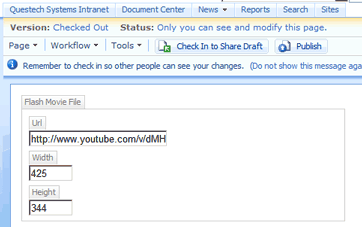
Figure 1
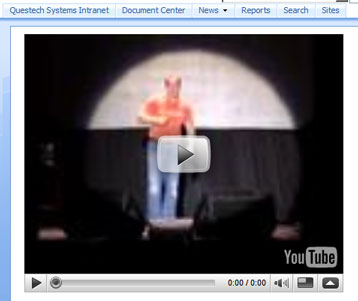
Figure 2
Introduction
Flash Movie Field is a custom WSS field to render Flash movies and YouTube videos. It uses the excellent swfobject to render the HTML and JavaScript for maximum browser compatibility. In edit mode, authors specify the Url, Width, and Height of the Flash movie. Optional parameters can be added easily by modifying the attached source code.
Description
The Flash Movie Field is based on a new Field Type SPFieldFlashMovie. It has the following properties or column values:
Url - URL to Flash (.swf) movie or YouTube video, e.g. /media/map.swf, http://www.youtube.com/v/dMH0bHeiRNg&hl=en&fs=1. Width - Width of Flash movie or YouTube video in pixels. For YouTube video, width includes embedded player. Height - Height of Flash movie or YouTube video in pixels. For YouTube video, height includes embedded player.
Rendering is provided by a custom Field Control FlashMovieField with an associating Rendering Template QuestechFlashMovieFieldTemplate. All UI strings are localized and stored in resource files.
- \SharePoint\ClientScripts\swfobject.js
Support JavaScript file for swfobject. Set as Embedded Resource. - \SharePoint\Fields\SPFieldFlashMovie.cs
Field Type for custom Flash Movie field. Inherits from SPFieldMultiColumn. - \SharePoint\Fields\SPFieldFlashMovieValue.cs
A class of column values for SPFieldFlashMovie. Inherits from SPFieldMultiColumnValue. - \SharePoint\Resources\Resources.resx
Project resource file for localized UI strings. - \SharePoint\RootFiles\CONFIG\Resources\QuestechCoreFlashMovie.resx
WSS provisioning resource file and application run-time resource file for localized UI strings. This sets the display name for the custom field and the label strings for properties Url, Width, and Height during authoring. Deploys to ..\12\Resources\. - \SharePoint\RootFiles\TEMPLATE\CONTROLTEMPLATES\
QuestechFlashMovieFieldTemplate.ascx
Form edit view of FlashMovieField with RenderingTemplate control. - \SharePoint\RootFiles\TEMPLATE\XML\fldtypes_SPFieldFlashMovie.xml
Field Type Definition for Field Type SPFieldFlashMovie. - \SharePoint\WebControls\FlashMovieField.cs
Field Control for SPFieldFlashMovie. Uses swfobject 2.1 to render Flash movies and YouTube videos. - \SharePoint\Utility.cs
Utility file for common methods and properties.
Feature QuestechFlashMovieColumns is required for the deployment. It is responsible for deploying the custom Field Type Definition in fldtypes_SPFieldFlashMovie.xml.
The sample Visual Studio 2008 solution includes all the support files you need to build and deploy the custom field, minus strong name key files (*.snk). It contains three projects: Deployment, Features, and SharePoint. The SharePoint project contains source code for the custom field. The Features project contains features to support the deployment. The Deployment project contains a pre-build script to aggregate all the files needed for deployment. It contains a Solution directory where a WSP file is generated and deployed by a post-build script.
This structure of Visual Studio solution and projects is designed to be scalable to full blown MOSS/WSS development and deployment. You could add additional projects like SharePoint.Publishing for MOSS Publishing development. Within your SharePoint or SharePoint.Publishing projects, you could have custom components like user controls, web controls, web parts, etc.
Installation
To deploy the custom field, follow the procedures below:
- Using
stsadm, install solution file QuestechFlashMovie.wsp in \Deployments\Solution\
stsadm -o addsolution -filename QuestechFlashMovie.wsp
- Open SharePoint 3.0 Central Administration, go to Operations/Global Configuration/Solution Management. Deploy QuestechFlashMovie.wsp to select web application(s).
- Go to the top site in the selected web application(s). Activate Site Collection feature Questech Systems Flash Movie Columns.
The custom Flash Movie Field should now be ready for use. You can go to the Site Columns gallery to verify. To use the custom field in your MOSS page layout, you would first need to add the custom site column to a content type by going to the Site content types gallery. In the gallery listing, select a content type and click Add from existing site columns.
In your page layout ASPX file, modify the code as follows:
...
<%@ Register Tagprefix="QuestechWebControls"
    Namespace="QuestechSystems.SharePoint.WebControls"
    Assembly="QuestechSystems.SharePoint.FlashMovie, Version=1.0.0.0,
    Culture=neutral, PublicKeyToken=f268fd4f0f42524c" %>

...
...
<QuestechWebControls:FlashMovieField FieldName="FlashMovieFile" runat="server" />
...
References
- Create custom field type in WSS V3 - Jim Yang
- SharePoint Resources, Types, Use and Deployment - Mikhail Dikov
- swfobject
- Features for SharePoint - MSDN Magazine
- SharePoint 2007 Features - Creating Site Columns and Content types - Share This Point
- Solution Deployment with SharePoint 2007 - MSDN Magazine
History
- V1.2 - 2009.05.22
- Converted Visual Studio solution projects to version 2008
- New SharePoint Solution QuestechFlashMovie.wsp and assembly QuestechSystems.SharePoint.FlashMovie.dll. This allows my other sample solutions in CodeProject to co-exist with this custom field.
- Renamed feature from
QuestechColumns to QuestechFlashMovieColumns - Removed feature
QuestechAppGlobalResources
- V1.1 - 2008.08.12
- Added support of YouTube videos
- Modified form view layout
- Upgraded
swfobject to V2.1
- V1.0 - 2008.04.26 - Base
A Microsoft Certified Professional Developer and Technology Specialist.
Experience and expertise in SharePoint 2016 / 2013 / 2010 / 2007.
Role ranges from a developer in a multi-person team to a solution consultant with expert-level skills, leading a project to completion status.
Proven experience working effectively in a team environment and a self-managed environment.



 General
  News
News  Suggestion
  Question
  Bug
Bug  Answer
  Joke
Joke  Praise
  Rant
Rant  Admin
Admin 


 Submit an article or tip


