Download Source: Here
Introduction
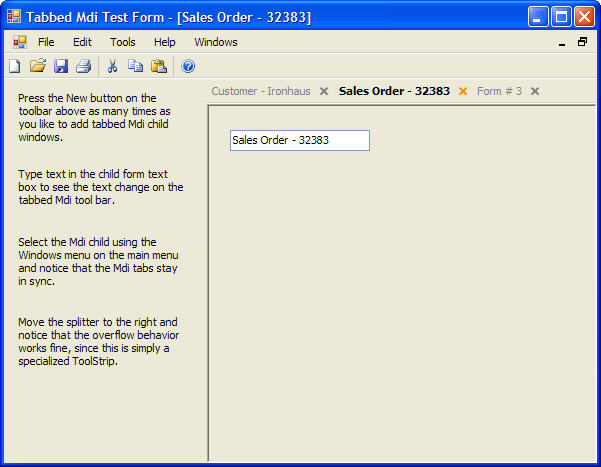
I'm a big fan of the "It's only got one button, and we've already pressed it for you" type of UI development. This control (I hope) follows that maxim. Just drop it on an Mdi Container form, and it will track all open windows, ensure they are maximized, and show the active window.
Background
My customers keep a lot of windows open at once. The Windows menu, which tracks Mdi child activity, works fine but is non-intuitive and far away from the action. I wanted a Tabbed Mdi interface that had the ability to click a portion of the tab to close the window, ala IE 7.
The ToolStrip turned out to be the perfect class to specialize. The ToolStripSplitButton is the ideal button to inherit from for our closable tab, because all we need to do is overdraw the little drop-down area and put a close "x" there, then trap some events.
Using the code
Just drop an MdiTabStrip control on your Mdi Container form (an Mdi Container form is one whose "IsMdiContainer" property is set to true).
If you want to inherit from MdiTabStrip, you can create your own MdiTabStripButton instances. Just override this method:
protected virtual MdiTabStripButton CreateMdiButton(Form f)
{
return new MdiTabStripButton(f);
}
Then you would inherit from MdiTabStripButton, and maybe override the OnPaint() or DoDrawBorder() methods:
protected virtual void DoDrawBorder(Graphics g)
{
g.SmoothingMode = SmoothingMode.Default;
using (Pen p = new Pen(BorderColor, 2F))
{
p.Brush = new LinearGradientBrush(
new Point(0, 0), new Point(Width / 2 + 2, 2),
BackColor, BorderColor);
g.DrawLine(p, 0, 1, Width / 2 + 2, 1);
p.Brush = new LinearGradientBrush(
new Point(Width / 2 - 2, 2), new Point(Width, 0),
BorderColor, BackColor);
g.DrawLine(p, Width / 2 - 2, 1, Width, 1);
}
}
There are several properties you can set on the MdiTabStrip. Either look in the commented code or drop one on a form and check in the Property Browser.
Each property has a corresponding static Default property, for example ActiveForeColor would have a static DefaultActiveForeColor property. This is a good design pattern to follow when developing controls to allow developers to more easily customize your controls in one place to suit their environment.
There are two Form classes for Mdi child forms that you can inherit from in the Cx.Windows.Forms namespace. The first one, MdiChildForm, simply ensures that it is maximized if it's the first one added to the Mdi Parent forms MdiChildren collection. It also overrides CreateParams so that the normal close "x" on the form is inaccessible (since it will now be on the tab). Not strictly necessary, but maybe more professional looking.
The second form, NoResizeChildForm, gets rid of the Control Box so that the minimize and maximize buttons go away. This is good to use if you want to force users to keep child windows maximized.
History
Initial Release, 12 May 2008
Bruce Pierson is the CTO of Connexa Softools, Inc. (www.connexatools.com), a software company specializing in product configuration and build-to-order manufacturing tools.



 General
  News
News  Suggestion
  Question
  Bug
Bug  Answer
  Joke
Joke  Praise
  Rant
Rant  Admin
Admin 


 Submit an article or tip


