Click here to Skip to main content
Licence CPOL
First Posted 14 May 2008
Views 79,281
Downloads 1,864
Bookmarked 79 times

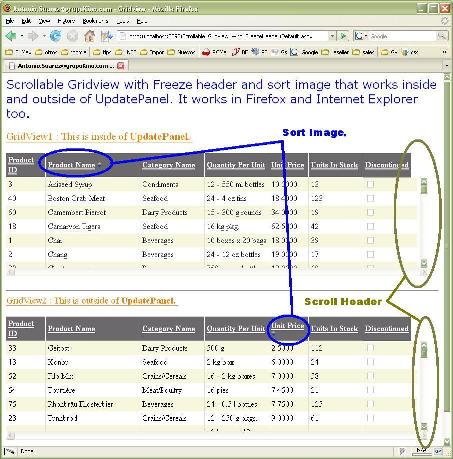
Scrollable Gridview with Freeze header and sort image.

this is an easy way to get Freeze GridView header and add image sort. And it works on IE,Firefox and Others. work inside and outside of updatepanel.
2 votes, 11.8%
1

2
1 vote, 5.9%
3
5 votes, 29.4%
4
9 votes, 52.9%
5
4.41/5 - 17 votes
2 removed
μ 4.00, σa 2.31 [?]

AntonioSuarez_gridview_ff.JPGAntonioSuarez_gridview_ie.JPG

Introduction

I was searching for a way to get a scrollable Gridview with a freeze header and I found different ways to do it, but most of them use CSS or JavaScript. What I want to find was a way to do it in the code file. (.CS or .VB)

Here I would try to explain how it could be done with code. (.CS)

Using the Code

You just need to add a Panel control then add a Table and Gridview control inside of Panel control.

in the .CS file you need to add this code:

AddSortDirectionImage Function

 
    /// summary
    ///   Email: Antonio.Suarez@GrupoKino.com
    ///Web Page: http://www.grupoKino.com    
    /// [Español]Funcion que agrega una imagen a la columna ordenada de un gridView 
    /// [English]Function that adds a image to the sorted column.
    /// summary
    /// param name="gridviewID"
    /// [Español]Gridview al cual se le agregara la imagen 
    /// [English]GridView to add sort image
    /// param
    /// param name="itemRow"
    /// [Español]Renglon del gridview al cual se le agrega la imagen 
    /// [English]Row of gridview to add sort image
    /// param

    public void AddSortDirectionImage(GridView gridviewID, GridViewRow itemRow)
    {
        if (gridviewID.AllowSorting == false)
            return;

        Image sortImage = new Image();
        Label space = new Label();

        sortImage.ImageUrl = (
            gridviewID.SortDirection ==
            SortDirection.Ascending ? @"~/sort_asc.gif" : @"~/sort_desc.gif");
        sortImage.Visible = true;
        space.Text = " ";


        for (int i = 0; i < gridviewID.Columns.Count; i++)
        {
            string colExpr = gridviewID.Columns[i].SortExpression;
            if (colExpr != "" && colExpr == gridviewID.SortExpression)
            {
                itemRow.Cells[i].Controls.Add(space);
                itemRow.Cells[i].Controls.Add(sortImage);
            }
        }
    }

And FreezeGridviewHeader Function


    /// summary
    ///  Author: Antonio Suarez
    ///   Email: Antonio.Suarez@GrupoKino.com
    ///Web Page: http://www.grupoKino.com    
    /// [Español]Funcion que copia el header de un gridview a un control tipo Table 
    /// [English]Function that copy a gridview header to a table control.
    /// summary
    /// param name="_gv1"
    /// [Español]Gridview del cual se copiara el encabezado.
    /// [English]GridView from where the header row will be copied
    /// param
    /// param name="_tb1"
    /// [Español]Renglon del gridview al cual se le agrega la imagen 
    /// [English]Row of gridview to add sort image
    /// 
    /// param name="_pc1"
    /// [Español]Panel que contendra tanto al gridview como al control table
    /// [English]Panel container of the gridview and table control.   
    /// param    
    protected void FreezeGridviewHeader(GridView _gv1, Table _tb1,Panel _pc1)
    {
        Page.EnableViewState = false;

        //[Español]Copiando las propiedades del renglon de encabezado
        //[English]Copying a header row data and properties    
        _tb1.Rows.Add(_gv1.HeaderRow);
        _tb1.Rows[0].ControlStyle.CopyFrom(_gv1.HeaderStyle);
        _tb1.CellPadding = _gv1.CellPadding;
        _tb1.CellSpacing = _gv1.CellSpacing;
        _tb1.BorderWidth = _gv1.BorderWidth;

        //if (!_gv1.Width.IsEmpty)
        //_gv1.Width = Unit.Pixel(Convert.ToInt32(_gv1.Width.Value) + Convert.ToInt32(
        //    _tb1.Width.Value) + 13);

        //[Español]Copiando las propiedades de cada celda del nuevo encabezado.
        //[English]Copying  each cells properties to the new header cells properties
        int Count = 0;
        _pc1.Width = Unit.Pixel(100);
        for (Count = 0; Count < _gv1.HeaderRow.Cells.Count - 1; Count++)
        {
            _tb1.Rows[0].Cells[Count].Width = _gv1.Columns[Count].ItemStyle.Width;
            _tb1.Rows[0].Cells[Count].BorderWidth = 
                _gv1.Columns[Count].HeaderStyle.BorderWidth;
            _tb1.Rows[0].Cells[Count].BorderStyle = 
                _gv1.Columns[Count].HeaderStyle.BorderStyle;
            _pc1.Width = Unit.Pixel(Convert.ToInt32(
                _tb1.Rows[0].Cells[Count].Width.Value) +
                Convert.ToInt32(_pc1.Width.Value) + 14);
        }
        //Panel1.Width = Unit.Pixel(Convert.ToInt32(
        //    _tb1.Rows[0].Cells[Count-1].Width.Value) + 12);
    }

Points of Interest

The point here is that it should work in the most of the graphical browser and we will not have to add fix for each browser compatibility.

History

We need to add edit functionality. I hope all this could be useful for you, if this work fine.

Other thing, if you have a page please add my web page link http://www.grupoKino.com


Antonio Suarez.

License

This article, along with any associated source code and files, is licensed under The Code Project Open License (CPOL)

About the Author

Antonio Suarez

Web Developer
Health Company
Mexico Mexico

Member
Working as:
Web Developer.
 
Free Time:
Web Developer.


message.
Espero no esperar y mientras mas espero, espero que esperar.

Sign Up to vote   Poor Excellent
Add a reason or comment to your vote: x
Votes of 3 or less require a comment

Comments and Discussions

 
You must Sign In to use this message board. (secure sign-in)
 
Search this forum  
 FAQ
    Noise  Layout  Per page   
  Refresh
GeneralMy vote of 1 Pinmemberdeveshbhattacharya4:04 17 Oct '10  
GeneralWorks with a static grid... PinmemberPak51410:11 13 Dec '08  
GeneralVery bad solution Pinmembernsimeonov15:53 5 Dec '08  
GeneralRe: Very bad solution PinmemberAntonio Suarez16:23 5 Dec '08  
GeneralMy vote of 1 Pinmembernsimeonov15:51 5 Dec '08  
QuestionIts not working?????? PinmemberNitish.112718:49 2 Nov '08  
AnswerHere I am posted the small and workable C# code which work with the panel also PinmemberNitish.11270:25 3 Nov '08  
Generalit won't work Pinmemberimran prasla9:09 24 Sep '08  
GeneralRe: it won't work PinmemberAntonio Suarez9:21 24 Sep '08  
GeneralRe: it won't work Pinmemberimran prasla4:36 25 Sep '08  
GeneralRe: it won't work PinmemberAntonio Suarez6:17 25 Sep '08  
Questionaspx page coding for freeze???????? Pinmemberqtrmile699:21 1 Aug '08  
Answeraddtl.....: aspx page coding for freeze???????? Pinmemberqtrmile699:23 1 Aug '08  
GeneralEdit functionality Pinmemberscott.m.owen@hotmail.com8:43 24 Jul '08  
GeneralRe: Edit functionality PinmemberAntonio Suarez21:29 24 Jul '08  
GeneralRe: Edit functionality Pinmembertommymro9:02 21 Nov '08  
GeneralTwo identical header rows Pinmemberscottlis3:19 27 Jun '08  
GeneralRe: Two identical header rows PinmemberAntonio Suarez21:45 24 Jul '08  
General[Message Removed] PinmemberMojtaba Vali23:10 23 May '08  
GeneralImprovements PinmemberHelmar Dahmer12:54 23 May '08  
GeneralRe: Improvements PinmemberAntonio Suarez13:20 23 May '08  
GeneralRe: Improvements PinmemberMember 311181614:08 5 Nov '08  
GeneralMinor Point PinmemberOakman16:22 14 May '08  
GeneralRe: Minor Point PinmemberAntonio Suarez20:01 14 May '08  

General General    News News    Suggestion Suggestion    Question Question    Bug Bug    Answer Answer    Joke Joke    Rant Rant    Admin Admin   

Use Ctrl+Left/Right to switch messages, Ctrl+Up/Down to switch threads, Ctrl+Shift+Left/Right to switch pages.

Permalink | Advertise | Privacy | Mobile
Web01 | 2.5.120209.1 | Last Updated 14 May 2008
Article Copyright 2008 by Antonio Suarez
Everything else Copyright © CodeProject, 1999-2012
Terms of Use
Layout: fixed | fluid
