Description
There are a lot of setup programs available, but I found that their code may add more than 250KB to the total size of the final setup application, and because most of my applications are not much bigger than 100KB, I decided to write my own installation builder.
The application does not have all the features available in commercial setup builders, but it's a good start (I think...). Maybe in the future I will extend the installation builder with more features, but for now I found it good enough for my needs. If you have any suggestions or improvements please let me know!
Little Install Builder is made up out of two parts:
- Installation Builder -> Used to create the installation package.
- Setup Program -> The actual setup application.
Installation Builder
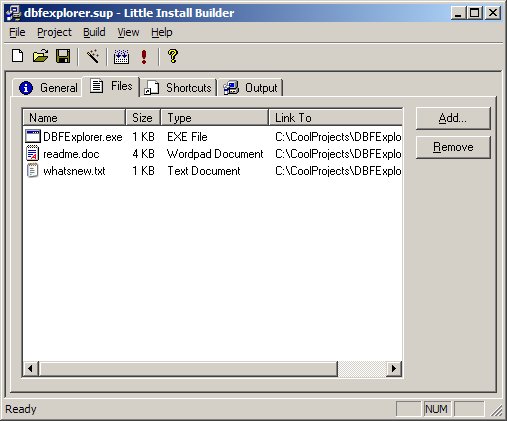
The installation builder is a simple SDI application with a tabbed form where you can enter all the information needed by the setup program. For example: add files, assign shortcuts and other setup specific variables. You can also use the wizard, which will guide you through the necessary steps of creating a setup program for your software product.
The application has 4 tab-pages:
- General, where you can enter application name, company name and so on.
- Files, this is where you specify all files that are needed to be distributed.
- Shortcuts, for specifying shortcuts in the program folder (start menu).
- Output, the final step where you enter the output directory.
After you entered all the necessary information you can build the setup program. This creates a single output file that contains all setup information and files needed for installation.
I decided to use no compression because most setups are distributed as zip files, so why compress it twice? The generated output file is made up from 3 parts:
- The setup program = stub.exe (which unpacks the files, asks for destination folder and executes setup script).
- All files needed for the distribution glued together.
- The setup script, which is a Windows compatible Setup Script that does all the installation stuff for us.
Setup Program
The setup program performs the following tasks:
- Extract all files from the distribution package.
- Ask for a destination folder and program folder.
- Execute setup (.inf) script.
The .inf file describes the actions in the setup process such as:
- Copying the files to the right place.
- Creating a start menu shortcut.
- Providing an uninstall procedure.
All these actions are taken care of by Windows, so we don't have to implement them ourselves!
Implementation Highlights
Because there's too much code to explain, I'll just give you a list of implementation highlights.
This project shows you how to:
- Create a self-extracting setup file.
- Create a simple .inf setup script.
- Run an executable that is linked in your resources.
- Create a setup wizard and run the setup script.
- Keep yourself busy for a while...
One of the problems I ran into was the lack of support for long file names when using Windows setup scripts. So I had to build a rename table (in the setup file), which renames all short names back to their original names. Even the latest version of syssetup.dll (in XP) can't handle long filenames without problems!
Contacting the Author
Please send any comments or bug reports to me via
email. For any updates to this article, check my site
here.
Revision history
- 22th May 2002 - Initial revision.
This member has not yet provided a Biography. Assume it's interesting and varied, and probably something to do with programming.



 General
  News
News  Suggestion
  Question
  Bug
Bug  Answer
  Joke
Joke  Praise
  Rant
Rant  Admin
Admin 


 Submit an article or tip


 . It uses a script in which is runned by windows installer, in fact is a replacement for the old setup.inf and it can be managed in a network much more easier.
