Overview
Window Sizer is a little program that I wrote when I was having to frequently
change screen resolutions when testing web pages or GUI applications to make
sure that they worked alright in other resolutions than my default one. Often we
also had requests from clients with weird specifications like a maximum window
size of 600 x 600 or something equally bizarre. Then I found that when I was
editing CP articles I had to switch to 800 x 600 to make sure that the article
looked fine in that resolution too. All this culminated in this little app that
you see.
Usage
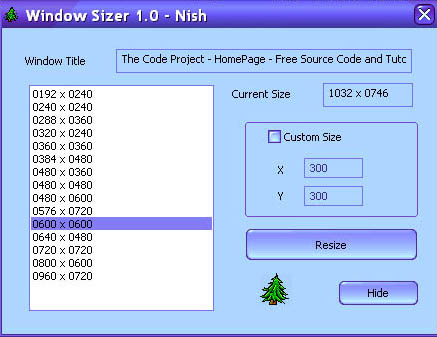
Just run the app once, probably at windows startup. Just drag a short cut to
the Start-Menu's Startup-folder. You'll see a green tree icon on your system
tray. That's to let you know that Window Sizer is active. Now just make your
window active by clicking on it and press CTRL-ALT-F12 which is the keyboard
shortcut that brings up Window Sizer. Now you can choose one of the resolutions
from the list box or use a custom resolution, and then click on Resize to resize
the window to that size. If you close the Window Sizer window the program won't
exit, it simply hides itself. The resolution list in the list box will never
exceed your screen resolution. Thus if you are on 800 x 600, don't expect to see
720 x 720 in the list box. But you can type what you feel like into the Custom
size text boxes at your own risk of course. You can exit the program by right
clicking on the task tray and choosing Exit.
Technical details
Basically we use GetForegroundWindow() to get the current window. This
usually works better than GetActiveWindow() on XP and 2K because they have some
kind of funny option that when set prevents windows from taking over the focus.
This means we end up with crazy situations where the foreground window may not
be the active window and vice versa. Now we use MoveWindow() to
resize the window. If the resizing gets the window out of screen, we center the
window on the screen. We also remove the WS_MAXIMIZE if it is set
because otherwise the OS will not know that the window has been un-maximized.
Initially I had over-looked such a contingency and had experienced some weird
side effects.
Conclusion
I'd like to thank
David
Wulff and
Roger
Wright for doing some quick testing for me. It was okay when I alone was
using it, but when I thought of CP-ing it, I wanted some external testing and
these two gentlemen helped me by testing out the application. Of course there
might be a few bugs left for all I know. But I am hoping on getting some quality
feedback and suggestions as usual.
Updates
- Aug 08 2002 - Added an MSI Installer
Nish Nishant is a technology enthusiast from Columbus, Ohio. He has over 20 years of software industry experience in various roles including Chief Technology Officer, Senior Solution Architect, Lead Software Architect, Principal Software Engineer, and Engineering/Architecture Team Leader. Nish is a 14-time recipient of the Microsoft Visual C++ MVP Award.
Nish authored C++/CLI in Action for Manning Publications in 2005, and co-authored Extending MFC Applications with the .NET Framework for Addison Wesley in 2003. In addition, he has over 140 published technology articles on CodeProject.com and another 250+ blog articles on his WordPress blog. Nish is experienced in technology leadership, solution architecture, software architecture, cloud development (AWS and Azure), REST services, software engineering best practices, CI/CD, mentoring, and directing all stages of software development.
Nish's Technology Blog :
voidnish.wordpress.com



 General
  News
News  Suggestion
  Question
  Bug
Bug  Answer
  Joke
Joke  Praise
  Rant
Rant  Admin
Admin 


 Submit an article or tip


