1. Introduction
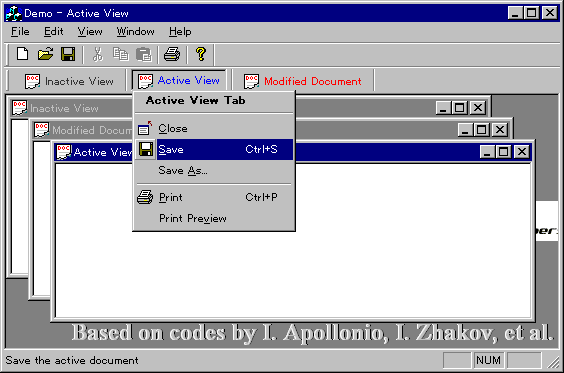
This code implements MDI tab view for easy navigation.
The views are supported on a control bar, which can be floated (of course
docked!).
2. Implemented Features
- Control bar-based owner-drawn tab view. Supports fonts and color settings,
the default is as follows
- The normal/inactive tab text is painted black,
- The active tab text is painted blue,
- The tab text of a modified document is painted red.
- The control bar can be docked (currently only top and bottom) or floated.
- Custom MDI window list dialogs, similar to VC++.
- Full screen modes.
- Cool menu popup, three types.
- From a right click on the tab control itself, as shown above.
- From the right click on the tab control bar.
- From a right click in the MDI main window client area, just a place
holder (demo) build yours.
- Display of company logo text in the MDI main window client area.
- MDI client background text logo and banner painting.
- Saves and restores the state of the MDI child window, i.e. normal or
maximize, and the position of the control bars and the main window frame.
- Tool tips and tab icons (icons!...just a demo-do not know what will be
better, let me know your views).
- Minimum modifications to existing projects, say automated! Few changes to
only existing main frame class and maybe application class, no base
class to derive from.
3. Unicode?
There is no reason why it should not work!
4. Files required:
- WindowManager.cpp/h: Manages the window list, and subclass the MDI
client to create the tab view bar. It also contain the class
CDocumentList, which lists all open documents. This is really
where life begins...
NOTE: The CDocumentList class can
be very useful for many applications, take a good look.
- ViewManager.cpp/h: Manages the views of the application, creating
the view tabs.
- WindowTabCtrl.cpp/h: Codes implementing the tab control.
- PopupMenu.cpp/h: Codes implementing the popup menu.
Others
- tabview.rc: The full screen toolbar, popup menus and window list
dialog resource.
- tabview.h: Contains the resource ids needed by the controls. (NOTE:
Not used directly, deleted later).
- tabview.bmp: The full screen and popup menus bitmap.
5. How to use it?
There is a bit of work involved in integrating the
resource file into your project. Lets do it, the difficult part first...
- Move the bitmap file, tabview.bmp to your res directory, and
tabview.rc to the project directory.
- Add the resource file tabview.rc to the project's *.rc2
file, and merge the resource id file tabview.h with your resource file,
resource.h. If you have not being manually modifying resource files
then read this...
- Identify the last resource type (numbering starts from 128) in your
resource.h file, copy and paste the resource type identifiers (2)
from the tabview.h, give each an incremental id and finally increment
the VC++ object
_APS_NEXT_RESOURCE_VALUE by 2, i.e. 1 more than
the last incremental id.
- Similarly, copy and paste the dialog control ids (8) (numbering starts
from 1000) and increment the
_APS_NEXT_CONTROL_VALUE by 8.
- Finally, copy and paste the menu items ids (9) ( numbering starts from
32771) and increment the
_APS_NEXT_COMMAND_VALUE by 9. The
project should now compile without any problem, and you can now delete the
tabview.h file.
- Now, move the files WindowManager.cpp/h, ViewManager.cpp/h,
WindowTabCtrl.cpp/h and PopupMenu.cpp/h to the project directory
and add the implementation files to the project.
- Open the WindowManager.h file, and in the Forward
Declaration part change the CMainFrame to your main window frame class
name (see TODO). Also include the header file of your main frame class in the
WindowManager.cpp.
- Include header files, WindowManager.h and ViewManager.h in
your main frame header file and declare in a public section the
following:
CMDIClient   m_MDIClient;
void GetControlBarsEx(CArray<CControlBar*, CControlBar*>& arrBars);
- Towards the end of the OnCreate() function of the main frame add
the ff:
VERIFY(m_MDIClient.SubclassMDIClient(this));
The SubclassMDIClient() is prototyped as
BOOL SubclassMDIClient(CMDIFrameWnd* pMDIFrameWnd,
    CViewManager* pViewManager, UINT uID = ID_VIEW_VIEWTAB);
- In order for command messages to be handled directly in the
CWindowManager, use the ClassWizard to override the
OnCmdMsg() method of the main frame and modify it to be similar
to the ff:
BOOL CMainFrame::OnCmdMsg(UINT nID, int nCode,
void* pExtra, AFX_CMDHANDLERINFO* pHandlerInfo)
{
if (m_MDIClient.OnCmdMsg(nID, nCode, pExtra, pHandlerInfo))
return TRUE;
return CMDIFrameWnd::OnCmdMsg(nID, nCode, pExtra, pHandlerInfo);
}
- Tired eh! Just compile and have fun...
- Well, you will need this too...build the menus, all the menu ids are
already defined so just select them from the ID combo box of the
property sheet.
- On the View menu build the ff:
| Menu Item ID | MENU ITEM STRING |
| ID_VIEW_VIEWTAB | Op&en File Tabs |
| ID_VIEW_FULLSCREEN | F&ull Screen |
-
On the Window menu build the ff:
| ID_WINDOW_NEXT | Ne&xt Window |
| ID_WINDOW_PREVIOUS | Pre&vious Window |
| ID_WINDOW_CLOSE_ALL | C&lose All |
| ID_WINDOW_SAVE_ALL | &Save All |
- Note: The Windows... menu is build for you automatically.
- Well, well, well...if you need to support the position and control bar
restoration then do this...(unfortunately, neither the main frame class
destructor nor the window manager class destructor is called by the MFC
framework!)
- Add message handle for the
WM_CLOSE message for your main
frame, or modify the existing one adding the following single line, calling
the SaveMainFrameState() method...
void CMainFrame::OnClose()
{
               ......
    m_MDIClient.SaveMainFrameState();
               ......
    CMDIFrameWnd::OnClose();
}
- Finally! replace the main frame displaying code at the end of the
InitInstance() of application class with the
RestoreMainFrameState() as
BOOL CDemoApp::InitInstance()
{
.............................
pMainFrame->m_MDIClient.RestoreMainFrameState(m_nCmdShow);
pMainFrame->UpdateWindow();
return TRUE;
}
6. Code Snippets
The icon support in the tab is application specific.
What I mean is you will need to build a more suitable solution for your
application. If, however, you have some ideas as how to implement something
general let me know.
For the current implementation...
The OnCreate() function of
the CViewManager, which created both the tab and itself (the tab
bar), simply creates a place holder icon to fill an image list, which is then
attached to the tab.
int CViewManager::OnCreate(LPCREATESTRUCT lpCreateStruct)
{
if (CControlBar::OnCreate(lpCreateStruct) == -1)
return -1;
m_ViewTabImages.Create(16, 16, ILC_MASK, 5, 5);
m_ViewTabCtrl.Create(WS_CHILD | WS_VISIBLE | WS_EX_NOPARENTNOTIFY |
TCS_TOOLTIPS | TCS_SINGLELINE | TCS_FOCUSNEVER | TCS_FORCELABELLEFT,
CRect(0, 0, 0, 0), this, ID_VIEWTAB);
m_ViewTabCtrl.SetImageList(&m_ViewTabImages);
HICON hIcon = AfxGetApp()->LoadStandardIcon(IDI_APPLICATION);
m_ViewTabImages.Add(hIcon);
EnableToolTips(TRUE);
return 0;
}LoadStandardIcon() is used to load system icon in there. You
may wish to replace this with the commented code,
IDR_DEMOTYPE is
your application specific resource type.
HICON hIcon = AfxGetApp()->LoadIcon(IDR_DEMOTYPE);
In the
AddView() function of the same class, the tab image
index is set to 0 (zero) the only image in the image list. Finally, in the
DrawItem() function of the tab,
CWindowTabCtrl, the
dummy icon is replaced by the small icon attached to the frame of your child
window, parent of the view.
void CWindowTabCtrl::DrawItem(LPDRAWITEMSTRUCT lpDrawItemStruct)
{
....
CView* pView = reinterpret_cast<CView*>(tci.lParam);
CDocument* pDoc = pView->GetDocument();
if (m_bDisplayIcons)
{
CImageList* pImageList = GetImageList();
CMDIChildWnd* pViewFrame = static_cast<CMDIChildWnd*>(pView->GetParent());
HICON hIcon = reinterpret_cast<HICON>(GetClassLong(pViewFrame->m_hWnd,
GCL_HICONSM));
pImageList->Replace(nTabIndex, hIcon);
....
}
....
}Initially, I considered getting the icon from the Windows shell, based on
the registered file extension
SHGetFileInfo() API. However, it does
not look nice for the view frame icon to be different from the tab view icon. By
the current implementation, all is needed is a good citizenship like the VC++
itself. Let your application child window system icons reflect the file type and
there will be no need to write extra codes.
7. Credits
The code is based on code and ideas shared by the following:
- Iuri Apollonio, he wrote the base codes using status bar. What is
his new email address?
- Ivan Zhakov, his "MDI Windows Manager dialog" is better than
Iuri's. The Window manager class is now the main engine driving the view
manager.
- Chris Maunder, his owner-drawn tab control code snippets are used
to improve Iuri's.
- Adolf Szabo, his Full-screen mode idea is simpler than that
implemented by MS and MS's Mike B.
- YOU, and many others...
Use this code in any project, there is no restriction!
Write whatever you like or do not like about this code in the comment
section, I will take note of all.
Happy coding...
Paul
Selormey, Japan. |
8. To Do
- Ability to dock on all sides of the main frame, involves more work since
the tab control is owner-drawn.
- Improved main frame window position saving and restoration...
- Support for multiple monitors-I do not have the OS (Win98/Win2000) to
test this now (if I do, not the video card and monitors!)
- Support for screen resolution changes. I have API code for my C/SDK
application, well tested on Win95 using the QuickRes program. I do not use
QuickRes currently, so a bit reluctant to implement it.
- Your wishes...
9. Known Issues
- The popup menu does not currently support accelerators (but is this
needed?).
- The modified flag is not re-drawn immediately, I do not wish to play any
game to introduce flickers! (implementation still good enough!).
- Add yours...
10. In this Update
- Many parts are rewritten to address most of the issues in the comment
section.
- The "tab view" is now CMDIChildWnd class, so splitters and others
should work.
- Many bug fixes.
- Should work with existing codes without little modifications, see Step 5.



 General
  News
News  Suggestion
  Question
  Bug
Bug  Answer
  Joke
Joke  Praise
  Rant
Rant  Admin
Admin 


 Submit an article or tip


![Rose | [Rose]](https://codeproject.freetls.fastly.net/script/Forums/Images/rose.gif)

