Introduction
This is a simple application developed using C# to send mail (with attachments) to multiple users. It uses an SMTP server to send mails.
Using the demo
To use the demo application, open "MailComposer.exe" from the demo link above. Type the subject and the body of the message. If the body of the message needs to be in HTML format, then select the checkbox provided below the body.
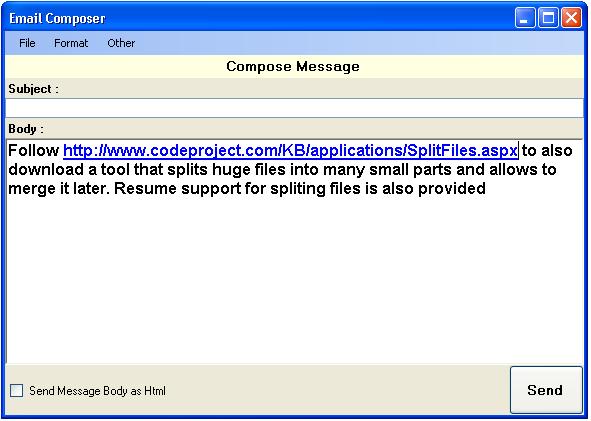
After typing in the normal message body and the subject, click Other --> Add Attachments. The form shown below will be displayed:

In the above window, click on the Add button to browse and add a new attachment. Add all the files to be attached, and then click the OK button to save the attachments. When you click the OK button, the attachments window will be closed and the previous form will be visible. Finally, to send the mail, you require a mail provider and a valid account to connect and send the mail. So, click Other --> Settings to open the form below to provide the settings.
- In the above form, select the provider in which you have the account. If your provider cannot be found in the list, then select Other from the list, and type the mail server name and the port used to connect to the server.
- Then, enter your user ID (complete mail address of the provider) and the password used to connect to the server.
- (Optional) Enter the display name which will be shown in the recipient's display.
- (Optional) Enter the Reply To address to which the recipient has to reply.
- Type the recipient's address at the Add Recipient space provided, and click the Add button to add the recipient to the list. Add more recipient mail addresses, if required.
- Finally, if the server requires secured connection, then select the Use Secured Connection checkbox.
- Click the Save button to save the settings temporarily till the new message is sent. The form will be closed and the previous form will be activated.
Finally, click on the Send button to send the mail message.
Clarifications
In case of any questions, or suggestions to improve the project, feel free to contact me at "shridhar_tl@ymail.com".
History
No updates so far.
Completed B.Com(CS) at DGVC and GNIIT Software Engineering at NIIT. Resident at Chennai and working as a Software Engineer.
Language / Technology :
C#, ADO.NET, ASP.NET, MVC, WCF, ASP, PHP, XML, Java, J2EE, HTML, JavaScript, JQuery, AngularJS, VB Script, C++, MS SQL Server, SSRS, MySql, Oracle, Oracle Forms Development, Windows, Linux.
Click here to view other articles.
Mail Me at: shridhar_tl@ymail.com
Visit my Site: www.iCodeIt.in



 General
  News
News  Suggestion
  Question
  Bug
Bug  Answer
  Joke
Joke  Praise
  Rant
Rant  Admin
Admin 


 Submit an article or tip


