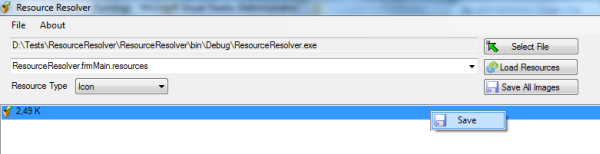
Introduction
This article is about resolving and extracting .NET resources. Many of us cannot find images and icons which we use on projects. When we want to reuse image on another project or an image with a different size, we have to search many disks or web. In another scenario, we want to use an image or an icon from an assembly that we didn’t develop.
Resource Types
Using Resource Resolver, we can list and extract Icon, Image and String resources. All resource item classes are derived from IResourceItem interface.
#region Properties
string Name { get; set; }
object Value { get; set; }
ResourceType ResourceType { get; }
int BoundHeight { get; }
#endregion

#region Methods
void Save();

void Draw(Graphics graphics, Font font, Rectangle bound);
#endregion
Draw method is used for listing item on the list and Save method is used for saving as default from the list.

Resolving Resources
For resolving resources, first we use Reflection and we get assembly information and manifest resource names of the selected file. After resolving assembly manifest names, we resolve all manifest files one by one.
Assembly assembly = Assembly.LoadFile(fileName);
string[] names = assembly.GetManifestResourceNames();
for (int i = 0; i < names.Length; i++)
{
ManifestResourceInfo info = assembly.GetManifestResourceInfo(names[i]);
	ResourceContainer container = new ResourceContainer(names[i]);
	container.Resolve(assembly, names[i]);
cbResources.Items.Add(container);
}

public void Resolve(Assembly assembly, string name)
{
_Items = new List<IResourceItem>();
	Stream resourceStream = assembly.GetManifestResourceStream(name);
	if (resourceStream == null)
		return;
	ManifestResourceInfo info = assembly.GetManifestResourceInfo(name);
	if (((info.ResourceLocation & ResourceLocation.Embedded) ==
		ResourceLocation.Embedded) && name.EndsWith(".resources"))
		{
			ResourceReader reader = new ResourceReader(resourceStream);
			IDictionaryEnumerator enumerator = reader.GetEnumerator();
			while (enumerator.MoveNext())
			{
				string type = string.Empty;
				string key = enumerator.Key.ToString();
				byte[] values = null;
				reader.GetResourceData(key, out type, out values);
				List<IResourceItem> items =
					ResourceItem.GetResourceItem
					(key, enumerator.Value, resourceStream);
				if (items != null)
				{
					for (int i = 0; i < items.Count; i++)
					{
						Items.Add(items[i]);
					}
				}
			}
		}
	}
We create resource item by type.
public static List<IResourceItem>
GetResourceItem(string name, object value, Stream stream)
{
	if (value is string)
	{
		StringResourceItem item = new StringResourceItem(name, value);
		return new List<IResourceItem>() { item };
	}
	else if (value is Icon)
	{
		IconResourceItem item = new IconResourceItem(name, value);
		return new List<IResourceItem>() { item };
	}
	else if (value is ImageListStreamer)
	{
		List<IResourceItem> items = new List<IResourceItem>();
		using (ImageList list = new ImageList())
		{
			list.ImageStream = value as ImageListStreamer;
			int index = 0;
			foreach (Image image in list.Images)
			{
				items.Add(new ImageResourceItem(name, image, index));
				index++;
			}
		}
		return items;
	}
	else if (value is Image)
	{
		ImageResourceItem item = new ImageResourceItem(name, value, -1);
		return new List<IResourceItem>() { item };
	}
	else
	{
		object v = value;
	}

	return null;
}
Save Images
After clicking Save All Images button, Resource Resolver saves all images and icons to selected path.
private void _SaveAllImages()
{
	if (cbResources.Items.Count == 0)
	{
		_LoadResources();
	}
	lblMessage.Text = "Saving...";
	Application.DoEvents();
	using (FolderBrowserDialog dialog = new FolderBrowserDialog())
	{
		if (!string.IsNullOrEmpty(Properties.Settings.Default.DefaultSavePath))
		{
			dialog.SelectedPath =
				Properties.Settings.Default.DefaultSavePath;
		}
		if (dialog.ShowDialog() == System.Windows.Forms.DialogResult.OK)
		{
			Properties.Settings.Default.DefaultSavePath =
						dialog.SelectedPath;
			Properties.Settings.Default.Save();
			string iconDirectory = dialog.SelectedPath + "\\Icons";
			string imageDirectory = dialog.SelectedPath + "\\Images";
			if (!Directory.Exists(iconDirectory))
				Directory.CreateDirectory(iconDirectory);
			if (!Directory.Exists(imageDirectory))
				Directory.CreateDirectory(imageDirectory);
			for (int resourceIndex = 0; resourceIndex <
					cbResources.Items.Count; resourceIndex++)
			{
				ResourceContainer container =
				cbResources.Items[resourceIndex] as ResourceContainer;
				string[] names = container.Name.Split
						(new char[] { '.' });

				for (int itemIndex = 0;
				itemIndex < container.Items.Count; itemIndex++)
				{
					IResourceItem item = container.Items
								[itemIndex];
					string fileName = string.Empty;
					if (item.ResourceType == ResourceType.Icon)
					{
						IconResourceItem resourceItem =
							item as IconResourceItem;
						if (resourceItem.Icon != null)
						{
							if (names.Length > 1)
							{
								fileName = dialog.
								SelectedPath +
								"\\Icons\\" +
								names[names.Length
								- 2] + ".ico";
								using (FileStream
								fs = new FileStream
								(fileName,
								FileMode.Create,
								FileAccess.Write))
								{
								    resourceItem.
								    Icon.Save(fs);
								    fs.Flush();
								}
							}
						}
					}
					else if (item.ResourceType ==
							ResourceType.Image)
					{
						ImageResourceItem imageItem =
							item as ImageResourceItem;
						if (imageItem.Image != null)
						{
							string name =
								imageItem.Name;
							if (imageItem.Index != -1)
							{
								name = imageItem.
								Index.ToString();
							}
							fileName = dialog.
							SelectedPath +
							"\\Images\\" +
							names[names.Length - 2] +
							"_" + imageItem.Width.
							ToString() +
							"_" + name + ".png";
							imageItem.Image.Save
							(fileName, ImageFormat.Png);
						}
					}
				}
			}
			MessageBox.Show("Operation Finished", "Success",
				MessageBoxButtons.OK, MessageBoxIcon.Asterisk);
		}
	}
	lblMessage.Visible = false;
}
I am a computer engineer, a .Net developer. I live in İstanbul. I work at CrsSoft, a software company.



 General
  News
News  Suggestion
  Question
  Bug
Bug  Answer
  Joke
Joke  Praise
  Rant
Rant  Admin
Admin 


 Submit an article or tip

