Introduction
It's a good practice to use many small JavaScript and CSS files instead of one large JavaScript/CSS file for better code maintainability, but bad in terms of website performance. Although you should write your JavaScript code in small files and break large CSS files into small chunks, when a browser requests those JavaScript and CSS files, it makes one HTTP request per file. Every HTTP request results in a network roundtrip from your browser to the server and the delay in reaching the server and coming back to the browser is called latency. So, if you have four JavaScripts and three CSS files loaded by a page, you are wasting time in seven network roundtrips. Within the USA, latency is average 70ms. So, you waste 7x70 = 490ms, about half a second of delay. Outside USA, average latency is around 200ms. So, that means 1400ms of waiting. The browser cannot show the page properly until CSS and JavaScripts are fully loaded. So, the more latency you have, the slower the page loads.
How Bad is Latency
Here's a graph that shows how each request latency adds up and introduces significant delay in page loading:
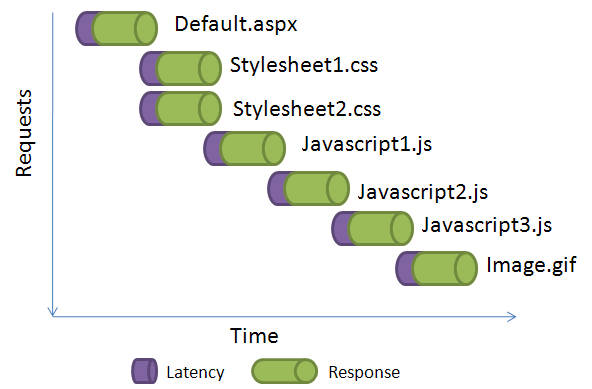
You can reduce the wait time by using a CDN. Read my previous blog post about using CDN. However, a better solution is to deliver multiple files over one request using an HttpHandler that combines several files and delivers as one output. So, instead of putting many <script> or <link> tags, you just put one <script> and one <link> tag, and point them to the HttpHandler. You tell the handler which files to combine and it delivers those files in one response. This saves browser from making many requests and eliminates the latency.

Here you can see how much improvement you get if you can combine multiple JavaScripts and CSS into one.
In a typical web page, you will see many JavaScripts referenced:
<script type="text/javascript" src="http://www.msmvps.com/Content/JScript/jquery.js">
</script>
<script type="text/javascript" src="http://www.msmvps.com/Content/JScript/jDate.js">
</script>
<script type="text/javascript"
    src="http://www.msmvps.com/Content/JScript/jQuery.Core.js">
</script>
<script type="text/javascript"
    src="http://www.msmvps.com/Content/JScript/jQuery.Delegate.js">
</script>
<script type="text/javascript"
    src="http://www.msmvps.com/Content/JScript/jQuery.Validation.js">
</script>
Instead of these individual <script> tags, you can use only one <script> tag to serve the whole set of scripts using an Http Handler:
<script type="text/javascript"
    src="HttpCombiner.ashx?s=jQueryScripts&t=text/javascript&v=1" >
</script>
The HTTP Handler reads the file names defined in a configuration and combines all those files and delivers them as one response. It delivers the response as gzip compressed to save bandwidth. Moreover, it generates a proper cache header to cache the response in the browser cache, so that, the browser does not request it again on future visits.
In the query string, you specify the file set name in the "s" parameter, then the content type in the "t" parameter and a version number in "v" parameter. As the response is cached, if you make changes to any of the files in the set, you will have to increase the "v" parameter value to make browsers download the response again.
Using this HttpHandler, you can deliver CSS as well:
<link type="text/css" rel="stylesheet"
 href="HttpCombiner.ashx?s=CommonCss&t=text/css&v=1" ></link>
Here's how you define the sets in web.config:
<appSettings>
    <add key="jQueryScripts"
        value="~/Content/JScript/jquery.js,
            ~/Content/JScript/jDate.js,
            ~/Content/JScript/jQuery.Core.js,
            ~/Content/JScript/jQuery.Delegate.js,
            ~/Content/JScript/jQuery.Validation.js"
    />
    <add key="CommonCss"
        value="~/App_Themes/Default/Theme.css,
            ~/Css/Common.css,
            ~/Controls/Grid/grid.css"
    />
</appSettings>
Example Website that Uses HttpCombiner
I have made a simple test website to show you the use of HttpCombiner. The test website has two CSS and two JS files. The default.aspx requests both of them using only one <link> and <script> tag via the HttpCombiner.ashx.
Here's the content of the Default.aspx:
Here you see, there's one <link> tag sending a request to HttpCombiner.ashx to deliver the set named Set_Css and a <script> tag asking for a set Set_Javascript.
Files that belong to these two sets are defined in the web.config file:
Here's how the handler works:
- First it reads the file set name passed in the "s" parameter
- Then it gets the files defined in the web.config for the set
- It reads individual files and stores in a buffer
- The buffer is then gzip compressed
- The compressed buffer is sent to the browser
- The compressed buffer is stored in ASP.NET cache so that subsequent requests for the same set can be directly served from cache without reading the individual files from file system or external URL
Benefits of the handler:
- It saves network roundtrip. The more files you can put in one set, the more you save in network latency. This improves performance.
- It caches the total combined response as compressed and thus saves reading file from file system and compressing it again and again. This improves scalability.
How the HttpHandler Works
First the handler reads the set, type and version to use from the query string:
If the set has already been cached, the it's written directly from cache. Otherwise the files in the set are loaded one by one and stored in a MemoryStream. The MemoryStream is compressed using GZipStream if browser supports compressed output.
After combining all the files and compressing it, the combined bytes are cached so that subsequent requests can be directly served from cache.
The GetFileBytes function reads a file or URL and returns the bytes. So, you can use Virtual Path to files within your website or you can use URL to external Javascript/CSS files hosted on another domain.
The WriteBytes function has much wisdom in it. It generates a proper header based on whether the bytes are in compressed form or not. Then it generates proper browser cache header to make browser cache the response.
How to use this handler::
- Include the
HttpCombiner.ashx in your project - Define the file sets in the
<appSettings> section of your web.config - Change
<link> and <script> tags throughout your website to point to HttpCombiner.ashx in this format:
HttpCombiner.ashx?s=<setName>&t=<contentType>&v=<versionNo>
Conclusion
That's it! Make your website faster to load, get more users and earn more revenue.
You should also read my earlier articles about deferring and combining script loading for faster perceived speed and how to make best use of browser cache.



 General
  News
News  Suggestion
  Question
  Bug
Bug  Answer
  Joke
Joke  Praise
  Rant
Rant  Admin
Admin 


 Submit an article or tip


