Introduction
Currently, I am developing an application on ASP.NET & SQL Server 2005. This application requires audit trail mechanism to track user changes on a database table. I have developed a technique based on SQL Server 2005 XML data type. This technique only requires one table and does not require any trigger as triggers create more overhead. In this article, I discuss how I have implemented audit trail in my application.
Audit Trail using Single Table with XML Column
I have used a table named tbl_audittrail to store user changes on a database table. I have created a table named tbl_student for example. Every time a record is inserted or updated in tbl_student, a corresponding record is inserted in tbl_audittrail table. The structure of the two tables is as follows:
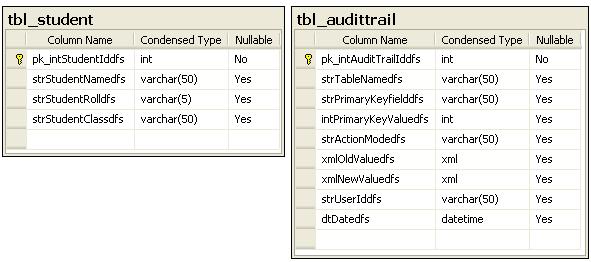
The primary key field of tbl_student table, i.e., pk_intStudentIddfs is IDENTITY column. The table tbl_audittrail consists of the following fields:
pk_intAuditTrailIddfs: Primary key & identity column strTableNamedfs: The name of the table on which user changes the data strPrimaryKeyfielddfs: Name of the primary key field of the changed table. For example, here it is pk_intStudentIddfs intPrimaryKeyValuedfs: The value of the primary key field of the inserted or updated record strActionModedfs: The action made by user on the table i.e. INSERT & UPDATE xmlOldValuedfs: The value of all columns except identity column of the changed table before update as XML. For INSERT action, this field will be null xmlNewValuedfs: The value of all columns except identity column of the changed table after INSERT or UPDATE as XML strUserIddfs: The user id of the user who is changing the table i.e. tbl_student dtDatedfs: Date & time of the change
I have added description text for all non identity columns of tbl_student to show in User Log report for user readability.
strStudentNamedfs: “Student Name” strStudentRolldfs: “Student Roll” strStudentClassdfs: “Student Class
I have created four stored procedures for this example:
I have called stp_GetXMLValue & stp_InsertAuditTrail procedure within stp_InsertUpdateStudent stored procedure. The code is as follows:
IF @intStudentId=0
BEGIN
	INSERT INTO dbo.tbl_student
			( strStudentNamedfs ,
			  strStudentRolldfs ,
			  strStudentClassdfs
			)
	VALUES  ( @strStudentName,
			  @strStudentRoll,
			  @strStudentClass
			)

	SELECT @IdentityValue=@@IDENTITY

	EXEC dbo.stp_GetXMLValue 'tbl_student',_
	'pk_intStudentIddfs',@IdentityValue,@XMLNewValue OUTPUT

	EXEC dbo.stp_InsertAuditTrail 'tbl_student','pk_intStudentIddfs',_
	@IdentityValue,'NEW',@strUserId,@Date,@XMLNewValue

END
ELSE
BEGIN

	EXEC dbo.stp_GetXMLValue 'tbl_student',_
	'pk_intStudentIddfs',@intStudentId,@XMLOldValue OUTPUT

	UPDATE dbo.tbl_student SET
	strStudentNamedfs=@strStudentName,
	strStudentRolldfs=@strStudentRoll,
	strStudentClassdfs=@strStudentClass
	WHERE pk_intStudentIddfs=@intStudentId

	EXEC dbo.stp_GetXMLValue 'tbl_student',_
	'pk_intStudentIddfs',@intStudentId,@XMLNewValue OUTPUT

	EXEC dbo.stp_InsertAuditTrail 'tbl_student',_
	'pk_intStudentIddfs',@intStudentId,'EDIT',_
			@strUserId,@Date,@XMLNewValue,@XMLOldValue
END
This technique assumes that every table has an identity column at ordinal position 1.
To use this technique elsewhere, just run the script without tbl_student table & stp_InsertUpdateStudent stored procedure.
This member has not yet provided a Biography. Assume it's interesting and varied, and probably something to do with programming.



 General
  News
News  Suggestion
  Question
  Bug
Bug  Answer
  Joke
Joke  Praise
  Rant
Rant  Admin
Admin 


 Submit an article or tip


