Click here to Skip to main content
Licence CPOL
First Posted 12 Sep 2008
Views 32,685
Downloads 366
Bookmarked 31 times

Instant Messenger Status Indicator - AIM, Yahoo, ICQ, MSN, Skype ...

By Najmul Hoda | 12 Sep 2008 | Unedited contribution
IM status indicator is as an easy and reliable way to check online status of certain instant messenger account like yahoo, msn, aol, skype and icq..
1 vote, 7.7%
1
2 votes, 15.4%
2

3

4
10 votes, 76.9%
5
4.50/5 - 13 votes
1 removed
μ 4.32, σa 2.59 [?]

Introduction

IM status indicator is as an easy and reliable way to check online status of a certain instant messenger account like Yahoo, AOL, MSN, Skype and ICQ. You can create your own IM status indicator to know who is online without logging into the specific messager.

This indicator ask for the protocol (Name of the messenge) and screen name (Messenger Id) and returns an image url that tells whether the user is online or offline.

The picture below show how it looks like.

Using the Code

It is very simple to create and use IM status indicator. Following are the steps to create IM status indicator.

  • Step 1. Open Microsoft Visual Studio. Create a web site and named it IMStatusIndicator.
  • Step 2.Create an .aspx file and named it IMStatusChech.aspx.
  • Step 3. Design the form that looks like this.
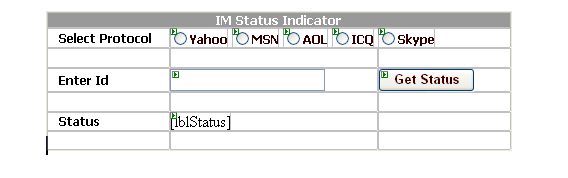
  • FormDesign.gif
  • Step 4. And write the code below
			// Now double click on btnGetStatus button and write 
			// the code below 

protected void btnGetStatus_Click(object sender, EventArgs e)
    {
        string Status = "";

        if (txtScreenName.Text.Trim() != string.Empty)
        {
            Status = GetIMStatus();
        }
        
        lblStatus.Text = Status;
    }

private string GetIMStatus()
    {
        if (rdbYahoo.Checked)
        {
            return GetIMStatus("yahoo", txtScreenName.Text);
        }
        else if (rdbMsn.Checked)
        {
            return GetIMStatus("msn", txtScreenName.Text);
        }
        else if (rdbAol.Checked)
        {
            return GetIMStatus("aol", txtScreenName.Text);
        }
        else if (rdbICQ.Checked)
        {
            return GetIMStatus("icq", txtScreenName.Text);
        }
        else if (rdbSkype.Checked)
        {
            return GetIMStatus("skype", txtScreenName.Text);
        }
        else return "";
    }

// GetIMStatus is an overloaded method that asks for protocot, name of the messenger and
// messenger id and returns the online/offline image that tells the status.

private string GetIMStatus(string Protocol, string ScreenName) 
    {
        string Status = "";
        switch (Protocol)
        {
            case "yahoo":
                Status = "<img src=\"http://opi.yahoo.com/online?u=" +
                    ScreenName  +"&m=g&t=0\" border=\"0\">";
                break;

            case "msn":
                Status = "<img src=\"http://www.funnyweb.dk:8080/msn/"+
                    ScreenName +"/onurl=www.braintechnosys.com/images/" +
                    "msnonline.png/offurl=www.braintechnosys.com/images/msnoffline.png/" +
                    "unknownurl=www.braintechnosys.com/images/msnoffline.png\"
                    align=\"absmiddle\">";

                break;

            case "aol":
                Status = "<img src=\"http://big.oscar.aol.com/"+
                   ScreenName +"?on_url=http://www.aim.com/remote/gr/" +
                   "MNB_online.gif&off_url=http://www.aim.com/remote/gr/MNB_offline.gif\"
                   style=\"border: none;\" alt=\"My status\" />";
                break;

            case "icq":
                Status = "<img src=\"http://web.icq.com/whitepages/online?icq=" +
                   ScreenName  +"&img=26\" />";
                break;

            case "skype":
                Status = "<img src=\"http://mystatus.skype.com/smallicon/" +
                    ScreenName + "border=\"1\" />";
                break;
        }
        return Status;
    }

Now run the project and select one of the protocol,Messanger and enter messenger id, click on the button and get the status as result. 

Here is the output.........

IM_StatusCheck.gif 

License

This article, along with any associated source code and files, is licensed under The Code Project Open License (CPOL)

About the Author

Najmul Hoda

Software Developer (Senior)
Birla Soft
India India

Member
Najmul Hoda is a Master of Computer Application.
He has worked with .Net technologies in web development and has been programming since 2007.
He is very comfortable in various languages,RDBMS & platforms from C# to VB.NET with Access & MS SQLServer
from Javascript,AJAX to ASP.NET.
 
Besides programming he loves playing mouth organ, guitar, listening to music,singing, bike riding & cricket.


Najmul's Articles
 
You can get my all article at
www.dotnetlogix.com


Sign Up to vote   Poor Excellent
Add a reason or comment to your vote: x
Votes of 3 or less require a comment

Comments and Discussions

 
You must Sign In to use this message board. (secure sign-in)
 
Search this forum  
 FAQ
    Noise  Layout  Per page   
  Refresh
Questioninvisible Pinmemberamertarekt0:53 2 Jan '12  
QuestionHow to get the status message instead of images? PinmemberInbam13:25 4 Sep '09  
AnswerSite work on my computer PinmemberMember 4558660:54 5 Feb '11  
General.h files to deal with Yahoo applications Pinmemberex_zarzor14:11 17 May '09  
GeneralMy vote of 2 Pinmemberkataras7:08 18 Feb '09  
Generalnot working Pinmemberkataras7:07 18 Feb '09  
GeneralThis one too PinmemberVuyiswa Maseko3:22 13 Feb '09  
GeneralGoogle Talk and add a Button to trigger IM to talk if online PinmemberMember 443067221:14 2 Feb '09  
Generalcan't check invisible status in yahoo PinmemberMember 25342756:37 15 Dec '08  
GeneralRe Pinmemberbudarin23:54 15 Sep '08  

General General    News News    Suggestion Suggestion    Question Question    Bug Bug    Answer Answer    Joke Joke    Rant Rant    Admin Admin   

Use Ctrl+Left/Right to switch messages, Ctrl+Up/Down to switch threads, Ctrl+Shift+Left/Right to switch pages.

Permalink | Advertise | Privacy | Mobile
Web02 | 2.5.120209.1 | Last Updated 13 Sep 2008
Article Copyright 2008 by Najmul Hoda
Everything else Copyright © CodeProject, 1999-2012
Terms of Use
Layout: fixed | fluid