Introduction
I am an enthusiastic audio book listener. I use my ASUS MyPal 639 to listen to audio books. When I started this habit about two years ago, I downloaded and tested almost every player that’s out there (including audio book designated players; like the one Audible provides you with when you purchase audio books). I found no player that’s specifically designed for audio books (some provided partial response to my wish list, but none had it all).
As I have some programming background, I decided to develop my own player – abPlayer (audio-book player).
Here are the main functions I wanted my player to have:
Multiple Playlists (audio books)
I often am in the middle of several books at the same time (as well as listen to music collections). I wanted to be able to define an unlimited number of playlists, and I wanted the player to “remember” the book location – “book-marks” across device shut-down and soft reset (anything short of hard-reset).
No Stylus Needed for Regular Operation
All the play/pause/next … functions should be accessible via thumb-thick buttons/menus, as well as browsing the book collection and switching books.
The action of defining a book and its files is something done only when you introduce a new book to the player, and I didn't mind using the stylus when performing these actions.
Switch between Play and Pause in “blind” Mode
When you listen to a book and are distracted for some reason, the last thing you want is to start fumbling for the device and looking for the pause button (you really don?’t want to skip several sentences and then have to re-orient yourself). I wanted most of the player display area to be used as an alternating play/pause switch panel.
Volume and Shuffle Attributes
Different books are read (and recorded) at different volume levels. Once you have adjusted the book’s volume to your liking, you usually want it to stay that way during the whole book. However, one book’s volume quite often is unsuitable for a different book. Also, I often listen to music collections with the random (“shuffle”) feature turned on, but this will not do for audio books. So –
I wanted the volume and shuffle features to be set and maintained as specific book attributes and “remembered” until I changed them.
Precise Navigation
When you listen to a book and need to navigate along the timeline, a rough gauge like object is too cumbersome.
I wanted to be able to navigate the time-line via a digital tool.
Display Important Information
I listen to books often several hours a day. As the battery life-span on these devices is often measured in terms of “hours”, I needed a continuous convenient display of the battery state, as well as some colour-coded mechanism to verify the battery level at a glance. I also wanted the time-of-day displayed in the same manner.
So, that’s it. Basically, the “wish-list” above kind of describes the abPlayer characteristics.
Background
The code attached is the full program. Compile it, load it, play with it.
As stated above, this is not a commercial venture, it is the product of an enthusiastic hobbyist. The only environment on which it was tested is my ASUS MyPal 639, Windows mobile 5 device. Some adjustments may be needed for:
- Different screen sizes
- Different manufacturers
- Different Operating System versions
All code lines that may be subject to device dependency are assembled together in one class (see code remarks below).
I also need to state that I have had no formal training in .NET or C# (as a matter of fact, I have very little “programming” training at all). Some conventions and techniques I use in my code arguably can be criticized. Feel free to enlighten me if you want. I'll appreciate any suggestions (as well as bug reports, functionality enhancements, whatever…).
Using the Code
I have not attached any code examples here as I am not sure if there is any novelty on the code level.
One remark though: the cPlayer class which is the class responsible for activating and manipulating the Windows Mobile Media Player took a lot of time and trials to develop as documentation in this area is often unclear and definitely incomplete. Users who are interested in coding some WMP related code might find this class helpful in flattening the learning curve.
There are six forms and eight form-less classes in this project.
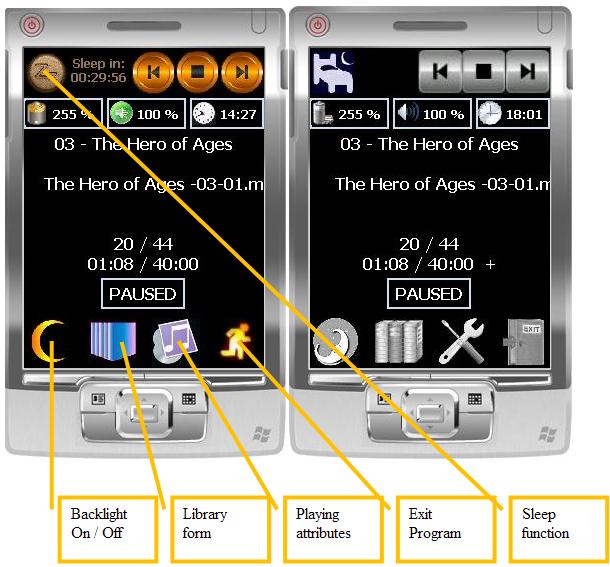
- The main “listening” form (shown above).
- I included 2 versions (Color & Grayscale to demonstrate the 'Skin' effect)
- A popup menu (Right-clicking) anywhere on the form allows access to the 'About' dialog and the 'Skin' Selection.
I have included 2 skins themes in the downloaded zip, these should be put in the directory where the abPlayer.exe resides. (One should create a 'Skins' directory in which each subdirectory represents a skin name and in which images for the various buttons should reside).

- The library form – used to view, organize, rename, move, and select books (playlists).
- The book properties form – as stated above, the book bookmark (file# and timeline marker), the shuffle attribute, and the volume level are maintained separately for each book.
- The file selector form – with which media files are selected for books.
- The Media Information form
- There's also an 'About' form which indicates the program version
The classes are:
cBaseClasses: includes the definition for 3 pure abstract classes which serve as basis/template for the following classes:
cBasePlayer - the player class cBasePersistancy - the persistency class cBaseDeviceSpecifics - the device specifics class
cPlayer (derived from cBasePlayer): Class responsible for all interactions with the Windows Mobile Media Player. cASUS639DeviceSpecifics (derived from cBaseDeviceSpecifics): Class encapsulating all calls to APIs and other features which might need device adaptation. This one is specific for Asus Mypal 639 but all or parts may work on other devices as well. cMP3Info: Class that reads MP3 files and provides information regarding its properties and tags cBookstore (derived from cBasePersistancy): 4 different persistency classes (only one is actually used at a time – see frmLibrary for its usage).
Apart from being fully functional, each can serve as a sample code for usage of the different methods (file IO, System Registry, Database, XML – respectively).
cFileSystemPersistancy (File System) cRegistryPersistancy (Registry) cDatabasePersistancy (DB – SqlServerCE) cXMLPersistancy (XML)
History
- Version 1 was published in September 2008
- Current download: Version 2.4
- Enhancements since version 1:
- Support for flying text
- Support for Bookshelves (means to group several books together – for series)
- Various GUI enhancements
- Support for external 'Skins'
- MP3 file information
- Total book duration (already read/still remaining)
- Sleep Function (turn off device after a certain time)
- Support key codes (to operate various functions via the arrow keys)
- Enhanced paint logic (flicker free)
- Classes restructuring for better code maintenance
- Support for an 'About' dialog and versioning
- Support for 4 different persistency methods
- Several minor bug fixes
References/Acknowledgements
cMP3Info – Reads MP3 files and reports its properties and tags
- Original C++ code by: Gustav "Grim Reaper" Munkby (originally called:
MP3Header) - Converted to VB (I don't recall by whom and can't relocate the original article)
- Converted to C# by me and modified to better support my program
This member has not yet provided a Biography. Assume it's interesting and varied, and probably something to do with programming.



 General
  News
News  Suggestion
  Question
  Bug
Bug  Answer
  Joke
Joke  Praise
  Rant
Rant  Admin
Admin 


 Submit an article or tip


 . I'd been looking so much without finding the ideal audiobook player since I got my first Windows Mobile device back in 2005 - but this is definitely the closest I've found - heck I was even considering programming one from scratch myself, but I just don't have the time unfortunately to do it from nothing - this definitely could give me the jumping board and more to start from though


