Introduction
A few weeks ago, a client asked me: "We need a simple listing, and we need to click and see details, inside the listing - not a pop-up - not another page - not reloading the entire page". I started to search, read, test. I found some interesting articles and samples, but not exactly what my client wanted. Then, I thought: I can merge some solutions and, maybe, satisfy the customer. The AJAX DynamicPopulate extender offers the mechanism. Let's open the sources and learn. Some interesting articles present some good ideas. Let's read and learn.
I would like to share the results of that work in this article.
You can see the sample project running (with simulated data only) here.
Background
When the AJAX DynamicPopulate extender is started, it calls a method on some page or web service, receives some results, and fills a control.
We can use a JavaScript function to start the extender, and we can capture the results and fill another control. The JavaScript function is activated when the user clicks the button, in the first column of the grid.
Using the Code
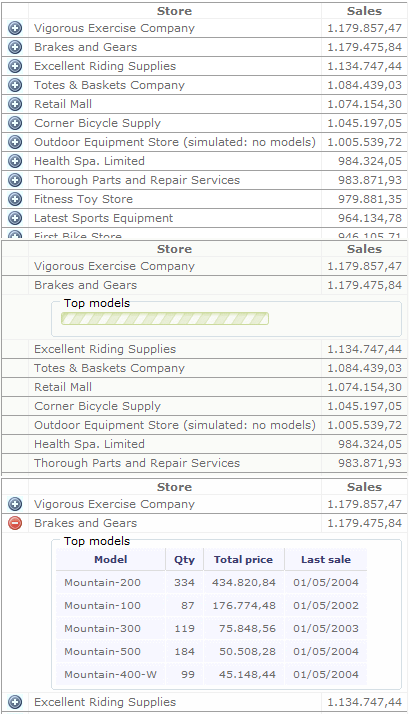
The main page has a GridView with three columns: an image that mimics a button to show and hide details, the name of the store, and the sum of the sales value.
The scenario is the Adventure Works Cycles, the fictitious large, multinational manufacturing company. The grid shows the top stores. When the user clicks a button, a panel is expanded and the top five models are displayed.
The onclick event of the image/button calls a JavaScript function (ExpandModels) with these parameters: customer ID, row of the grid view, destination panel, and the button clicked.
protected void gridStores_RowDataBound(object sender, GridViewRowEventArgs e) {
...
Image btn = gridViewRow.FindControl("imgModel") as Image;
btn.Attributes["onClick"] = String.Format(CultureInfo.InvariantCulture,
"ExpandModels('{0}', '{1}', '{2}', '{3}');",
contextKey,
newRow.ClientID,
internalPanel.ClientID,
btn.ClientID);
...
}
The JavaScript function ExpandModels does some preparations, and starts the populate method of the 'behavior' dpBehaviorMod of the DynamicPopulate extender, passing the customer ID. The 'behavior' will send a callback to the WebMethod ExpandModelsService, which will build an HTML table and send it back to the browser.
var expPainelId = '';
var expPainelAuxId = 'painelAux';
function ExpandModels(customerId, trId, painelId, buttonId) {
...
var tr = $get(trId).style;
tr.display='block';
lastBehavior = $find('dpBehaviorMod');
expPainelId = painelId;
lastBehavior.add_populated(ShowTopModels);
lastBehavior.populate(customerId);
}
<!-- Default.aspx -->
<cc1:DynamicPopulateExtender ID="dinPopMod"
runat="server"
BehaviorID="dpBehaviorMod"
CacheDynamicResults="false"
ClearContentsDuringUpdate="true"
EnableViewState="False"
ServiceMethod="ExpandModelsService"
TargetControlID="painelAux">
</cc1:DynamicPopulateExtender>
<asp:Panel ID="painelAux"
runat="server"
EnableViewState="false"
Style="background-image:url('img/loading.gif');
background-repeat: no-repeat; display: none">
</asp:Panel>
When the extender returns, it fills the auxiliary panel 'painelAux' (indicated by the property TargetControlID), then another JavaScript function (ShowTopModels) copies the result into the destination panel. The panel ID is saved in the variable expPainelId by the function ExpandModels.
function ShowTopModels(s, e) {
var p1 = $get(expPainelId);
var p2 = $get(expPainelAuxId);
...
p1.innerHTML = p2.innerHTML;
...
}
Inside the web method, the program builds a simple HTML table with the details.
[System.Web.Services.WebMethod]
[System.Web.Script.Services.ScriptMethod]
public static string ExpandModelsService(string contextKey) {
...
    StringBuilder sb = new StringBuilder("<table class = 'tab-mod'> \n"
    + "<tr> \n"
    + "<th>Model</th> \n"
    + "<th>Qty</th> \n"
    + "<th>Total price</th> \n"
    + "<th>Last sale</th> \n"
    + "</tr> \n",
    topModels.Count * 180);
...
    sb.Append("<tr> \n");
    sb.AppendFormat(CultureInfo.CurrentCulture,
        "<td>{0}</td> ",
        modelRow.Name);
...
    sb.Append("</table> \n");

    return sb.ToString();
}
The above code snippets were extracted from the sample project and simplified. The full source code is available for download.
Points of Interest
When the page is sent to the browser, only the main listing will be sent (stores). The models will be sent dynamically when the user clicks the button on each row. We could use another approach to load all the data during the first time and hide/show at the onclick event. That approach could cause a long time to load the entire page.
The 'loading.gif' file is pre-loaded by the panel 'painelAux', to speed the display when the user clicks the button.
I included the WebMethod ExpandModelsService inside 'Default.aspx'. If the project contains a lot of WebMethods, we can create one or more 'asmx' files to help us to organize the project.
Conclusion
If this article can help you in any form, I will be happy.
Certainly, you can find many mistakes, bugs, and not-so-good code in the sample project. I thank you in advance for tips, suggestions, and corrections.
References
There are many good articles already written on this subject:
Born and lives in São Paulo - Brasil.
Programmer since 1982, and in 'tailor' mode since 1995, I had the oportunity to work for many kinds of business.
Today I create Windows Forms applications, Web projects and Palm OS applications.
My experience :
Languages : Cobol, Fortran, Basic, Clipper, Turbo Pascal, Data Flex, C, C++, Turbo C++, Borland C++ Builder, C#, Javascript.
DBMS : Adabas, DBF, Paradox, MS Access, DB2, Oracle, MS SQL Server.
I Know and experienced a little : Natural, Prolog, Lisp, Assembly IBM/370, Assembly Z80, Assembly 8080, MS Visual Basic (5/6).



 General
  News
News  Suggestion
  Question
  Bug
Bug  Answer
  Joke
Joke  Praise
  Rant
Rant  Admin
Admin 


 Submit an article or tip


