Introduction
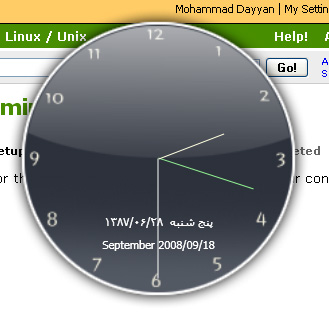
This is an analog clock in WPF.
Using the Code
My XAML code is as follows:
<Window x:Class="clock.Window1"
xmlns="http://schemas.microsoft.com/winfx/2006/xaml/presentation"
xmlns:x="http://schemas.microsoft.com/winfx/2006/xaml"
Title="Clock" Margin="2" Height="327" Width="311" AllowsTransparency="True"
WindowStyle="None" Background="Transparent" WindowStartupLocation="CenterScreen"
Icon="images/clock.ico"
ResizeMode="NoResize" Topmost="False" Opacity="1">
<Grid Width="300" Height="300" MouseLeftButtonDown="Grid_MouseDown">
<Image Source="images/backGround.png"></Image>
<Label Name="christianityCalendar" Foreground="White"
Margin="0, 0, 0, 52" HorizontalAlignment="Center"
VerticalAlignment="Bottom" Height="Auto"
Width="Auto">Value
</Label>
<Label Name="persianCalendar" Foreground="White"
Margin="0, 0, 0, 75" HorizontalAlignment="Center"
VerticalAlignment="Bottom" Height="Auto"
Width="Auto">Value
</Label>
<Rectangle Margin="150,0,149,150" Name="rectangleSecond"
Stroke="White" Height="120" VerticalAlignment="Bottom">
<Rectangle.RenderTransform>
<RotateTransform x:Name="secondHand" CenterX="0"
CenterY="120" Angle="0" />
</Rectangle.RenderTransform>
</Rectangle>
<Rectangle Margin="150,49,149,151" Name="rectangleMinute"
Stroke="LightGreen">
<Rectangle.RenderTransform>
<RotateTransform x:Name="minuteHand" CenterX="0"
CenterY="100" Angle="0" />
</Rectangle.RenderTransform>
</Rectangle>
<Rectangle Margin="150,80,149,150" Name="rectangleHour"
Stroke="LightYellow">
<Rectangle.RenderTransform>
<RotateTransform x:Name="hourHand" CenterX="0"
CenterY="70" Angle="0" />
</Rectangle.RenderTransform>
</Rectangle>
</Grid>
</Window>
My C# code is as follows:
System.Timers.Timer timer = new System.Timers.Timer(1000);
public Window1()
{
    InitializeComponent();

    MDCalendar mdCalendar = new MDCalendar();
    DateTime date = DateTime.Now;
    TimeZone time = TimeZone.CurrentTimeZone;
    TimeSpan difference = time.GetUtcOffset(date);
    uint currentTime = mdCalendar.Time() + (uint)difference.TotalSeconds;
    persianCalendar.Content = mdCalendar.Date("Y/m/D  W", currentTime, true);
    christianityCalendar.Content = mdCalendar.Date("P Z/e/d", currentTime, false);

    timer.Elapsed += new System.Timers.ElapsedEventHandler(timer_Elapsed);
    timer.Enabled = true;
}

void timer_Elapsed(object sender, System.Timers.ElapsedEventArgs e)
{
    this.Dispatcher.Invoke(DispatcherPriority.Normal, (Action)(() =>
    {
        secondHand.Angle = DateTime.Now.Second * 6;
        minuteHand.Angle = DateTime.Now.Minute * 6;
        hourHand.Angle = (DateTime.Now.Hour * 30) + (DateTime.Now.Minute * 0.5);
    }));
}

private void Grid_MouseDown(object sender, MouseButtonEventArgs e)
{
    this.DragMove();
}
History
- 17th September, 2008: Initial post
This member has not yet provided a Biography. Assume it's interesting and varied, and probably something to do with programming.



 General
  News
News  Suggestion
  Question
  Bug
Bug  Answer
  Joke
Joke  Praise
  Rant
Rant  Admin
Admin 


 Submit an article or tip


 -- can you please share?