Click here to Skip to main content
Licence CPOL
First Posted 3 Oct 2008
Views 12,608
Downloads 24
Bookmarked 11 times

The Big Problem of WYSIWYG Editors

By | 3 Oct 2008 | Article
The Big Problem of WYSIWYG Editors and How to write a fast loading editor

Introduction

You use WYSIWYG editors in your web apps, don't you ? Do you like the loading speed of a page that contains WYSIWYG editor ? I don't like slow loading of page and I think that most of the WYSIWYG editor has too much useless options, so I created fast loading editor (no images,

10 lines of css and 5 javascript) which contains only the basic options:
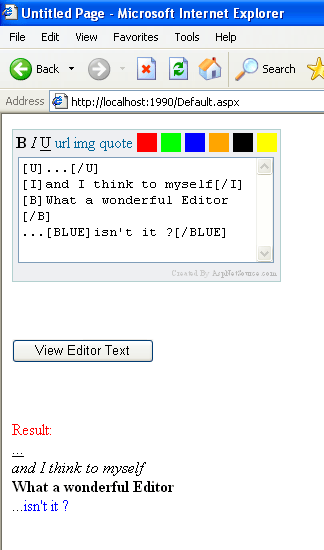


Using the code 

First, include in your asp.net web app the files:

TihEditorControl.ascx

TihEditorControl.ascx.cs

 They contain all the code for the editor (No additional css, js, images).


In the page you want to use the editor, include it as a normal web control: 

in aspx page

<%@ Register Src="~/TihEditorControl.ascx" TagName="TihEditor" TagPrefix="usr" %>

<html xmlns="http://www.w3.org/1999/xhtml" >
<head runat="server">
    <title>Untitled Page</title>
</head>
<body>
    <form id="form1" runat="server">
    <div>
      <usr:TihEditor ID="_tihEditor" runat="server"></usr:TihEditor>
    </div>
        
    <br /><br /><br />

    <div>
      <asp:Button ID="_submitBtn" Text="View Editor Text" runat="server" 
            onclick="_submitBtn_Click" />
    </div>
    
    <br /><br /><br />
    
    <div>
      <asp:Label ID="_resultLbl" runat="server" ForeColor="Red"></asp:Label>
    </div>
    
    <div>
      <asp:Literal ID="_resultLiteral" runat="server"></asp:Literal>
    </div>
    
    </form>
</body> 

 in code-behind, handle the submit button click on postback:

protected void _submitBtn_Click(object sender, EventArgs e)
    {
        // local variables
        string editorText;

        try
        {
            // get editor text
            editorText = _tihEditor.GetText();

            // checks if no text is entered
            if (string.IsNullOrEmpty(editorText))
            {
                _resultLbl.Text = "No Text Entered";
                return;
            }

            _resultLiteral.Text = ConvertToHtml(editorText);

            _resultLbl.Text = "Result: ";
        }
        catch (Exception ex)
        {
            _resultLbl.Text = ex.ToString();
        }
    }
		 

 ConvertToHtml is a method that converts the editors meta text to real html code using Regular Expressions.

    /// <summary>
    /// Converts meta text to html code
    /// </summary>
    /// <param name="metaText"></param>
    /// <returns></returns>
    private string ConvertToHtml(string metaText)
    {
        string result = "";

        try
        {
            // replace '\r\n' with <br />
            result = metaText.Replace("\r\n", "<br />");

            // remove empty meta [B][/B]
            result = result.Replace("[B][/B]", "");

            // remove empty meta [I][/I]
            result = result.Replace("[I][/I]", "");

            // remove empty meta [U][/U]
            result = result.Replace("[U][/U]", "");

            // remove empty meta [URL][/URL]
            result = result.Replace("[URL][/URL]", "");

            // remove empty meta [IMG][/IMG]
            result = result.Replace("[IMG][/IMG]", "");

            // remove empty meta [QUOTE][/QUOTE]
            result = result.Replace("[QUOTE][/QUOTE]", "");

            // remove empty meta [RED][/RED]
            result = result.Replace("[RED][/RED]", "");

            // remove empty meta [GREEN][/GREEN]
            result = result.Replace("[GREEN][/GREEN]", "");

            // remove empty meta [BLUE][/BLUE]
            result = result.Replace("[BLUE][/BLUE]", "");

            // remove empty meta [ORANGE][/ORANGE]
            result = result.Replace("[ORANGE][/ORANGE]", "");

            // remove empty meta [BLACK][/BLACK]
            result = result.Replace("[BLACK][/BLACK]", "");

            // remove empty meta [YELLOW][/YELLOW]
            result = result.Replace("[YELLOW][/YELLOW]", "");

            // replace [B]some_text[/B] with <b>some_text</b>
            result = Regex.Replace(result, @"\[B\]([\w|\W]+?)\[/B\]", @"<b>$1</b>");

            // replace [I]some_text[/I] with <i>some_text</i>
            result = Regex.Replace(result, @"\[I\]([\w|\W]+?)\[/I\]", @"<i>$1</i>");

            // replace [U]some_text[/U] with <u>some_text</u>
            result = Regex.Replace(result, @"\[U\]([\w|\W]+?)\[/U\]", @"<u>$1</u>");

            // replace [URL]some_text[/URL] with <a href='some_text'>some_text</u>
            result = Regex.Replace(result, @"\[URL\]([\w|\W]+?)\[/URL\]", @"<a href='$1'>$1</a>");

            // replace [IMG]some_text[/IMG] with <img src='some_text' alt='' />
            result = Regex.Replace(result, @"\[IMG\]([\w|\W]+?)\[/IMG\]", @"<img src='$1' alt='' />");

            // replace [QUOTE]some_text[/QUOTE] with <div style='border: solid 1px #000000;'>some_text</div>
            result = Regex.Replace(result, @"\[QUOTE\]([\w|\W]+?)\[/QUOTE\]", @"<div style='border: solid 1px #000000;'>$1</div>");

            // replace [RED]some_text[/RED] with <span style='color: #ff0000;'>some_text</span>
            result = Regex.Replace(result, @"\[RED\]([\w|\W]+?)\[/RED\]", @"<span style='color:#ff0000;'>$1</span>");

            // replace [GREEN]some_text[/GREEN] with <span style='color: #00ff00;'>some_text</span>
            result = Regex.Replace(result, @"\[GREEN\]([\w|\W]+?)\[/GREEN\]", @"<span style='color:#00ff00;'>$1</span>");

            // replace [BLUE]some_text[/BLUE] with <span style='color: #0000ff;'>some_text</span>
            result = Regex.Replace(result, @"\[BLUE\]([\w|\W]+?)\[/BLUE\]", @"<span style='color:#0000ff;'>$1</span>");

            // replace [ORANGE]some_text[/ORANGE] with <span style='color: #ffa500;'>some_text</span>
            result = Regex.Replace(result, @"\[ORANGE\]([\w|\W]+?)\[/ORANGE\]", @"<span style='color:#ffa500;'>$1</span>");

            // replace [BLACK]some_text[/BLACK] with <span style='color: #000000;'>some_text</span>
            result = Regex.Replace(result, @"\[BLACK\]([\w|\W]+?)\[/BLACK\]", @"<span style='color:#000000;'>$1</span>");

            // replace [YELLOW]some_text[/YELLOW] with <span style='color: #ffff00;'>some_text</span>
            result = Regex.Replace(result, @"\[YELLOW\]([\w|\W]+?)\[/YELLOW\]", @"<span style='color:#ffff00;'>$1</span>");
        }
        catch (Exception)
        {
        }

        return result;
    }

Points of Interest

 I like to optimize my pages to load really fast :)


License

This article, along with any associated source code and files, is licensed under The Code Project Open License (CPOL)

About the Author

real_coder

Software Developer
AspNetSource.com
Bulgaria Bulgaria

Member


Sign Up to vote   Poor Excellent
Add a reason or comment to your vote: x
Votes of 3 or less require a comment

Comments and Discussions

 
You must Sign In to use this message board. (secure sign-in)
 
Search this forum  
 FAQ
    Noise  Layout  Per page   
  Refresh
GeneralNice... PinmemberMarc74yr7511:06 3 Oct '08  
GeneralRe: Nice... Pinmemberreal_coder11:25 3 Oct '08  
GeneralRe: Nice... PinmemberMarc74yr7511:46 3 Oct '08  
After 15 years of coding I still make errors and still I learn. I meant what I said: "Keep writing articles" and do not be afraid of making mistakes.
 
Writing code is learning... unfortunately in this world you will learn until you drop... You will never know everything... focus on what you like and be the best in that. Don't forget, you should have fun in coding! (don't be embarrassed!) Cool | :cool:
 
Here's another one: try to explain what it is you are doing in your code comments...
 
// if stats is true
if (stats == true){
 
}
 

thats overkill... I can read that from the code, explain why 'stats' could be true and what it is you are doing if it is so (if stats is true parse the log file and update the database... for instance).
GeneralRe: Nice... Pinmemberreal_coder12:36 3 Oct '08  
GeneralRe: Nice... PinmemberViral Upadhyay23:27 3 Oct '08  
GeneralRe: Nice... Pinmemberreal_coder3:08 4 Oct '08  

General General    News News    Suggestion Suggestion    Question Question    Bug Bug    Answer Answer    Joke Joke    Rant Rant    Admin Admin   

Use Ctrl+Left/Right to switch messages, Ctrl+Up/Down to switch threads, Ctrl+Shift+Left/Right to switch pages.

Permalink | Advertise | Privacy | Mobile
Web03 | 2.5.120529.1 | Last Updated 3 Oct 2008
Article Copyright 2008 by real_coder
Everything else Copyright © CodeProject, 1999-2012
Terms of Use
Layout: fixed | fluid
