|
|
 |
I found this: "A Brand New Web Look for Your Folders" at http://msdn.microsoft.com/library/default.asp?url=/library/en-us/dnwebtool/html/webview.asp. Listen: "... bla bla bla ..." Then : "The display capability is provided by an ActiveX control called ThumbCtl. You can also use it from within a Microsoft Foundation Classes (MFC) or Active Template Library (ATL) application to quickly display GIF and JPEG images." Really ??? Yes - no documentation. But it does not work anyway. Sometimes I just surprise at Microsoft.
|
|
|
|
 |
|
 |
They just show as blank white boxes. Am I missing something?
Thanks
-Julie
|
|
|
|
 |
|
 |
Has anyone tried to implement something similar using the IE 5.5+ version of the print preview, fir example, using the IDM_PRINTPREVIEW command ID for MSHTML?
|
|
|
|
 |
|
 |
Iam using an Thumbctl ActiveX control to display a Thumbnail for an Html page.I have an object tag for Thumbctl and i have written a function using javascript.Whenever i run this page by typing in the browser it doesn't show up anything.The page goes blank.
Please suggest me how should i go about this.
<%
Set str= server.CreateObject("Thumbctl.Thumbctl.1")
str.displayfile("C:/Prashant/index_mail.htm")
%>
<OBJECT CLASSID="clsid:1D2B4F40-1F10-11D1-9E88-00C04FDCAB92" id=Thumbnail width="100%" height="100" >
</OBJECT>
The browser goes blank showing up nothing.
Any help would be appreciated
Thanx
Prashant
|
|
|
|
 |
|
 |
i think a found a workaround for this problem.
i also tried to use ThumbCtl with VC++ and it
did not work, neither did with VB.
but it DOES work within HTML documents.
my workaround was to create a html document
on the fly in my MFC app looking like this:
<html>
<body>
<object id=Thumbnail classid="clsid:1D2B4F40-1F10-11D1-9E88-00C04FDCAB92" style="width: 150px; height: 150px;"></object>
<script language="JavaScript">
document.all.Thumbnail.displayFile("YOUR FILE HERE");
</script>
</body>
</html>
then, i display this HTML document in the MFC App using the WebBrowser
ActiveX control.
you can display html, jpeg, gif, bmp, ppt, wmf (even doc and xls files if saved
with preview option) this way!
|
|
|
|
 |
|
 |
sorry i did not understand what you said about document(.doc) file..
"Save with preview option" how to do it?
|
|
|
|
 |
|
 |
Hi folks!
I want to use the thumbnail control in IE to display thumbs of webpages. This is my HTML code:
<object id=Thumbnail classid="clsid:1D2B4F40-1F10-11D1-9E88-00C04FDCAB92" style="width: 150px; height: 150px;"></object>
<SCRIPT LANGUAGE="JavaScript">
document.all.Thumbnail.style.display = "";
document.all.Thumbnail.displayFile("C:\\WWWRoot\\cfdocs\\dochome.htm");
// document.all.Thumbnail.displayFile("http:\\www.trilobiet.nl\\cfdocs\\dochome.htm");
</SCRIPT>
This works fine as long as the displayFile function has a file as argument. I have no clue how to feed it with a URL. I tried something like the commented-out line, which doesn't work as one might expect.
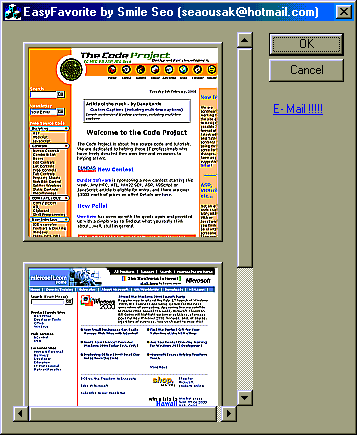
EasyFavorite gets its thumbs from a url.
Can this be done?????? If so, can it be done easily?????
Any insights appreciated,
Regards,
Richard.
|
|
|
|
 |
|
 |
One walkaround is to create a local html file that has two frames with one frame being invisible. The other frame points to the target url...
|
|
|
|
 |
|
 |
I have used this control in the past without any probs but now under IE5 i can't get the thumbnail control to load files anymore. Is anyone else having the same problem under IE5 and if so what is the solution?
|
|
|
|
 |
|
 |
sorry, no solution here... but i encountered the same problem. the thumbnail control does not work in visual c++, vb6 or delphi. it only runs in vbscript. actually, that's where it is designed for, since it is only used by microsoft in the folder templates (.htt files). on msdn i found some docs and c++ sources... but i'm no c++ programmer...
|
|
|
|
 |
|
 |
hello
there is a problem with active desktop in winNT
you should do:
ie5setup /c:"iewzd /e:ie4shell_NTx86"
and then you can use the thumbnail control in VB by adding references to
c:\winnt\system32\webvw.dll
and then put this in the code
ThumbCtl1.displayFile "htmlfile.html"
|
|
|
|
 |
|
 |
Hi.
I don't using this app. I use win2000, VC6.0 and ie5.5.
i'm doing this...
ie5setup /c:"ie5wzd /e:ie4shell_NTx86"
but do not use easy favorite. -.-
plz..help me... how to use in win2000 env??
and my windows is korean language windows.
|
|
|
|
 |
|
 |
The control behaves differently on W2K.
First, GUID of the control is changed on W2K.
Second, control requires from container to support IServiceProvider with some service. MFC container doesn't implement IServiceProvider, so control doesn't work on W2K.
(I dug this info when doing reverse engeenering of the control)
I'll try to find what kind of service is required and how to simulate this service to make control work.
The problem code (that requires IServiceProvider) is located in the shlwapi.dll (ordinal #176). Control calls this method and the method fails with E_NOINTERFACE.
Denis
|
|
|
|
 |
|
 |
hi. i am looking for a way to save this generated thumbnail to a disk file.
i couldnt what-so-ever do so with the API that VB provides when using the WebVW.DLL control.
do you have any suggstions?
Thanks, Zaffi.
(zaffi@hotmail.com
|
|
|
|
 |
|
 |
Hi. Zaffi..
WebVW.dll has just a little method, as you know.
But maybe.. maybe.. You can get thumbnail control's DC and save thumbnail to disk by using DC. ok?
|
|
|
|
 |
|
 |
hi. i am looking for a way to save this generated thumbnail to a disk file.
i couldnt what-so-ever do so with the API that VB provides when using the WebVW.DLL control.
do you have any suggstions?
Thanks, Zaffi.
(zaffi@hotmail.com
|
|
|
|
 |
|
 |
When I drag a URL from IE4, I just get a button that says
"ThumbBtn". How do I get the image to display
|
|
|
|
 |
|
|
 |
|
 |
Are you sure you have active desktop loaded? I believe that is the source of the object
|
|
|
|
 |
|
 |
I had the same problem in NT
you can install ie5 like this
ie5setup /c:"iewzd /e:ie4shell_NTx86"
this will install active desktop
|
|
|
|
 |