Introduction
Over the past few months I have been creating a variety of WebControls some of which have needed access to a
DataSource such as a DataSet in order to work properly. Adding a DataSource to your WebControl is relatively easy
however the tricky part is when you need to interact with that property in the Properties window e.g. in the same manner
as you would for a DropDownList control etc. Now if you are lucky and you get the query right in MSDN you will come across the following article
Implementing a Web Forms Data-Bound Control Designer. However
you will notice like I did that the sample just does not work as advertised. While attempting to debug it I posted a message on the
microsoft.public.dotnet.framework.aspnet.webcontrols
newsgroup and I received the following answer from Mike Moore "DataSource property and DataBinding thread"
which eventhough was not 100% what I wanted put me on the right track. However an interesting comment, see the supplied source for the
IDataSourceProvider interface, was in the source supplied by Mike Moore that made me look further into how to add data binding
capabilities to a WebControl such that you can manipulate them in the properties window.
What I intend to do is explain each step of the process and describe what you actually need to do support data binding in a WebControl against
what the MSDN sample says you have to do. For this demonstration I created a very simple control that does nothing other than expose properties
that can be used to bind to a data source, a table within that data source and finally some fields that reside in that table in the same manner
as a listbox.
A Simple Data Bound Control and its Designer
The source available for download contains the code for SimpleDataBoundControl the class view of which is shown below.

Now in order to support data binding in the properties window we need to add a designer to the control. It is this designer that does
all the hard work while you are working with your control at design time. The source to the final implementation of
SimpleDataBoundControlDesigner is also supplied in the download. To link the WebControl with its designer you use the
class attribute Designer, since I prefer to keep the control and its related designer together in the same library I find
it easier to use the typeof version.
[DefaultProperty("DataSource"),
ToolboxData("<{0}:SimpleDataBoundControl runat=server></{0}:SimpleDataBoundControl>"),
Designer(
    typeof(ManyMonkeys.Web.ControlLibrary.Design.SimpleDataBoundControlDesigner))]
public class SimpleDataBoundControl : System.Web.UI.WebControls.WebControl ,
    INamingContainer
{
    ...
}
The DataSource Property
DataSource is the common member name for a property that is used to bind to a data source such as a DataSet. Before
we can bind the other properties we need to make sure that this property is set up correctly. We use the designer to allow us to represent
DataSource which is an object type property as a string type. To the designer class we add a
DataSource property that is of type string and which looks like the extract below.
public class SimpleDataBoundControlDesigner : ...
{
    ...

    public string DataSource
    {
        get
        {
            DataBinding binding = DataBindings["DataSource"];
            if (binding != null)
                return binding.Expression;
            return string.Empty;
        }
        set
        {
            if ((value == null) || (value.Length == 0))
                base.DataBindings.Remove("DataSource");
            else
            {
                DataBinding binding = DataBindings["DataSource"];
                if (binding == null)
                    binding = new DataBinding("DataSource", typeof(IEnumerable),
                        value);
                else
                    binding.Expression = value;
                DataBindings.Add(binding);
            }

            OnBindingsCollectionChanged("DataSource");
        }
    }
}
We also need to add a type converter called DataSourceConverter to the above property so that it will correctly enumerate the available
data sources that exist on the WebForm and present them in the Properties window as a combobox. To add this converter we need to override the
PreFilterProperties method and add the TypeConverter attribute dynamically to the DataSource property at Design runtime.
public class SimpleDataBoundControlDesigner : ...
{
...
protected override void PreFilterProperties(IDictionary properties)
{
base.PreFilterProperties(properties);
PropertyDescriptor prop = (PropertyDescriptor)properties["DataSource"];
if(prop!=null)
{
AttributeCollection runtimeAttributes = prop.Attributes;
Attribute[] attrs = new Attribute[runtimeAttributes.Count + 1];
runtimeAttributes.CopyTo(attrs, 0);
attrs[runtimeAttributes.Count] = new
TypeConverterAttribute(typeof(DataSourceConverter));
prop = TypeDescriptor.CreateProperty(this.GetType(), "DataSource",
typeof(string),attrs);
properties["DataSource"] = prop;
}
}
}
The final step in implementing the DataSource property in SimpleDataBoundControl is to include the
DesignerSerializationVisibility attribute such that the data source is saved in the HTML in the following style,
DataSource="<%# dataSet11%> rather than as
DataSource="dataset11".
public class SimpleDataBoundControl : ...
{
...
private object _dataSource=null;
[
Bindable(true),
Category("Data"),
DefaultValue(null),
Description("The datasource that is used to populate the list with items."),
DesignerSerializationVisibility(DesignerSerializationVisibility.Hidden)
]
public object DataSource
{
get { return _dataSource; }
set
{
if ((value == null) || (value is IListSource) || (value is IEnumerable))
_dataSource = value;
else
throw new Exception("Invalid datasource.");
}
}
}
Now we should have a control for which we can select a data source from a list of available data sources.
The IDataSourceProvider interface
As you can see there has been no need to implement the IDataSourceProvider interface as described
in the MSDN sample and alluded to by the sample provided via the newsgroup. In fact if you read the MSDN documentation for
IDataSourceProvider you will see that is only required for when you use the DataMemberConverter and DataFieldConverter
type converters. The fact that the sample doesn't use IDataSourceProvider will explain why the given code does
not work when we try to implement the properties that use the DataMemberConverter and DataFieldConverter
as it was probably never able to be tested and debugged.
A designer that implements the IDataSourceProvider interface requires two methods to be supplied:
GetSelectedDataSource which appears to be only used by DataMemberConverterGetResolvedSelectedDataSource which appears to be only used by DataFieldConverter
Since it is required to implement the properties that use DataMemberConverter before we implement those that use
DataFieldConverter we will deal with the respective method implementations of IDataSourceProvider at that time.
The DataMember Property
The DataMember is used to select a particular table from within a supplied data source such as a DataSet or if it is empty
then the control should use the first available table or DataView. All of the work to implement a DataMember property
such that in the Properties window it will be represented as a combobox with a list of available tables is done in the designer class which in this
case is SimpleDataBoundControlDesigner.
First we need to create a property for DataMember that we will use to attach a type converter attribute.
public class SimpleDataBoundControlDesigner : ...
{
    ...

    public string DataMember
    {
        get
        {
            return ((SimpleDataBoundControl)this.Component).DataMember;
        }
        set
        {
            ((SimpleDataBoundControl)this.Component).DataMember = value;
        }
    }

}
and then in PreFilterProperties we attach a type converter, in this case a DataMemberConverter, in the same manner as we did
for the DataSource property.
public class SimpleDataBoundControlDesigner : ...
{
...
protected override void PreFilterProperties(IDictionary properties)
{
...
prop = (PropertyDescriptor)properties["DataMember"];
if(prop!=null)
{
AttributeCollection runtimeAttributes = prop.Attributes;
Attribute[] attrs = new Attribute[runtimeAttributes.Count + 1];
runtimeAttributes.CopyTo(attrs, 0);
attrs[runtimeAttributes.Count] = new TypeConverterAttribute(
typeof(DataMemberConverter));
prop = TypeDescriptor.CreateProperty(this.GetType(), "DataMember",
typeof(string),attrs);
properties["DataMember"] = prop;
}
}
}
Now for the DataMemberConverter to work correctly we need to implement the IDataSourceProvider interfaces and in particular
the GetSelectedDataSource() method. Unfortunately the implementation provided in the MSDN sample does not work when you use a
DataSet and this is because a DataSet does not support IEnumerable however it does support
IListSource. So we can add this interface into the check in the MSDN supplied code (see comments below).
public class SimpleDataBoundControlDesigner : ...
{
...
object IDataSourceProvider.GetSelectedDataSource()
{
object selectedDataSource = null;
string dataSource = null;
DataBinding binding = DataBindings["DataSource"];
if (binding != null)
{
dataSource = binding.Expression;
}
if (dataSource != null)
{
ISite componentSite = Component.Site;
if (componentSite != null)
{
IContainer container = (IContainer)componentSite.GetService(
typeof(IContainer));
if (container != null)
{
IComponent comp = container.Components[dataSource];
if ((comp is IEnumerable) || (comp is IListSource))
{
selectedDataSource = comp;
}
}
}
}
return selectedDataSource;
}
IEnumerable IDataSourceProvider.GetResolvedSelectedDataSource()
{
return null;
}
}
We have only implemented a simple implementation for GetResolvedSelectedDataSource method as it does not appear to be needed for the
DataMemberConverter to work.
Now we should have a control for which we can select a table, using a listbox, from a list of available tables for a selected data source.
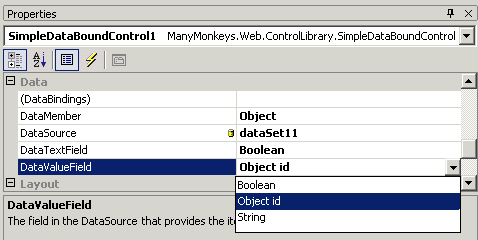
The DataTextField and DataValueField Properties
The DataTextField and DataValueField properties are to be used to select a particular field from the default or selected
table from a preselected data source. Again all the work required to allow us to select from a list of available fields is also done in the
designer class. Again we add a property that is used to attach the required type converter, which is DataFieldConverter, to and we also
add the type converter to the attributes in the PreFilterProperties method.
public class SimpleDataBoundControlDesigner : ...
{
...
public string DataTextField
{
get
{
return ((SimpleDataBoundControl)this.Component).DataTextField;
}
set
{
((SimpleDataBoundControl)this.Component).DataTextField = value;
}
}
public string DataValueField
{
get
{
return ((SimpleDataBoundControl)this.Component).DataValueField;
}
set
{
((SimpleDataBoundControl)this.Component).DataValueField = value;
}
}
protected override void PreFilterProperties(IDictionary properties)
{
...
prop = (PropertyDescriptor)properties["DataTextField"];
if(prop!=null)
{
AttributeCollection runtimeAttributes = prop.Attributes;
Attribute[] attrs = new Attribute[runtimeAttributes.Count + 1];
runtimeAttributes.CopyTo(attrs, 0);
attrs[runtimeAttributes.Count] = new TypeConverterAttribute(
typeof(DataFieldConverter));
prop = TypeDescriptor.CreateProperty(this.GetType(), "DataTextField",
typeof(string),attrs);
properties["DataTextField"] = prop;
}
prop = (PropertyDescriptor)properties["DataValueField"];
if(prop!=null)
{
AttributeCollection runtimeAttributes = prop.Attributes;
Attribute[] attrs = new Attribute[runtimeAttributes.Count + 1];
runtimeAttributes.CopyTo(attrs, 0);
attrs[runtimeAttributes.Count] = new TypeConverterAttribute(
typeof(DataFieldConverter));
prop = TypeDescriptor.CreateProperty(this.GetType(), "DataValueField",
typeof(string),attrs);
properties["DataValueField"] = prop;
}
}
}
Now that all is needed is the GetResolvedSelectedDataSource method for IDataSourceProvider to be implemented.
The MSDN sample supplies the following implementation.
IEnumerable IDataSourceProvider.GetResolvedSelectedDataSource()
{
    return (IEnumerable)((IDataSourceProvider)this).GetSelectedDataSource();
}
However as already mentioned a DataSet does not support IEnumerable and so the above code causes an exception
to be thrown and does not work. For this to work for a DataSet we need to drill down to the DataViews that exist
in a DataSet and we also need to choose the DataView based on a table alreade preselected in the
DataMember property. The following implementation has been tested to work with a DataSet.
public class SimpleDataBoundControlDesigner : ...
{
...
IEnumerable IDataSourceProvider.GetResolvedSelectedDataSource()
{
object selectedDataSource =
((IDataSourceProvider)this).GetSelectedDataSource();
DataView dataView = null;
if (selectedDataSource is DataSet)
{
DataSet dataSet = (DataSet)selectedDataSource;
DataTable dataTable = null;
if ((DataMember != null) && (DataMember.Length>0))
dataTable = dataSet.Tables[DataMember];
else
dataTable=dataSet.Tables[0];
if (dataTable!=null)
{
dataView = dataTable.DefaultView;
}
}
else if (selectedDataSource is DataTable)
{
dataView = ((DataTable)selectedDataSource).DefaultView;
}
else if (selectedDataSource is IEnumerable)
{
return selectedDataSource as IEnumerable;
}
return dataView as IEnumerable;
}
}
Now we should have a control for which we can choose a field from a selected table.
The DesignTimeData Class
The DesignTimeData class is found in the .NET Framework and it can be used to implement the methods of
IDataSourceProvider interface. The code below shows a much simpler implementation of the methods required by an implementation of
IDataSourceProvider interface using the DesignTimeData class.
public class SimpleDataBoundControlDesigner : ...
{
    ...

    object IDataSourceProvider.GetSelectedDataSource()
    {
        DataBinding binding;
        binding = this.DataBindings["DataSource"];
        if (binding != null)
            return DesignTimeData.GetSelectedDataSource(this.Component,
                binding.Expression);
        return null;
    }

    IEnumerable IDataSourceProvider.GetResolvedSelectedDataSource()
    {
        DataBinding binding;
        binding = this.DataBindings["DataSource"];
        if (binding != null)
            return DesignTimeData.GetSelectedDataSource(this.Component,
                binding.Expression, this.DataMember);
        return null;
    }

}
Comments
Please take the time to vote for this article and/or to comment about it on the boards below. All suggestions for improvements will be considered.
History
- 02/10/92 - Initial Version



 General
  News
News  Suggestion
  Question
  Bug
Bug  Answer
  Joke
Joke  Praise
  Rant
Rant  Admin
Admin 


 Submit an article or tip


