Introduction
The PeopleTrac solution demonstrates several LightSwitch capabilities:
- The ability to develop a solution
- Framework that can be easily enhanced and modified by others
- The use of WCF-RIA services to provide extended database capabilities
- The use of native SQL Transact commands for enhanced data manipulation capabilities
- Name and Address merge / purge capability through the use of a custom LightSwitch extension
PeopleTrac is designed to help organizations manage their most important resource – people. The system is focused particularly on the needs of community theatres. Designed around the specific requirements of ICT MainStage in Irving Texas, it takes advantage of the LightSwitch model to allow modifications and enhancements effectively.
In common with almost all community theatres, we required a system that could be quickly brought on line, could be used with the minimum of training, and would allow for future modifications by whatever volunteer help was available at the time.
The LightSwitch model met our needs by:
- Providing the ability to put a working application in front of the users very quickly. Suggestions for change from the users could then be implemented easily and quickly
- The inherent structure of the LightSwitch model encouraged the development of a solution that would be modifiable in the future as new requirements were identified – even by people other than the original developer
- Provided the mechanism through the use of WCF – RIA and LightSwitch extensions to provide sophisticated processing such as name and address matching.
PeopleTrac initial capabilities include:
-
Entry and management of basic information about the organization’s stakeholders. In the case of a community theater, these can include Subscribers, Actors, Directors, Designers, Technical Crew, Contributors, and potential Audience Members.
-
Capturing a stakeholder’s activity. This activity is divided into four primary classes:
- Subscriptions - where a person purchases tickets for an entire season
- Donations - sometimes people just give money
- Program Activity – activity related to a specific program, for example, auditioning for a specific production
- General Activity – activity not related to a specific program, for example, serving on the Board of Directors
- Generating mailing lists for the mailing service to mail promotional materials.
-
Providing for the import of lists from other sources. Sometimes, a theatre does not manage its own box office, and the need exists to import a file from the box office source. This involves not only getting the data into the system, but identifying duplicates with existing people.
PeopleTrac required the ability to combine ease of basic capability generation with the more complex processing required to handle identifying potentially duplicate names and addresses. Names and addresses do not conform precisely from one system to another. Names may be misspelt; addresses can be represented in different forms. A LightSwitch extension was developed to provide tools to assist in identifying potential duplicates.
While other platforms (e.g., Access) could have provided the ease of building a basic solution, they could not so easily accommodate the additional complexities. In fact, the LightSwitch application replaced an existing Access solution that had become too difficult to maintain and modify.
In order to provide the capabilities required, the following extensions were used:
- Excel Importer for Visual Studio. Can be downloaded here
- PeopleTrac Theme Extension
utlleStringUtilities – a collection of string utilities used in the address matching. A further discussion appears under “String Utilities Extension” below- WCF – RIA services – provided additional database access not easily accomplished with out-of-the-box LightSwitch
In addition, two modules are included in the Client / User Code library:
- ImportExport.vb to handle output to a comma-delimited file
- MatchPeople.vb to handle the match of imported people and external lists with the
People table
String Utilities Extension
The String Utilities Extension provides a collection of methods used to perform comparisons on strings. In the PeopleTrac solution, they are used to compare names and addresses that have come from different sources. Names and address comparison represent a classic example of the need to compare strings that might not be perfectly alike, but do in fact represent the same entity. A look at your own junk mail will demonstrate the different ways your name and address can be represented.
The extension provides a number of single purpose methods, allowing the developer to mix and match as appropriate.
The following methods take a single string inout parameter and return a string.
RemoveUnprintableCharacters
- Removes any unprintable characters that might be lurking in the
string
RemoveCarriageReturnsAndLineFeeds
- Removes Carriage Returns and Line Feeds
RemoveSpecialCharacters
- Removes all special characters including puntuation
RemoveFillerWords
- Used specifically with company names, removes and standardizes filler words such as "
Company", "Limited"
RemoveAddressTypeWords
- Used in name and address matching
- Removes words found in addresses such as "
Street", "Blvd."
RemoveDuplicateSpaces
- Removes any duplicate spaces, leaving a single space in their place
RemoveAllSpaces
CleanAndTrim
- Removes unprintable characters and duplicate spaces, and then performs a left and right trim on the
string
CleanCompanyNames
- Performs multiple clean functions and returns the result in Upper case.
- Functions performed:
- Remove special characters
- Remove filler words
- Remove duplicate spaces
CleanAndRemoveSpaces
- Cleans company names and removes all spaces
The following methods require different parameters and may return a value other than a string:
IncludeExcludeNumerics(InputString as String, IncludeNumerics as Boolean)
- Returns a
string - If
IncludeNumerics is True, returned string will contain ONLY the numeric characters in the input string - If
IncludeNumerics is False, returned string will contain all the characters EXCEPT the numerics in the string
Function GetDamerauLevenshtein(InputString1 as string, InputString2 as string)
- Returns an integer
- Compares two
strings and returns a score that shows how alike they are - The analysis is based on the algorithms develoved by Damerau and Levenshtein
FixEuropeanCharacters(ByRef InputArray() as Byte)
- Note that this method modifies the input array
- Fixes European characters sometimes found in company names
- Used primarily in comparing company names that may or may not have the European characters correctly shown
GetRatcliffObershelpScore(String1 as String, String2 as String, Optional MinimumStringPercent as integer)
- Returns a
double - Compares two
strings and returns a score between zero and one, identifying how well the strings match one another. One is a perfect match. MinimumStringPercent identifies the minimum value to be returned. If this is not provided, the default is 75 which means that the minimum value returned will be 0.75. The significance of this field is that the lower the value, the more work the calculation will do - with possible response implications.
GetFolderFromFilePath(FilePath as string)
- Filepath contains the full path name of a file
- The method returns the folder path
Soundex(s as string)
- Returns a
string - This method was built by Christian d'Heureuse.
- Calculates the 4 character Soundex code for the input
string
Some Stats
- Number of screens: 27
- Number of entities: 17
- Number of WCF _RIA virtual entities: 5
- Number of additional queries: 12
- Time to build basic solution: about 1 week
- Time to add additional capabilities: about one month
- Number of users supported: No known limit
Download and Screenshots
The PeopleTrac Visual Studio solution may be downloaded at:
Please see the file PeopleTrac.rtf for instructions on building the solution and a demo walk-through.
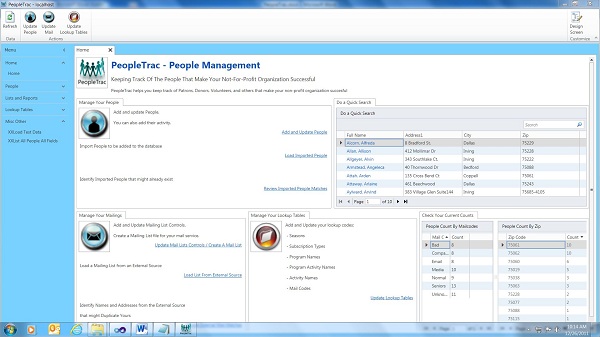
The Home Screen
A Person's Information

Managing Imported People
Managing Mail Lists
People to Mail To
History
- 3rd January, 2012: Initial version
This member has not yet provided a Biography. Assume it's interesting and varied, and probably something to do with programming.



 General
  News
News  Suggestion
  Question
  Bug
Bug  Answer
  Joke
Joke  Praise
  Rant
Rant  Admin
Admin 


 Submit an article or tip


