|
|
 |
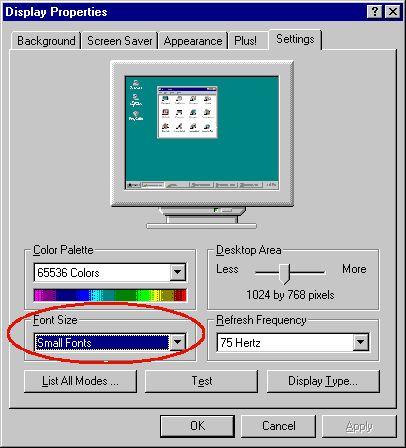
It didn't work in XP. The title should be changed to "Detecting the DPI Setting." "Font size" is a different story.
|
|
|
|
 |
|
 |
For C# you can use this code:
[System.Runtime.InteropServices.DllImport("Gdi32.dll")]
static extern int GetDeviceCaps(IntPtr hDC, int nIndex);
[System.Runtime.InteropServices.DllImport("Gdi32.dll")]
static extern IntPtr CreateDC(string lpszDriver, string lpszDeviceName, string lpszOutput, IntPtr devMode);
const int LOGPIXELSX = 88;
const int LOGPIXELSY = 90;
int DPIX()
{
return DPI(LOGPIXELSX);
}
int DPIY()
{
return DPI(LOGPIXELSY);
}
int DPI(int logPixelOrientation)
{
IntPtr displayPointer = CreateDC("DISPLAY", null, null, IntPtr.Zero);
return Convert.ToInt32(GetDeviceCaps(displayPointer, logPixelOrientation));
}
|
|
|
|
 |
|
 |
Thanks Chizik. You also need to call the DeleteDC() API function in your DPI() method because the .NET framework GC will not take care of that for you. Without the DeleteDC() call you will get a resource leak.
|
|
|
|
 |
|
 |
In fact, it would be better to use the DpiX and DpiY properties of the Graphics class in .NET.
|
|
|
|
 |
|
|
 |
|
 |
I, I would like to know, How can I get the installedFonts?
Is necessary any namespace?
Thank's
DMD
|
|
|
|
 |
|
 |
Use the EnumFontFamiliesEx API function.
|
|
|
|
 |
|
 |
I refer you to
http://support.microsoft.com/default.aspx?scid=kb;en-us;177795
This explains how the result of this polling is an attempt to get at the contents provided in a barely standard manner by the graphics driver and how such things cannot be depended on. Rather vexing that they have not put a method of dependably querying the driver into the driver interface, but there you go.... in short, program design based on this is a dodgy process at best.
|
|
|
|
 |
|
 |
Please could u tell me,
How to find font size if i have TEXTMETRIC of CDC with me?????
Vinod Tanaji Patil
|
|
|
|
 |
|
 |
Title says it all. Any idea of how to detect font size in XP?
"When a man sits with a pretty girl for an hour, it seems like a minute. But let him sit on a hot stove for a minute and it's longer than any hour. That's relativity." - Albert Einstein
|
|
|
|
 |
|
 |
It does work in XP. Did you debug it? What are the values of nLogDPIX and nLogDPIY?
|
|
|
|
 |
|
 |
Yes, they always return 96.
"When a man sits with a pretty girl for an hour, it seems like a minute. But let him sit on a hot stove for a minute and it's longer than any hour. That's relativity." - Albert Einstein
|
|
|
|
 |
|
 |
I tried it on my XP and it works fine. They return 120 for Large Size. Try other computers with different display drivers.
|
|
|
|
 |
|
 |
Well, I figured out the difference. If you change to large fonts from the "Appearances" tab, it doesn't work. But if you change the DPI setting from the "Settings/Advanced" tab, it works as expected.
"When a man sits with a pretty girl for an hour, it seems like a minute. But let him sit on a hot stove for a minute and it's longer than any hour. That's relativity." - Albert Einstein
|
|
|
|
 |
|
 |
Navin wrote:
If you change to large fonts from the "Appearances" tab, it doesn't work.
So we still need a solution to this...
|
|
|
|
 |
|
 |
Look at these values in the Registry:
Windows XP Theme
HKCU\Software\Microsoft\Windows\CurrentVersion\ThemeManager\SizeName
Possible values: NormalSize, LargeFonts, and ExtraLargeFonts
These values are language-independent.
Windows Classic Theme
HKCU\Control Panel\Appearance\Current
Possible values: Windows Classic, Windows Classic (large), Windows Classic (extra large), Windows Standard, Windows Standard (large), Windows Standard (extra large)
Note that these values are language-dependent.
Windows Vista doesn't support this feature. If we want a bigger font, simply change the DPI Setting. In that case, GetDeviceCaps should work.
Hope this helps.
|
|
|
|
 |
|
 |
How to edit the program to set the display font size?
|
|
|
|
 |
|
 |
Do you know if there is a way to make a CDialog window impervious to a setting higher than 96DPI?
I have a couple of users who set to 120 and I do not want to provide a whole different dialog for this. I would like to 'force' my dialog window to use the correct size fonts throughout so that the dialog size does not get increased by windows.
|
|
|
|
 |
|
 |
You might want to override CDialog::OnInitDialog() and call MoveWindow() to resize the dialog and controls.
|
|
|
|
 |