Click here to Skip to main content

Gnu Privacy Guard (GPG/PGP) for .NET [v1.0]

By , 18 Sep 2003
 

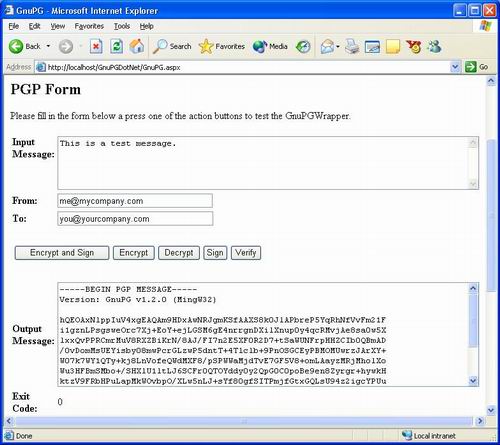
Sample Image - GnuPGDotNet.jpg

Introduction

This article presents GnuPGWrapper v1.0, a wrapper class for GnuPG.

GnuPG stands for GNU Privacy Guard and is GNU's tool for secure communication and data storage. It can be used to encrypt data and to create digital signatures. It includes an advanced key management facility and is compliant with the proposed OpenPGP Internet standard as described in RFC 2440. As such, GnuPG is a complete and free replacement for PGP (Pretty Good Privacy).

This article provides a C# wrapper class (GnuPGWrapper) that will enable use of OpenPGP Internet encryption standard within a .NET world. It is shipped with a demo ASP.NET Web Form (GnuPG.aspx) which calls the wrapper class.

Installation

Prerequisites

  • Complete .NET Environment, e.g. Windows XP Professional + IIS 5.0 + .NET Framework SDK
  • GnuPG for Windows (more about GnuPG)

Procedure

Background

GnuPG ships as a command line program (gpg.exe) acting as a filter (reads from standard input and writes into standard output). Although suitable for scripting on UNIX systems (where calling a command line program from sh or bash is easy), it's pretty hard to integrate this in a production .NET environment.

The GnuPG Wrapper executes the command line program (gpg.exe) in a different process, redirects standard input (stdin), standard output (stdout) and standard error (stderr) streams, and monitors the streams to fetch the results of the encryption/signing operation.

Please note that you must have INSTALLED GnuPG AND generated/imported the appropriate keys before using this class. Refer to the GnuPG manual to do this...

Using the code

In order to use the wrapper class, you need to proceed as follows:

  1. Create an instance of the class
  2. Set the command property to the requested command (SignAndEncrypt, Encrypt, Decrypt, Sign, Verify)
  3. Optionally, set parameters for the command (home directory, originator, recipients, etc...)
  4. Call the ExecuteCommand method with input/output strings variables

The next sections show sample source code for the most command operation (SignAndEncrypt, Decrypt, Verify).

Encrypt and Sign

// Reference My GnuPG wrapping class
using Emmanuel.Cryptography.GnuPG;

// Create GnuPG wrapping class
GnuPGWrapper gpg = new GnuPGWrapper();

// Set command
gpg.command = Commands.SignAndEncrypt;

// Set some parameters from on Web.Config file
gpg.homedirectory = Server.MapPath
       (ConfigurationSettings.AppSettings["homedirectory"]);
gpg.passphrase = ConfigurationSettings.AppSettings["passphrase"];

// Set other parameters from Web Controls
gpg.originator = FromTextBox.Text;
gpg.recipient = ToTextBox.Text;

// Declare input/output variables
// (input is also read from a Web control)
string inputText = MessageTextBox.Text;
string outputText = "";

// Execute GnuPG
gpg.ExecuteCommand(inputText, out outputText);

// Display output text
OutputTextBox.Text = outputText;
OutputTextBox.Visible = true;
ErrorMessage.Visible = false;
ExitCodeLabel.Text = gpg.exitcode.ToString();

Decrypt

using Emmanuel.Cryptography.GnuPG;

GnuPGWrapper gpg = new GnuPGWrapper();

gpg.homedirectory = "C:\Inetpub\wwwroot\GnuPGDotNet\GnuPG"
gpg.passphrase = "My passphrase is so cool I can't remember it"
gpg.command = Commands.Decrypt;

// Execute GnuPG
string outputText = "";
gpg.ExecuteCommand("This is a test message.", out outputText);

// Display output text
[...]

Verify

using Emmanuel.Cryptography.GnuPG;
GnuPGWrapper gpg = new GnuPGWrapper();

gpg.homedirectory = "C:\Inetpub\wwwroot\GnuPGDotNet\GnuPG"
gpg.passphrase = "My passphrase is so cool I can't remember it"
gpg.originator = "me@mycompany.com";
gpg.command = Commands.Verify;

// Execute GnuPG
string outputText = "";
gpg.ExecuteCommand("This is a test message.", out outputText);

// Display output text
[...]

Error handling

Error handling is done via a specific Exception class; method ExecuteCommand raises this exception whenever an error occurs. You calling application can handle this exception as follows:

using Emmanuel.Cryptography.GnuPG;

    try 
    {

        GnuPGWrapper gpg = new GnuPGWrapper();

        gpg.homedirectory = "C:\Inetpub\wwwroot\GnuPGDotNet\GnuPG"
        gpg.passphrase = "My passphrase is so cool I can't remember it"
        gpg.originator = "me@mycompany.com";
        gpg.recipient = "you@yourcompany.com";
        gpg.command = Commands.SignAndEncrypt;

        // Execute GnuPG
        string outputText = "";
        gpg.ExecuteCommand("This is a test message.", out outputText);

        // Display output text
        [...]

    }
    catch (GnuPGException gpge)
    {
        // Display error message
        // Contains a clear text error message, 
        // either from the wrapper or from gpg.exe itself
        ErrorMessage.Text = gpge.Message; 
    }

Points of interest

The GnuPG wrapper:

  • Doesn't use any temporary files to store results; it directly uses streams/pipes.
  • Uses multiple threads to read data from standard input and standard error, preventing any deadlocks.
  • Uses configurable timeouts to prevent blocking calling applications in case of a system/program/process crash
  • Uses a configurable passphrase, which can be stored in a local configuration file (Web.Config) to prevent disclosure of the phrase

About GnuPG and PGP

This class has been developed and tested with GnuPG v1.2.0 (MingW32).

You can check the command line manual page for gpg.exe.

For more about GNU, please refer to http://www.gnu.org/. For more about GnuPG, please refer to http://www.gnupg.org/. For more about OpenPGP (RFC 2440), please refer to http://www.gnupg.org/rfc2440.html. For more about PGP, please refer to http://www.pgpi.org/.

History

  • Date posted: October 30th, 2002
  • Updated: September 19th, 2003

License

This article has no explicit license attached to it but may contain usage terms in the article text or the download files themselves. If in doubt please contact the author via the discussion board below.

A list of licenses authors might use can be found here

About the Author

Emmanuel Kartmann
Web Developer
France France
Member
Fell into computer software at the age of 11, founder of 3 startups, and now manager of an independent software vendor (ISV) labelled proSDK (www.prosdk.com)... And still a freeware writer and technical article author!


Sign Up to vote   Poor Excellent
Add a reason or comment to your vote: x
Votes of 3 or less require a comment

Comments and Discussions

 
You must Sign In to use this message board.
Search this forum  
    Spacing  Noise  Layout  Per page   
AnswerRe: public key not found: problem and solutionmembervikasprasad16 Nov '10 - 23:53 
dsf
GeneralDecrypt Error [modified]memberDrivenTooFar23 Jul '07 - 9:12 
Hello, I am trying to decrypt a file using this code but I am coming across some errors. I will give you a little information about my project and hopefully you can help me with it.
 
I am creating a web site in ASP.NET (C#) that will allow a user to upload a file that will then be converted to a dataset. The files that will be uploaded will be encypted. As the file is being converted to a dataset, it will also decrypt it. Here is the code for the decryption:
 
//The DataSet to Return
DataSet result = new DataSet();
 
GnuPGWrapper gpg = new GnuPGWrapper("Path");

//Open the file in a stream reader.
StreamReader s = new StreamReader(File);
 
//Read the rest of the data in the file.
string AllData = s.ReadToEnd();
 
gpg.passphrase = "passphrase";
gpg.command = Commands.Decrypt;
 
// Execute GnuPG
string outputText = "";
gpg.ExecuteCommand(AllData, out outputText);
AllData = outputText;
 
Basically, the text from the file is read into a string and then it should be decrypted. After that, the result should be put back into the string. I have done this successfully with files and the command line, but when I try it here I get the errors: gpg: no valid OpenPGP data found & gpg: decrypt_message failed: eof. Thank you for any help that you can give me.
 
----------------------------------------------------------------------------------------
 
I found that the problem with my code was with the file itself. As I read through these forums I found that this will only work with asc ASCII armored files. When I armored the files, everything worked fine.
 
-- modified at 15:07 Thursday 2nd August, 2007
GeneralRe: Decrypt Errormemberkwhe9718 Oct '07 - 10:32 
Thanks for the reply to your original post. This helped a lot.
QuestionKeys vs. Passphrase??memberJeff960012 Jul '07 - 8:37 
In the code example provided you use a passphrase. I have been asked to be able to encrypt/decrypt based on the use of a public key. How would you use this code to work with the key instead of the passprase?

QuestionIs this possible?memberrkd803 Jul '07 - 5:56 
I feel bad for asking this, but I am stuck. I have an existing .pgp key and I would like to encrypt it using my c# application. However the file gets transferred to a unix platform and decrypted by gpg there.
 
Using Emmanuel's wrapper is it possible to do this? I am thinking if I already have a public key, it should be straight forward, but given the examples provided I cannot understand how to approach it.
 
I am very new to encryption so I am probing in the dark completely.
 
Thanks in advance, I would appreciate any help.
 
email: arkadyka@yahoo.com
AnswerRe: Is this possible?memberi6189 Jul '07 - 13:53 
It should be possible.
Read GnuPG info if you must. If you can get it working manually using gpg command, you'll be able to use this wrapper in your .NET app.
GeneralProblems with pgp.exememberbevans197526 Jun '07 - 5:00 
I downloaded and unzipped the app. Converted to VS.NET 2005 with no problms. I click on the pgp.exe under the GnuPG folder and I got the same error listed below about the keys not being created. I then went out the GNU wesite and downloaded v1.2.2. There was no installer so I clicked on all the .exe in the unzipped folder and one of these created a folder on my root drive, however, there is something I am missing because I am not getting anywhere with this....
 
Can someone please point me in the right direction.
 
-Brian
GeneralRe: Problems with pgp.exememberi6189 Jul '07 - 13:49 
that doesn't seem to be a recent version. are you sure you are downloading the windows binary? - it is an installer.
 
I have noticed however that pgp.exe itself was enough to work without installing the whole GnuPG application.
QuestionKeyblock resource file open errormemberChristopher Payne7 Jun '07 - 12:04 
I've just started using this component, but I'm having some difficulties.
 
I installed GnuPG and I've added 2 key pairs. I can successfully encrypt and decrypt files with both pairs using gpg.exe.
 
But when I try to encrypt or decrypt with GnuPGWrapper, I get this message:
 
gpg: keyblock resource `C:/GnuPG" -se -a -r recipient@xxx.com -u signedby@xxx.com --no-verbose -o //myserver/encryption/sample.txt.pgp //myserver/encryption/sample.txt \secring.gpg': file open error
 
If I copy the bold part of the message and paste it after gpg.exe on the command line, it prompts me for the passphrase for signedby@xxx.com. When I enter it, the pgp file is successfully created.
 
Obviously I've tinkered with the code, adding support for working with files and using the shorter switch codes, but this same problem was happening with the original source as well.
 
Any ideas on why the keyblock resource error is coming up?
 
-Chris Payne
AnswerRe: Keyblock resource file open errormemberHoots9 Jul '07 - 5:13 
I was having exactly the same problem, it turned out to be because the procedure BuildOptions() puts double quotes around the path for the --homedir command line argument. Changing those 3 lines to just:
 
optionsBuilder.Append("--homedir ");
optionsBuilder.Append(_homedirectory);
optionsBuilder.Append(" ");
 
fixes it for me. Hope that helps.
 
Hoots.

General General    News News    Suggestion Suggestion    Question Question    Bug Bug    Answer Answer    Joke Joke    Rant Rant    Admin Admin   

Permalink | Advertise | Privacy | Mobile
Web01 | 2.6.130523.1 | Last Updated 19 Sep 2003
Article Copyright 2002 by Emmanuel Kartmann
Everything else Copyright © CodeProject, 1999-2013
Terms of Use
Layout: fixed | fluid