Introduction
This system will be a good solution to exchange message or tasks through Windows Mobile and a central location for the employee and employer.
From my thought
Most people now work away from the office. For example, a stock exchange monitor working from the exchange building needs to send or receive important messages to/from the centre of administration. H can use SMS or email , but I suggest another good way using a Web Service and a client.
More about the task assigner
The task assigner is the name of the core functionality in the system. It has a server and a client. The server is an ASP.NET Web Service and the client is a Windows Mobile device.
The server is the central location for company. It has a file called messagefile.txt. This file has all the information to send messages to employees.
The client is a hand-held device with Windows Mobile installed. When the user logs in in to the system, the system will check if it is an authorized user. The application then checks for any new messages in the server for the specific user, which are then automatically downloaded from the server. But, how do we handle unwanted data, and what about security?
For the first question, the answer is, it's very simple. We have a standard format for messagefile.txt. Here is the file format:
Hi, Please check the walk Street 27|07-12-2008|18.00|james"
For the second question, we have a list of users in the server who can access these features. So we will send the user name and password to server and verify the user. We also use encryption for addes security.

Get messages from the server
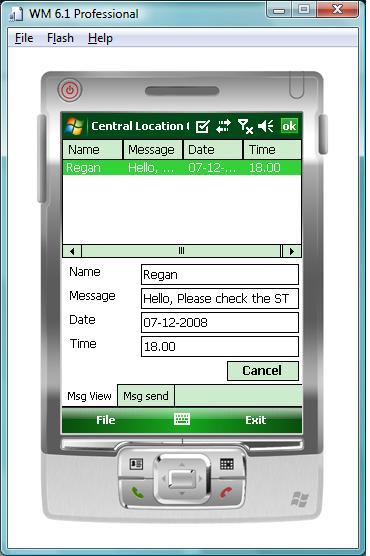
Once the user logs in to the system, we automatically check the server for any new messages and download all messages to client and list them in a listview like a summary.
Using the code
using System;
using System.Linq;
using System.Collections.Generic;
using System.Text;

using FileTransfer.Core.FileService;
using System.Net;

namespace FileTransfer.Core
{
    public class FileReader
    {
        public FileReader()
        {

        }

        char[] spillter = new char[] { '|' };
        public Message GetMessageFromServer(string line)
        {
            Message message = null;
            if (!string.IsNullOrEmpty(line))
            {
                string[] values = line.Split(spillter);
                message = new Message();
                message.Name = values[3];
                message.Content = values[0];
                message.Date = values[1];
                message.Time = values[2];
            }
            return message;
        }

        public Message GetMessageFromServer()
        {
            return null;
        }
        public List<Message> GetListOfMessages(string username, string pwd)
        {
            try
            {
                List<Message> collection = null;
                FileService.FileService service =
                   new FileTransfer.Core.FileService.FileService();
                service.Url = "http://server/wmservice/FileService.asmx";
                service.PreAuthenticate = false;
                string[] lines = service.ReadFile(username, pwd);
                collection = new List<Message>();
                if (lines != null && lines.Length > 0)
                {
                    for (int i = 0; i < lines.Length; i++)
                    {
                        Message message = GetMessageFromServer(lines[i]);
                        collection.Add(message);
                    }
                }
                return collection;
            }
            catch (Exception ex)
            {
                throw ex;
            }
        }

    }
}
The above code is very simple. It helps access the Web Service and gets all messages via the service from the server. I have defined an object called "message" for building up the messages.
using System;
using System.Linq;
using System.Collections.Generic;
using System.Text;

namespace FileTransfer.Core
{
    public class Message
    {

        string name;

        public string Name
        {
            get
            {
                return name;
            }
            set
            {
                name = value;
            }
        }
        string content;
        string date;

        public string Date
        {
            get
            {
                return date;
            }
            set
            {
                date = value;
            }
        }
        string time;

        public string Time
        {
            get
            {
                return time;
            }
            set
            {
                time = value;
            }
        }
        public string Content
        {
            get
            {
                return content;
            }
            set
            {
                content = value;
            }
        }

    }
}
View of the system design
The server-side
The server-side is very easy, because we have a simple text config file. The administration guys put messages in the standard format. After that, the Web Service reads the file for the specific user and sends the messages to the user.
using System;
using System.Collections.Generic;
using System.Linq;
using System.Text;
using System.IO;

namespace WindowsMobileService.Core
{
    public class MessageReader
    {

        public MessageReader()
        {
        }

        public string[] ReadMessage(string filePath)
        {
            if (string.IsNullOrEmpty(filePath))
            {
                return null;
            }
            if (File.Exists(filePath))
            {
               return File.ReadAllLines(filePath);
            }
            else
            {
                return null;
            }
        }
    }
}
Setup the server
It's very simple, just download the service code, create a virtual directory in your IIS server, and copy the server code to that. Or you can run it using the VS IDE.
Final result
The final result looks like below:
What is next
This is the initial version. I would like to list here features I plan to include in the upcoming versions:
- Verify the user name and password with the server.
- Include AES encryption.
- Show notification to the user if new messages exist in the server.
- Check internet is reachable.
- Partisanship with other users. A user can connect to the server and download messaged for another to be send through SMS or some other way.
- Put all the messages in an Excel sheet in the sever.
- Message send feature for the server.
History
- 08-12-2008: Initial version.
- B.Sc. degree in Computer Science.
- 4+ years experience in Visual C#.net and VB.net
- Obsessed in OOP style design and programming.
- Designing and developing Network security tools.
- Designing and developing a client/server application for sharing files among users in a way other than FTP protocol.
- Designing and implementing GSM gateway applications and bulk messaging.
- Windows Mobile and Symbian Programming
- Having knowledge with ERP solutions
The summary of my skills:
C#, VB.Net#,ASP.net, VC++, Java, WPF,WCF, Oracle, SQL Server, MS Access, Windows NT administration
Cheers
RRave
MCPD,MCTS
http://codegain.com



 General
  News
News  Suggestion
  Question
  Bug
Bug  Answer
  Joke
Joke  Praise
  Rant
Rant  Admin
Admin 


 Submit an article or tip


