Overview
Craigslist is a hugely popular website with free local listings for jobs, housing, and items for sale.
Trying to buy something on Craigslist is like a flock of seagulls going after one French fry. If something good gets posted, it might be gone before you get a chance to call. So do you scan new items every morning? What if you miss a day? There are hundreds of new items that get posted each day.
I wanted a desktop window that would show me filtered search results from Craigslist and update them periodically.
Approach
Instead of sending Craigslist a server-side query, I decided to just get the Craigslist RSS feed and filter the results on the client-side. There are two advantages of this -- server changes don't break our code and we can watch other feeds in a similar way (for example, eBay). At first, I made a general purpose feed monitor, but it got kind of abstract and complicated and I decided a Craigslist specific application would be nicer and easier to explain.
Interface
A listview is used to display results so I can sort by column (e.g. price or date).
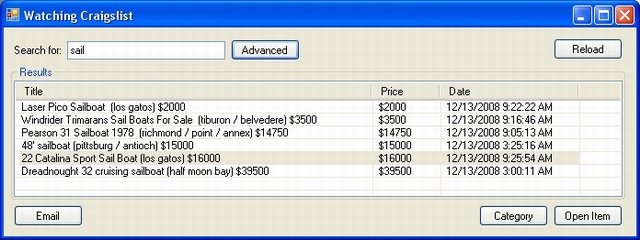
For most searches, just type some keywords and press enter to load the results. Double-clicking on an item in the results list will open it in a browser. Or you can just click on the "open item" button. The Category button will open the entire list in a browser. For more advanced searches, press the Advanced button.

For email alerts, check the send email alerts box and setup an email address.
Code
Settings are saved and restored using XML serialize.
StreamWriter sw = new StreamWriter(path);
new XmlSerializer(obj.GetType()).Serialize(sw, obj);
sw.Close();
You gotta love C#. And when we load and parse the RSS feed, XML does the trick again.
XmlDocument feed = new XmlDocument();
feed.Load(GetUrl());
XmlNodeList nodes = feed.GetElementsByTagName("item");
foreach (XmlNode node in nodes)
{
if (Match(info)
}
Similar Tools
There are other similar programs out there but none of them provide free C# code so you can extend them.
- Craigswatch - Freeware but closed source
- CraigSpy - Closed source and not free
- CScrape - Open source and free but written in Perl/Tk
Extending This
You could easily add multiple searches and a treeview control to expand titles into descriptions. For this article, I decided to keep those features out. The advanced search form could easily be expanded to allow excluded keywords and any-or-all keywords.
History
- Dec 12, 2008: Original submission
- Dec 13, 2008: Added email alerts
- Dec 13, 2008: Updated source and demo project
- Dec 29, 2008: Updated source and demo projects
David McClurg is a game programmer from Oregon, USA. He is currently interested in C#, xna for zune, and steering behaviors. When not coding, David enjoys tennis, kayaking, and botany.



 General
  News
News  Suggestion
  Question
  Bug
Bug  Answer
  Joke
Joke  Praise
  Rant
Rant  Admin
Admin 


 Submit an article or tip


 Thank you for sharing that.