Click here to Skip to main content

ClientCallback custom control for web applications

By , 19 Dec 2008
 

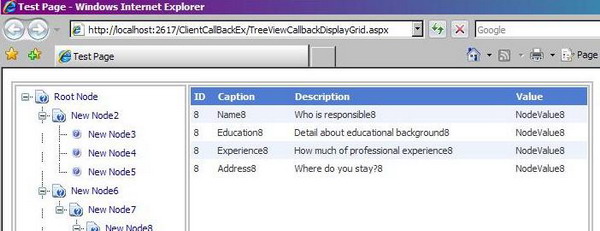
TestPageImage2.JPG

Introduction

There are scenarios where we have a list of items on one side of a page (the list can be ordered or hierarchical) and on selection of an item from this list, all the details related to it is shown on the other half of the page. All this without a postback or a flicker would give a smooth and good feel to the user.

For example, we have a finance related Web application. We need to see the details related to a stock script in our portfolio (a number of scripts are listed on the same page). The moment a script is selected, all the details and the current status of the script is shown on the same page without any postback or flicker.

Out here, the above described scenario was achieved using the Client Callback feature introduced in ASP.NET 2.0. I found that a good amount of code related to this feature can be embedded inside a custom control such that it is easy to use. Moreover, if we use callback a number of times on a page, it would reduce lots of code. So, I tried to develop a "user friendly" custom control to use the Client Callback feature.

Background

In my current project, we had a scenario where different manufacturing parts were categorized (because of the hierarchical structure in the categorization, we decided to go with a tree view control). On selection of any one part (node), we were supposed to show the status and the data related to it in a grid placed on the same page. Performance was one of the major demands from the client. So, based on the needs, we decided to go with the Client Callback feature. The sample is based on this experience of mine.

Using the code

First, the important code parts of the custom control:

Apart from inheriting the control from WebControl, we also inherit it from ICallbackEventHandler.

public class MyCustomCallBackControl : WebControl, ICallbackEventHandler {}

The OnInit() method of the control is overridden. The callback scripts related to the control are embedded here.

// OnInit was overriden in order to attach a callback handler to the control
protected override void OnInit(EventArgs e)
{
     base.OnInit(e);
            
     string callback = Page.ClientScript.GetCallbackEventReference(this, "input", 
                       string.Concat(ID, "OnSuccess"), "context");
     Page.ClientScript.RegisterClientScriptBlock(typeof(MyCustomCallBackControl), 
                       ID, string.Concat("function ", ID, 
            "Callback(input, context) { ", callback, "; }"), true);
     //Above line - Script added during runtime:
     //function MyCustomCallBackControl1Callback(input, context) 
     //{      
     //    WebForm_DoCallback('MyCustomCallBackControl1',
     //          input,MyCustomCallBackControl1OnSuccess,context,null,false);      
     //}

     //General meaning of it:
     // WebForm_DoCallback(eventTarget, eventArgument, eventCallback, 
     //                    context, errorCallback, useAsync)
}

We will need to write the GetCallBackResult and RaiseCallBackEvent methods related to implement the ICallbackEventHandler interface.

// Event handler for code logic at server side on client-callback
// Event bubbling done here 
public event EventHandler MyCallBackEvent;
public void RaiseCallbackEvent(string eventArgument)
{
      argumentParameter = eventArgument;
      if (MyCallBackEvent != null)
      {
          MyCallBackEvent(this, EventArgs.Empty);
      }
}

public string GetCallbackResult()
{
      //Returns back the output set during the callback
      return renderedOutput;
}

The Client Callback custom control is now ready to use.

We will now work on how to use the control on our web page. We drag drop the control on the page, and define the code-behind handler for it, basically, the server code that will run when the callback control is called.

// Bubbled event for Callback control placed
// One can handle the operations required during the callback out here.
protected void CallBackControl_Perform(object sender, EventArgs e)
{
    DataTable dt = RetrieveDataTable(((
      MyCustomControls.MyCustomCallBackControl)sender).ArgumentParameter);
    gvTest.DataSource = dt;
    gvTest.DataBind();

    //Setting of the response output for callback
    using (System.IO.StringWriter sw = new System.IO.StringWriter())
    {
        gvTest.RenderControl(new HtmlTextWriter(sw));
        ((MyCustomControls.MyCustomCallBackControl)sender).RenderedOutput = sw.ToString();
    }
}

In our sample, we will bind the tree nodes to this callback control. This is done using JavaScript.

//Client Side callback event attached
tNode.NavigateUrl = "javascript:OnNodeClick('" + tNode.Value + "');";

We are just left with defining the JavaScript functions that are attached to the custom callback control. The functions will be bound in the OnNodeClick method defined above.

//Node Callback Click Event
function OnNodeClick(nodeID)
{         
    // Method name to call has a fixed naming convention
    // CustomCallbackControl name + "Callback" 
        // Parameters to the function would be:
            // 1st : Input 
            // 2nd : Context                     
    MyCustomCallBackControl1Callback(nodeID, null); 
}        

// Function name has a fixed naming convention
// CustomCallbackControl name + "OnSuccess"
function MyCustomCallBackControl1OnSuccess(responseText) 
{       
    // Based on responseText, action taken on client side     
    document.getElementById("tdGridView").style.display = "block";
    document.getElementById("gvTest").outerHTML = responseText;   
}

We are finished with using the control now. The naming conventions for the JavaScript functions are defined, and need to be given accordingly.

Points of interest

Performance came out really good, that too with a simple and sleek UI. It was a good experience learning the comparisons and differences between using an UpdatePanel and a callback control.

Making it a custom control helped a lot. Even a beginner can use it without knowing much of what is happening inside it (it can be used multiple times on the same page). The control was easy to use and came out to be a good weapon in my Web stock! :)

History

  • 19th December, 2008: Initial post.

License

This article, along with any associated source code and files, is licensed under The Code Project Open License (CPOL)

About the Author

Sandeep Mewara
Software Developer (Senior)
India India
Member
From Bangalore, India.
My blog: http://smewara.wordpress.com/

Sign Up to vote   Poor Excellent
Add a reason or comment to your vote: x
Votes of 3 or less require a comment

Comments and Discussions

 
You must Sign In to use this message board.
Search this forum  
    Spacing  Noise  Layout  Per page   
GeneralMy vote of 5memberSavalia Manoj M18 Nov '12 - 16:46 
Good..
GeneralMy vote of 1memberDavid.jos12323 Jun '12 - 5:35 
Need to improve a lot
GeneralRe: My vote of 1mvpthatraja5 Aug '12 - 1:02 
David.jos123 wrote:
Need to improve a lot
Please be specific so that the author could improve things on article.

QuestionThis is not working in MozillamemberGANTA THE GREAT29 Jun '11 - 5:42 
Great work....!
 
But it's not working in mozilla.Any one have code for mozilla?...
AnswerRe: This is not working in MozillamvpS Mewara29 Jun '11 - 20:13 
It might be because of Javascript implementation. You can debug and see where it is going wrong. Try out, if you face issue then share across.

GeneralMy vote of 5mvpLuc Pattyn11 Jun '11 - 5:09 
Good one!
GeneralMy vote of 5memberRamalinga Koushik25 Feb '11 - 21:24 
Great Article
GeneralGreat work!membermjesterak10 Aug '09 - 19:03 
Thank-you for providing a useful implementation of client callbacks. I definitely will use this! Smile | :)
AnswerRe: Great work!memberSandeep Mewara7 Jan '10 - 22:23 
Smile | :)
GeneralCompare to PageMethodmemberbitseeker26 Apr '09 - 8:34 
Hi, I implemented similar logic, not as nicely packaged, which does this
 
- user clicks a control that activates a client side JS routine
- JS calls client side callback routine, and passes it a transaction string
- client side callback routine sends the transaction string to the server page backend logic
- server page backend PageLoad recognizes it's a "callback", and calls the backend router
- backend router opens the string, routes the transaction to appropriate backend VB routine
- backend VB routine processes the transaction, produces a return string, and passes the return string to the serverside "callback" return function
- callback return function passes the return string to the client side "callback" return function
- client side callback function passes the return string to the clientside JS router
- client side JS router passes the return string to a specific JS function that responds to the original user input click
 
All works fine. I use it in perhaps 30 different transactions with the "Main" screen of my app.
 
I was wondering if you might know of or suggest any infrastructure, compatibility, performance, code management or other benefits to converting this functionality to use PageMethods (which I have successfully implemented in a test...looks pretty slick).
 
I'm not in a big hurry to revamp my code, just wanted to see if I should consider it.
 
Thanks!
AnswerRe: Compare to PageMethodmemberSandeep Mewara7 Jan '10 - 22:22 
Where's your work? any links?
 
I cannot assure you for now, but will try to look.
GeneralMy vote of 2memberProJester115 Jan '09 - 11:07 
---
AnswerRe: My vote of 2memberSam DoLittle19 Jan '09 - 19:12 
Do explain why just 2 for such a good article!
 
Good work.
Generalnotmembermohamedgamal14 Jan '09 - 7:59 
not operate on firefox browser
AnswerRe: notmemberSandeep Mewara18 Jan '09 - 19:08 
The control as of now is IE compatible only. I will check it with Firefox asap.
Scripts are handled a little different in Firefox. On doing a google, i found lots of links reporting the same issue.
QuestionWhy Not Use a Page Method?membernickyt13 Jan '09 - 2:34 
Sandeep,
 
I'm not criticizing your article, but I'm just wondering why you wouldn't just use a PageMethod instead of a ClientCallback? Or is this article assuming an ASP.NET 2.0 site without ASP.NET AJAX?
 
Regards,
Nick
 

AnswerRe: Why Not Use a Page Method?memberSandeep Mewara13 Jan '09 - 21:20 
Hi Nick,
 
I just presented one of the features provided in ASP.NET2.0 that can be used in our web applications. I am not saying that it should be used ahead of UpdatePanel or PageMethods or any other ASP.NET AJAX method.
 
As i replied in one of the messages below, based on the requirements - one can decide the way to handle the data retrival,page update, etc. Since there is a difference in Page life cycle in these features - one can decide what would be best for the requirement scenario.
 
I also found Callback features are rarely used by developers because of the manul code involved in it relative to almost no code with UpdatePanel or PageMethod.
 
Hope i replied your question. Smile | :)
 
Thanks,
Sandeep.
GeneralVery Nice!memberJimWhite_Aus12 Jan '09 - 23:02 
Good work...
AnswerRe: Very Nice!memberSandeep Mewara13 Jan '09 - 21:21 
Thanks Jim!
GeneralUpdatePanelmembergstolarov31 Dec '08 - 13:17 
I'm pretty sure this is what UpdatePanel is doing internally, so in 99% of the cases I would use UpdatePanel. Having said that, I have to say that you did a good job and this control may be a useful addition in the arsenal.
AnswerRe: UpdatePanelmemberSandeep Mewara4 Jan '09 - 20:49 
First... Happy New Year!
 
Well, thanks for your comments sir. I am sorry but, this does not happens inside the Update Panel.
 
There is a difference between ASP.NET AJAX (uses Update Panel) & Client Callback feature provided in ASP.NET2.0.
 
In ASP.NET AJAX (Update Panel):
It supports asynchronous requests via a partial page postback. Partial postbacks iterate through the same page life cycle as a synchronous full page postback, but only specific regions or controls on the page are refreshed - thus partial page rendering. Since ASP.NET AJAX is built on the existing ASP.NET postback architecture it also supports utilizing event validation and maintaining view state in a partial postback communication process. It's easy to use. However the update panel still flickers if one puts lots of control in it.
 
In ASP.NET Client Callbacks:
At runtime, after initial page load, a callback to a page runs a modified version of its normal life cycle (figure below) where the page is initiated and loaded, but the page contents are not rendered. View State is not maintained when this feature is used. Callback's doesn't flicker.
Here, a single method in the server-side code is invoked, which processes the callback request and returns a value to the browser and can be read by a JavaScript function. The communication process is extremely lightweight.
 
In a way Client Callbacks had a drawback - when utilizing it, Web developers are responsible for providing all the server and client-side code necessary to rerender controls in a browser and manage client-server synchronization.
I have tried to overcome a part of the drawback in this article of mine.
I tried to make the feature user-friendly.
 
Hope, i was able to clarify. Do drop a message if any discussion is required.
 
Thanks,
Sandeep.
GeneralRe: UpdatePanelmembergstolarov5 Jan '09 - 3:53 
It's not entirely true. UpdatePanel is build on top of callback mechanism. Client side javascript makes sure that all the hidden variables posted back so server can re-create viewstate, control state and normal page flow. In you example if you try to put gridview into your control, it will not be able to properly function in all the situations (sorting, paging, editing), since it will be missing information in the viewstate.
 
Flicker has nothing to do with the view state. As you mentioned it a subject of how much you try to refresh. Put enough stuff in your control and it will flicker as well.
AnswerRe: UpdatePanelmemberSandeep Mewara5 Jan '09 - 8:52 
I hope we are not confusing the XML Http Request with Callback out here. BOTH Update Panel & Client Callback internally uses XMLHttp Request in order to communicate. I confirmed the same on MSDN too. There are couple of articles discussing about these two features provided in ASP.NET2.0.
 
About loosing the functions like sorting,paging,editing - i agree to that. That's why we need to decide when to use update panel and when to use a callback feature. Earlier, I just tried to provide the information regarding the differences that will be present when either is used.
 
About flickering, i am not sure of why it happens (whether viewstate is resposible or something else), but had definitely seen(personal experience) that update panels flicker with same number of controls and callback feature doesn't.
 
It's not that Update panel is bad! We cannot compare them as they both function totally different. They both are good in a given scenario and one needs to decide based on the requirements.
 
Thanks,
Sandeep.
GeneralExcellent article!memberStuart_Mic24 Dec '08 - 19:56 
Easy to use & understand.
GeneralRe: Excellent article!memberSandeep Mewara29 Dec '08 - 17:26 
Thanks Stuart!
GeneralToo good...memberTim Hammer24 Dec '08 - 10:07 
Nicely done...
Very useful.
GeneralRe: Too good...memberSandeep Mewara29 Dec '08 - 17:25 
Thanks Tim!
GeneralReally nice one!memberchkumar19 Dec '08 - 20:34 
Keep going...
GeneralRe: Really nice one!memberSandeep Mewara21 Dec '08 - 18:10 
Thanks! Smile | :)
GeneralAnother good jobmemberAbhijit Jana19 Dec '08 - 2:47 
Hi sandeep, very good article after "multiselect Dropdown" article.
5 from me Wink | ;)
 
cheers,
Abhijit

GeneralRe: Another good jobmemberSandeep Mewara21 Dec '08 - 18:10 
Thanks Abhijit!

General General    News News    Suggestion Suggestion    Question Question    Bug Bug    Answer Answer    Joke Joke    Rant Rant    Admin Admin   

Permalink | Advertise | Privacy | Mobile
Web01 | 2.6.130516.1 | Last Updated 19 Dec 2008
Article Copyright 2008 by Sandeep Mewara
Everything else Copyright © CodeProject, 1999-2013
Terms of Use
Layout: fixed | fluid
