Introduction
Yet another great application, this one is a Desktop Alarm Clock! The desktop alarm clock is a very useful application that can perform several tasks. First, it will show the current time in a user friendly interface. Second, the user can schedule events with the clock so that the clock will alarm when the events are due. Third, the clock is simple, user friendly, and customizable.
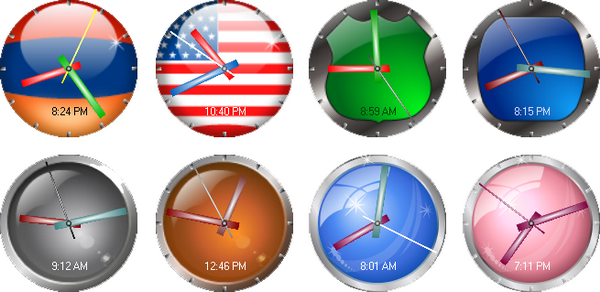
Shown here are some of Desktop Alarm Clock's dials. You can design the elements by changing their properties.
Alarming clock:

In order to have animated characters notify you about the events, your system must have a Microsoft Agent(s) installed. By default, at least one agent comes with Windows (the Merlin character). For more agents (Genie, Peedy, and Robby), you can download them from the link given below. To get the most out of the Desktop Alarm Clock, you could also download and install Text-To-Speech engine(s) for the preferred language so that the characters could pronounce the events' reminding notes. To download these components, follow this link: Microsoft Agents and Text-to-Speech engines.
Note, this is an application, and my only goal of posting it in here is to share it with the CodeProject members. I don't see a need for posting any code examples in here since I have already described in the Background section that this clock uses an analog clock control (from one of my articles) that has code examples in the demo project. For the reference, check the article in here. If you decide to get the Analog Clock control, then make sure to download the control from the external link that includes the latest version.
Background
The Desktop Alarm clock uses the Analog Clock control from one of my articles posted on The Code Project. If you decide to get the Analog Clock control, then make sure to download the control from the external link that includes the latest version. With the Analog Clock control, creating this alarm clock was very easy since the control is fully customizable. The application just paints the clock elements with different brushes to get a nicely designed clock. The rest of the functionality of the clock concerns saving and retrieving scheduled events of the alarm clock.
System Requirements
- Windows 2000 and above
- .NET Framework 3.5
Desktop Alarm Clock Information
History
Version 2.0.0.2
- Besides notifying about the events, this update adds to Desktop Alarm Clock an ability to start applications, open document files (print, view, etc.), play audio and video files, play online radio (streaming path should be provided with the Windows Media, Winamp or other players as an argument), navigate to a web page, etc.
- This version gives the user an ability to design the clock fully (every element). You are the artist of your desktop clock.
- This version of the clock gives the user the ability to set the clock size, location, etc.
- It also has a nicely designed stopwatch and ability to provide information about different time zones.
- Finally with this update, the scheduling got even more flexible. Here are the scheduling options: Sundays, Mondays, Tuesdays, Wednesdays, Thursdays, Fridays, Saturdays, Once, Daily, Weekends, AfterStart.
Version 2.1.0.2
- Some fixes for Windows Vista
This member has not yet provided a Biography. Assume it's interesting and varied, and probably something to do with programming.



 General
  News
News  Suggestion
  Question
  Bug
Bug  Answer
  Joke
Joke  Praise
  Rant
Rant  Admin
Admin 


 Submit an article or tip


 Anyway, thank you again!