Click here to Skip to main content

Track your position using a Windows Mobile 6 device

By , 29 Dec 2008
 

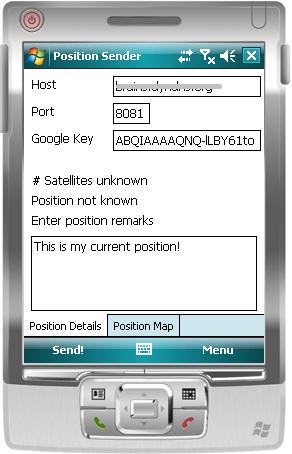
MobilePositionTracker/positiontrackermobile.JPG

Introduction

One of my hobbies besides programming for fun and my work is long-distance hiking. The favourite event of the year is the "Four Days Marches" in Nijmegen, the Netherlands. I have participated five times now, and it is really great fun to do.

One of the problems for the "supporting" people staying behind is to know where you are. You get called several times a day with the questions "where are you?" and "how long until the finish?". Well, having a mobile phone carrying a GPS and an Internet connection can solve that problem quite easily.

Binaries usage

All you need is:

  1. A WM6 SmartPhone with a GPS device on board and the possibility to connect to Internet.
  2. A PC connected to the Internet on the "home location".
  3. .NET CF 3.5 installed on the mobile phone.
  4. .NET 3.5 Framework installed on the PC.
  5. A Google Static Maps API key (distributed for free here).

The PC application

We will not dive into the details of the PC application, since that is not the subject of this article. It suffices to say that the program hosts a WCF web service, capable of consuming a set of coordinates. These coordinates are then used to call the Google Static Maps API to produce a map of the location denoted by the coordinates.

The web service's endpoint is at http://yourhost:xxx/services/positionservice.

When the program has ran once, it will have created a configuration file called AppConfig.xml. In this file, you can enter the details like hostname, port number, and the Google API key.

The mobile application

The mobile application is just an EXE which can be put on the mobile device using the usual mechanics of ActiveSync. There is no installer, so you will have to do it by hand. Once installed on the device, run the program once. In the folder where you put the EXE, you will now find AppConfig.xml, which houses the configuration.

Using the application

On the PC which will be used to track your position, startup the PositionTrackerPC program. Make sure that the configuration in the configuration file is correct. You may have to edit your firewall settings to open up the port you will use, and you may have to edit the NAT rules in your modem to get it working. I cannot help you configure that, each modem / firewall is different. So, now you have your position tracker ready running on the PC.

Now, fire up the position tracker program on the mobile device. Also here, make sure to enter the correct hostname and port number.

On the first tab, you can enter the hostname where the position tracker PC application runs, along with the port number used. Also, you enter your Google API key here (it is used on the second tab). If you are ready putting in configuration information, make sure to save it, or you will have to do it again! In the textbox, you can enter a remark, which will also show up at the PC application. Besides all this, some GPS information is shown concerning the number of satellites and the current location.

Pushing the "Send" button at the bottom will call the web service on your PC, and voila, your position will be shown!

MobilePositionTracker/positiontrackingPC.JPG

On the second tab of the application, as a bonus, you can also get the map of your current location. If the GPS is not functioning or present, the map of my location will be shown...

The internals of the mobile application

The mobile application is not very sophisticated, it is just a simple form with a tab control on it, housing two forms. There are three major technologies, interesting enough to be explained:

  1. Calling a WCF web service from a mobile device.
  2. Getting the GPS location from the GPS device.
  3. Showing a Google map using the found GPS coordinates.

Calling the WCF web service

Remember the web service endpoint from the PC application:

http://yourhost:xxx/services/positionservice

Let's, for the sake of this article, assume it is http://acme.com:8080/services/positionservice. Now, two problems arise: Visual Studio does not provide you with the tools to create a reference to the web service, and .NET 3.5 CF does not have the implementation of the ChannelFactory<TInterface> class.

So, how to do it then?

You will have to install the Power Toys for .NET Compact Framework 3.5. These tools include a command line tool called netcfSvcUtil.exe. This tool allows to generate the proxy for your web service and, in our case, is used as follows:

netcfSvcUtil.exe /language:cs http://acme.com:8080/services

This command will generate two files: PositionService.cs and CFClientBase.cs. Both of these files should be added to your project. In PositionService.cs, you must add a constructor for the PositionServiceClient to allow an endpoint URI to be passed in:

public PositionServiceClient(string endPointAddress) :
       this(CreateDefaultBinding(), 
       new System.ServiceModel.EndpointAddress(endPointAddress))
{
}

Now, you can create the PositionServiceClient using the dynamically constructed end point address from your configuration information.

//Calling it is now quite easy:
private void sendMenuItem_Click(object sender, EventArgs e)
{
    double latitude = 52.031694;
    double longitude = 5.165283;
    string uri = String.Format("http://{0}:{1}/services/PositionService", 
                               hostTextBox.Text, Convert.ToInt32(portTextBox.Text));
    PositionServiceClient client = new PositionServiceClient(uri);

    if (_position != null)
    {
        if (_position.LatitudeValid && _position.LongitudeValid)
        {
            latitude = _position.Latitude;
            longitude = _position.Longitude;
        }
    }
    client.SendPosition(latitude, longitude, remarksTextBox.Text);

    MessageBox.Show("Position sent!");
}

Getting the GPS location from the GPS device

Doing this is quite easy using the Microsoft supplied classes which wrap the native GPS API in WM6. I have included those classes in the application, and changed the namespace to match my application's one. No mistake here: all credits go to Microsoft for these very easy to use classes!

The initialization part is in the form's Load handler:

private void PositionSenderForm_Load(object sender, EventArgs e)
{
    _configuration = AppConfiguration.ApplicationConfiguration();
    
    hostTextBox.Text = _configuration.WebServiceHostName;
    portTextBox.Text = _configuration.PortNumber.ToString();
    googleAPIKey.Text = _configuration.GoogleMapAPIKey;
    
    if (!_gps.Opened)
    {
        _gps.Open();
        updateDataHandler = new EventHandler(UpdateData);
        _gps.LocationChanged += new LocationChangedEventHandler(_gps_LocationChanged);
    }
}

The call to Gps.Open turns on the GPS (if not already on) and starts looking for satellites. If the location changes, an event handler will be called to update the coordinates. It is as easy as that!

Showing a Google map using the found GPS coordinates

The last part concerns the display of a map using the GPS coordinates. Google exposes an API which makes it possible to get an image of the map centered around a set of latitude/longitude values, with a specified zoom value. A URL must be built for this using the following format:

String.Format(CultureInfo.InvariantCulture,
                    "http://maps.google.com/staticmap?center={0}," + 
                    "{1}&size={5}x{6}&markers={0},{1}," + 
                    "greenc&zoom={2}&maptype={3}&key={4}",
                    _coordinate.Latitude, _coordinate.Longitude, 
                    _zoomLevel, _mapType, _apiKey, _xSize, _ySize);

For this, the MapUrlBuilder class is used.

The code to retrieve the image is as follows:

MapUrlBuilder builder = new MapUrlBuilder();
builder.CenterCoordinate = coordinate;
builder.MapType = "mobile";
builder.ZoomLevel = 15;
builder.XSize = mapPictureBox.ClientRectangle.Width;
builder.YSize = mapPictureBox.ClientRectangle.Height;
builder.GoogleMapsAPIKey = _configuration.GoogleMapAPIKey;

LocationMap map = new LocationMap(builder.MapUrl);
mapPictureBox.Image = map.Map;

The LocationMap class retrieves the image as follows:

private Bitmap FromUrl(string url)
{
    WebRequest request = HttpWebRequest.Create(url);
    WebResponse response = request.GetResponse();
    Bitmap bmp = new Bitmap(response.GetResponseStream());
    return bmp;
}

For the complete code details, I will have to refer you to the supplied source.

Points of interest

Hopefully, I have given you some insight and some tooling to build your own great WM6 applications. I think it is a great platform which has lots of potential, especially when used with other .NET pillars like WCF.

License

This article, along with any associated source code and files, is licensed under The Code Project Open License (CPOL)

About the Author

Perry Bruins
Software Developer (Senior)
Netherlands Netherlands
Member
I'm a software engineer, working in this field since May 1989. Currently doing C# .NET development and project management using SCRUM.


Sign Up to vote   Poor Excellent
Add a reason or comment to your vote: x
Votes of 3 or less require a comment

Comments and Discussions

 
You must Sign In to use this message board.
Search this forum  
    Spacing  Noise  Layout  Per page   
Questionhow do draw line 2 point GPSmemberanasbazbaz22 Oct '12 - 22:11 
How can draw Line the coordinates, for example: (Start GPS, and End GPS)
QuestionGPS LocationmemberEid Shkhaidem2 Aug '11 - 14:12 
Hello,
thanks for that nice app, but i tried to trace the code looking about how to get (Latitude and Longtitude) parameters for my project but i couldnt!
would you please explain more about this.
i;m using windows mobile 6.5 and trying to retrieve thus parameters without using SDK.
 
thanks in advance,
AnswerRe: GPS LocationmemberPerry Bruins2 Aug '11 - 21:38 
Hi,
 
Check the file GPS.cs, this is the wrapper around the GPS device in your telephone.
 
Regards, perry
QuestionHow to 'install' the PC exe [modified]memberjkpieters26 Aug '10 - 1:15 
Hi, can you tell me how to install the PC exe. I have an XP environment with IIS 5.1.
 
What I mean is how do you get the service running, not only by running the executable I think? Earlier you mentioned a document on the web and that you prefer having the web service run as a windows service. Could you explain how to do so (the document that you mentioned is not clear to me)?
 
Regards,
 
Jan

modified on Thursday, August 26, 2010 7:26 AM

GeneralTrack your position using a Windows Mobile 6 devicememberadcreature27 Jul '10 - 17:01 
Hello Perry,
 
I really like the idea in this article and i'm also trying to implement similar concept in my project. I'd download the source code, edited the required fields i.e. hostname, port number and also update my settings on my modem but still i'm facing problem running the application. Might be my settings are wrong so can you please provide me with working version of code so that i can understand properly that how the code and application are working.
 
Thanks a lot in advance and looking forwords to hear from you soon.
 
Regards,
Sanjeev Maharjan
GeneralRe: Track your position using a Windows Mobile 6 devicememberPerry Bruins28 Jul '10 - 1:32 
Hello Sanjeev,
 
Thanks for you interest in my article!
 
Last time I checked myself, the code was working properly, So I am guessing there is something wrong in your setup or parameters. Can you provide me with a description of your setup (e.g. equipment, OS version(s), etc) and a detailed description of the messages you are getting while running the whole thing (on phone AND PC).
 
Thanks and regards,
 
Perry
GeneralRe: Track your position using a Windows Mobile 6 devicememberadcreature29 Jul '10 - 17:57 
hello perry,
 
here i'm providing you with my settings,
hostname: sankalpa.dyndns.org
port : 8080
 
i'm using htc touch diamond phone.
 
and error messages in phone are
 
PositionSenderMobile.exe
EndpointNotFoundException
An error message is available for this exception but cannot be displayed because these messages are optional and are not currently installed on this device. Please install ‘NETCFv35.Messages.EN.wm.cab’ for Windows Mobile 5.0 and above or ‘NETCFv35.Messages.EN.cab’ for other platforms. Restart the application to see the message.
 
at System.ServiceModel.Channels.HttpChannelUtilities.ProcessGetResponseWebException(WebException webException, HttpWebRequest request, HttpAbortReason abortReason)
at System.ServiceModel.Channels.HttpChannelFactory.HttpRequestChannel.HttpChannelRequest.WaitForReply(TimeSpan timeout)
at System.ServiceModel.Channels.RequestChannel.Request(Message message, TimeSpan timeout)
at System.ServiceModel.Channels.RequestChannel.Request(Message message)
at Microsoft.Tools.ServiceModel.CFClientBase`1.getReply(Message msg)
at Microsoft.Tools.ServiceModel.CFClientBase`1.Invoke[TREQUEST,TRESPONSE](CFInvokeInfo info, SendPositionRequest request)
at PositionServiceClient.SendPosition(SendPositionRequest request)
at PositionServiceClient.SendPosition(Double latitude, Double longitude, String remarks)
at PositionSenderMobile.PositionSenderForm.sendMenuItem_Click(Object sender, EventArgs e)
at System.Windows.Forms.MenuItem.OnClick(EventArgs e)
at System.Windows.Forms.Menu.ProcessMnuProc(Control ctlThis, WM wm, Int32 wParam, Int32 lParam)
at System.Windows.Forms.Form.WnProc(WM wm, Int32 wParam, Int32 lParam)
at System.Windows.Forms.Control._InternalWnProc(WM wm, Int32 wParam, Int32 lParam)
at Microsoft.AGL.Forms.EVL.EnterMainLoop(IntPtr hwnMain)
at System.Windows.Forms.Application.Run(Form fm)
 
i guess u can figure it out. Can you let me know if i need to do any further setups
 
Thanks again in advance.
 
Regards,
Sanjeev
GeneralRe: Track your position using a Windows Mobile 6 devicememberPerry Bruins29 Jul '10 - 19:54 
Hi Sanjeev,
 
Thanks for sending the details of your error message.
 
It seems that the WCF call to your PC webservice does not find its endpoint. Area's where to look:
 
1) Check if the PC application is running. The PC app itself hosts the webservice, so if it is not running it will not be found.
2) Check your router configuration. In order for this to work the port on which the PC app is listening must be madde reachable to the outside world. Generally this requires some firewall configuration to map the port on your intranet to the IP address on the outside world. Since there are many brands/types of routers out there, I cannot give you advice on this because each has its own means of configuration.
 
If you have all this in place, it should work.
 
Please let me know if you get any further with this, I am always glad to help out.
 
Regards, Perry
GeneralRe: Track your position using a Windows Mobile 6 devicememberadcreature31 Jul '10 - 6:49 
Hello Perry,
 
Thanks for your previous response.
 
As you said, I have gone through all router settings and as far as i know, all router firewall settings are right. I forgot to mention last time that while running netcfsvcutil.exe /language:cs http://sankalpa.dyndns.org:8080/services, i'm getting error: cannot obtain metadata from http://sankalpa.dyndns.org:8080/services. Do i need to run this command in my computer or it's already included in you binary code application???
 
and also i'm getting following error messages from mobile.
 
PositionSenderMobile.exe
EndpointNotFoundException
There was no endpoint listening at http://sankalpa.dyndns.org:8080/services/PositionService that could accept the message. This is often caused by an incorrect address or SOAP action. See InnerException, if present, for more details.
 
at System.ServiceModel.Channels.HttpChannelUtilities.ProcessGetResponseWebException(WebException webException, HttpWebRequest request, HttpAbortReason abortReason)
at System.ServiceModel.Channels.HttpChannelFactory.HttpRequestChannel.HttpChannelRequest.WaitForReply(TimeSpan timeout)
at System.ServiceModel.Channels.RequestChannel.Request(Message message, TimeSpan timeout)
at System.ServiceModel.Channels.RequestChannel.Request(Message message)
at Microsoft.Tools.ServiceModel.CFClientBase`1.getReply(Message msg)
at Microsoft.Tools.ServiceModel.CFClientBase`1.Invoke[TREQUEST,TRESPONSE](CFInvokeInfo info, SendPositionRequest request)
at PositionServiceClient.SendPosition(SendPositionRequest request)
at PositionServiceClient.SendPosition(Double latitude, Double longitude, String remarks)
at PositionSenderMobile.PositionSenderForm.sendMenuItem_Click(Object sender, EventArgs e)
at System.Windows.Forms.MenuItem.OnClick(EventArgs e)
at System.Windows.Forms.Menu.ProcessMnuProc(Control ctlThis, WM wm, Int32 wParam, Int32 lParam)
at System.Windows.Forms.Form.WnProc(WM wm, Int32 wParam, Int32 lParam)
at System.Windows.Forms.Control._InternalWnProc(WM wm, Int32 wParam, Int32 lParam)
at Microsoft.AGL.Forms.EVL.EnterMainLoop(IntPtr hwnMain)
at System.Windows.Forms.Application.Run(Form fm)
at PositionSenderMobile.Program.Main()
 

Thanks and hope to get right direction once again.
 
Regards,
Sanjeev
GeneralRe: Track your position using a Windows Mobile 6 devicememberPerry Bruins3 Aug '10 - 0:18 
Ji Sanjeev,
 
Just te get things running you do not need to use the netsvcutil tool. This tool is only used to create a proxy for the webservice for the mobile platform. The sources already include this file.
 
Anyways, all messages you are sending point to the fact that the PC application is not running while you are trying to access the webservce. Before you do anything, make sure that the application is running on your PC. You can verify that by trying to access the webservice via internet explorer (use the same address, it should give you a HTML page which is generated by the webservice itself).
 
Regards, Perry
GeneralRe: Track your position using a Windows Mobile 6 devicememberadcreature4 Aug '10 - 6:11 
Hello Perry,
 
Guess what?? Finally it's working. Thanks a lot perry for your time and help. Now i'll start going thru your source code and try to understand them, if i'll need any further help understanding your code, i'll write to you again.
 
Till then thanks once again and have G'Day.
 
Cheers,
Sanjeev
GeneralQueries on this paper for my projectmemberSushreeta12 May '10 - 23:56 
Hey Perry,
I am trying to do this as my project in my university.
I have a lot of queries.
I would like to know if you could help me out.
 
Regards
GeneralRe: Queries on this paper for my projectmemberPerry Bruins13 May '10 - 3:39 
Hi Sushreeta,
 
Nice to hear that my article is being used for university. I am not blessed with enormous amounts of free time. Therefore, you can try asking me your questions and I will try to find the time to answer them.
 
Maybe it is better to do this offline using email?
 
Regards, Perry
GeneralRe: Queries on this paper for my projectmemberSushreeta14 May '10 - 16:35 
wht will my hostname be? do i have to use IIS and make my PC a web server? if so how do i do it?
 
and can u give me a brief description of whts happening? why are we using the WCF?
i had been surfing about how to track one's mobile positon and i found applications like mologogo and loopt which do the same thing i guess...
 
i m confused about all this rite now..
i have downloaded the binaries and sources...but the positiontrackerPC is not showing me any coordinates..
 
even on the windows mobile that my friend has...the power toys is not working...
could you please let me know more on this?
 
thankyou for all your time....

Regards,
Sushreeta
Questionwhat wud be the host namememberMember 369370110 May '10 - 19:56 
I want the google map to display on my .net 2008 WM emulator. I ve tried the PC project, it gives me no output. I dont kno what the hostname shud be. I tried my machine ip there but no output. Any suggesion??
AnswerRe: what wud be the host namememberPerry Bruins11 May '10 - 3:59 
Hi,
 
If the only thing you want is to display the map on your mobile device, it is sufficient to enter a valid Google Static Maps API key. The hostname / portnumber is only used when you press the "send" button.
 
It is already a long time ago since I posted this article, so I am not sure if the google system is still the same...
 
Regards, Perry
GeneralStand alone WCF servicememberEssam Helmy15 Nov '09 - 4:47 
Hi Perry,
Very nice idea I compiled it through VS2008 and running excellent. Big Grin | :-D
 
My question is how to make PositionService stand alone service loaded automatically by IIS?
 
thanks
Essam
GeneralRe: Stand alone WCF servicememberPerry Bruins15 Nov '09 - 20:27 
Hi Essam,
 
The option to host the webservice standalone is perfectly described in the next article on MSDN:
http://msdn.microsoft.com/en-us/library/bb332338.aspx[^]
 
You can choose either to go for IIS, or a Windows Service (the latter is what I prefer, but that is a personal choice).
 
Regards, Perry
GeneralRe: Stand alone WCF servicememberEssam Helmy17 Nov '09 - 6:16 
Hi Perry,
thank u for the article, it help me to isolate the web service from the PositionTrackerPC. I succeed to run it on IIS, so PositionTrackerPC using now the PositionService as client service.
 
I don't know how to make web service's event PositionChanged notify the PositionTrackerPC. Is there some way to do it?
 
regards,
Essam
GeneralNot working...memberWerk139 Nov '09 - 21:18 
Hello!
 
First, let me say i like your code very much, but i am not able to get it to work!D'Oh! | :doh:
First, i am using htc with wm 6.5,the app runs succesfully on it, but when i push send it crashes with the following error:
 
TypeLoadException
 
at
PositionSenderMobile.PositionSenderForm.sendMenuItem_Click(Object sender,EventArgs e)
at
.......(seven more at...)
 
and at the end
at
PositionSenderMobile.Progrm.Main()
 
*********************************
Any idea???
 
Thanks again!
GeneralRe: Not working...memberPerry Bruins10 Nov '09 - 3:22 
Hey Hello!
 
I cannot make up out of your comments what the problem can be. Can you share the complete stacktrace with me? Then I can pinpoint the exact location to see what is happening.
 
P.S. Are you also running the PC app when testing this?
 
Regards, Perry
GeneralRe: Not working...memberWerk1310 Nov '09 - 21:39 
Hello again!
 
As i said, i get the following errors:
 
****************************************************************************************
 
TypeLoadException
 
at
PositionSenderMobile.PositionSenderForm.sendMenuItem_Click(Object sender,EventArgs e)
at
System.Windows.Forms.MenuItem.Onclick(EventArgs e)
at
System.Windows.Forms.Menu.ProcessMnuProc(Control ctlThis,WM wm,Int32 wParam,Int32 IParam)
at
System.Windows.Forms.Form.WnProc(WM wm,Int32 wParam,Int32 IParam)
at
System.Windows.Forms.Control._InternalWnProc(WM wm,Int32 wParam,Int32 IParam)
at
Microsoft.AGL.Forms.EVL.EnterMainLoop(IntPtr hwnMain)
at
System.Windows.Forms.Application.Run(Form fm)
at
PositionSenderMobile.Progrm.Main()
*************************************************************************************
 
This is the full error report (i hope i wrote it correctly D'Oh! | :doh: D'Oh! | :doh: ),and it does not matter if i run the pc app or not...
 
Maybe i have wrong setting??The settings are:
 
Host: my pc name (did not know what to put here... Sleepy | :zzz: Sleepy | :zzz: )
Port: 8081
Google key: got it from google for the next www: http://www.aptrans-adriatico.com
 
My device is HTC Touch HD (wm 6.5), my pc is running win 7.
 
Thank you for your help!!!!!
 
Jure
GeneralRe: Not working...memberPerry Bruins11 Nov '09 - 1:20 
Hi again!
 
This Typeload exception (I would have appreciated line numbers, but if they are not there, they are not there Smile | :) ) can be thrown if you do not have right version of .NET on your device (program was written using .NET CF 3.5). The program uses WCF to call the webservice, WCF is only supported from .NET CF 3.5. Can you check that?
 
I have a HTC Pharos (P3470) running WM6 Professional. It might also be that it has to do with you running WM 6.5 ... I cannot check that since I have no device available to check that.
 
Regards, Perry
GeneralRe: Not working...memberWerk1311 Nov '09 - 1:54 
Yes, i have netcf 3.5 on my device...what about the host,how should i set it (maybe the problem is here)
 
Thanks!
 
Jure
GeneralRe: Not working...memberPerry Bruins15 Nov '09 - 20:04 
Hi Jure,
 
Host is the same, you should have .NET 3.5. Also make sure that you have opened up the port for your service in the windows firewall. Again, the typeload exception could indicate version problems in .NET CF on your device. It might also be that you have a newer version of windows mobile... Icannot test that since I do not have such a device available.
 
Regards, Perry

General General    News News    Suggestion Suggestion    Question Question    Bug Bug    Answer Answer    Joke Joke    Rant Rant    Admin Admin   

Permalink | Advertise | Privacy | Mobile
Web01 | 2.6.130523.1 | Last Updated 29 Dec 2008
Article Copyright 2008 by Perry Bruins
Everything else Copyright © CodeProject, 1999-2013
Terms of Use
Layout: fixed | fluid