Click here to Skip to main content

Applying Observer Pattern in .NET Remoting

By , 10 Dec 2002
 

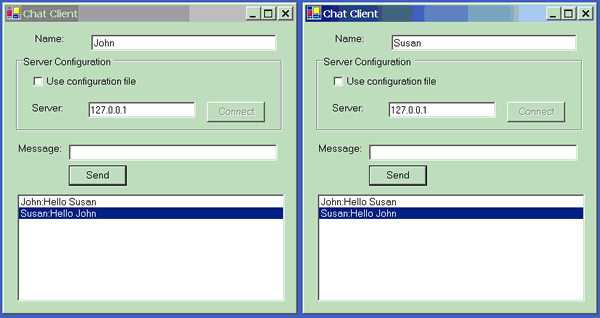
Sample Image - ChatClients.gif

Introduction

.NET Remoting allows objects or applications to communicate with one another in object oriented way. The applications can reside on the same computer or different computer. This article demonstrates the use of .NET Remoting to create simple client and server chat applications utilizing the Observer pattern.

The chat application consists of multiple clients and one server. The client, as shown above, is a GUI application, and the server is a console application. When a client sends a message, the message is routed to the server, and the server broadcasts the message to all of the connected clients.

This type of client and server relationships can be modelled by the observer pattern. Observer pattern also known as "publish and subscribe" design pattern, introduced by Gang of Four see Design Patterns: Elements of Reusable Object Oriented Software by E. Gamma, R. Helm, R. Johnson and J. Vlissides, defines a one-to-many dependency between a subject (observable) and any number of observers. When the subject changes state, all of its observers are notified and updated automatically. In response, each observer will query the subject to synchronize its state with the subject's state.

Observer Pattern

The following class diagram shows the relationship between the Subject and the Observer. The Subject may have one or more Observers, and it provides an interface to attaching and detaching the observer object at run time. The observer provides an update interface to receive signal from the subject. The ConcreteSubject stores the subject state interested by the observers, and it sends notification to it's observers. The ConcreteObserver maintains reference to a ConcreteSubject, and it implements an update operation.

The following collaboration diagram describes the interactions between the above objects in more detail. The ConcreteSubject notifies its observers whenever a change occurs that could make its observers' state inconsistent with its own. After being informed of a change in the concrete subject, a ConcreteObserver object may query the subject for information. ConcreteObserver uses this information to reconcile its state with that of Subject.

In C#, the subject and the observer interfaces can be defined as follows:

namespace Patterns.Observer
{
	public interface ISubject
	{
		void Attach( IObserver observer );
		void Detach( IObserver observer );

		bool Notify( string objType, short objState );
	}

	public interface IObserver
	{
		bool Update( ISubject sender, string objType, 
                             short objState );
	}
}

.NET Remoting

.NET remoting defines two types of objects activation, server activation and client activation. Server activated objects are created by the server when they are needed. There are two types of server activated objects, Singleton, and Single Call. Singleton objects are objects for which there will always be only one instance, regardless of how many clients there are for that object, and which have a default lifetime. SingleCall objects are created on each client method invocation. Therefore the lifetime of the SingleCall object is for the duration of the client call. Client-activated objects are objects whose lifetimes are controlled by the calling application domain, just as they would be if the object were local to the client.

Single Call objects are stateless where as Singleton objects share state for all clients. Client-activated objects maintain state on per-client basis. The client and server chat applications in this article use the Singleton server activation mode.

Any object can be changed into a remote object by deriving it from MarshalByRefObject. When a client activates a remote object, it receives a proxy to the remote object. All operations on this proxy are appropriately indirected to enable the remoting infrastructure to intercept and forward the calls appropriately.

The following classes, the ChatServerObject and ChatClientObject, inherit from MarshalByRefObject, and implements ISubject and IObserver respectively. These classes are created following the ConcreteSubject and ConcreteObserver classes as explained in the Observer Pattern section. ChatClientObject implements IObserver, therefore it can call the Attach function of ChatServerObject in order to register itself to the server, ChatServerObject. The member variable of ChatServerObject, clients contains the list of observers or ChatClientObject objects registered to ChatServerObject.

namespace ChatApplication
{
   public class ChatServerObject : MarshalByRefObject, ISubject
   {
      private ArrayList clients = new ArrayList(); 

      public void SetValue( string clientData )
      {
         Notify( clientData, 0 );
      }
         
      public void Attach( IObserver client )
      {
         Console.WriteLine( "observer attached" );
         clients.Add( client );         
      }

      public void Detach( IObserver client )
      {
         clients.Remove( client );
      }

      public bool Notify( string clientData, short objState )
      {
         for ( int i = 0; i < clients.Count; i++ )
            ((IObserver) clients[i]).Update( this, clientData, objState );

         return true;
      }
   }

   public class ChatClientObject : MarshalByRefObject, IObserver
   {
      private ArrayList newData = new ArrayList(); 

      public bool Update( ISubject sender, string data, short objState )
      {
         newData.Add( data );
         return true;
      }

      public int GetData( out string[] arrData )
      {
         int len = 0;

         arrData = new String[newData.Count];
         newData.CopyTo( arrData );
         newData.Clear();
         len = arrData.Length;

         return len;
      }

   }
}

Now we will create a server that hosts the ChatServerObject object. As mentioned above, the server is a console application. If /config is passed as the argument, the server will load the configuration from "server.config" file. Otherwise, it will configure the remoting parameters at run time.

At run time, it must first create a channel for communication between the subject and the observers, or the server and the clients. Channels are used to transport messages to and from remote objects. When a client calls a method on a remote object, the parameters, as well as other details related to the call, are transported through the channel to the remote object. Any results from the call are returned back to the client in the same way. A client can select any of the channels registered on the "server" to communicate with the remote object, A channel is a type that takes a stream of data, creates a package according to a particular network protocol, and sends the package to another computer. The channel can be one directional or bidirectional. .NET framework comes with two types of channels, TcpChannel and HttpChannel. In this application, the TCP channel is used, and it listens to port 9000.

After the TCP channel is created, it must be registered by calling ChannelServices.RegisterChannel( chan ). Then, the object type ChatApplication.ChatServerObject is registered by calling the function, RemotingConfiguration.RegisterWellKnownServiceType as an object Type on the service end as one that can be activated on request from a client. The last parameter of this call specifies that the activation type is Singleton.

class ChatServer
{
   [STAThread]
   static void Main(string[] args)
   {
      if ( args.Length == 1 )
      {
         if ( args[0].CompareTo("/config") == 0 )
         {
            RemotingConfiguration.Configure( "server.config" );
         }
      }
      else
      {
         TcpChannel chan = new TcpChannel( 9000 );
         ChannelServices.RegisterChannel( chan );
         RemotingConfiguration.RegisterWellKnownServiceType( 
            typeof(ChatApplication.ChatServerObject), 
            "ChatServer", WellKnownObjectMode.Singleton );
      }

      System.Console.WriteLine( "Hit <enter> to exit..." );
      System.Console.ReadLine();
   }
}		

The configuration file is in the XML form. The server configuration file "server.config" specifies the application name as "ChatServer". The service is well known service type "Singleton", and its URI is "Chatserver". The client can specify this URI when connecting to this object. In the "channel" element, port 9000, and "TCP" channel type are defined.

The default lifetime of this object is specified using the element. "leaseTime" attribute specifies the initial span of time that an object will remain in memory before the lease manager begins the process of deleting the object. The default is 5 minutes.

<configuration>
  <system.runtime.remoting>
    <application name="ChatServer">
      <service>
	<wellknown mode="Singleton" 
           type="ChatServerObject, ChatObjects" objectUri="Chatserver" />
      </service>
      <channels>
        <channel port="9000" ref="tcp" />
      </channels>
      <lifetime leaseTime="1M" renewOnCallTime="2M" />
    </application>
  </system.runtime.remoting>
</configuration>

The process of initializing the client application is very similar. The client application can load the remoting parameters contained in the configuration file, or or it can configure them at run time. To configure the remoting parameters at run time, the user can press the "Connect" button, and the following code will be executed.

It first checks whether the "use configuration" check box is checked. If it is, load the configuration from the file. Otherwise, register the TCP channel for communication with the server. A value of zero is passed in to TcpChannel to indicate full-duplex or bidirectional communication. The same as the server application above, the channel must be registered. The Activator.GetObject function call creates a proxy of the remoting object. In this case, it creates a proxy of type ChatApplication.ChatServerObject.

private void buttonConnect_Click(object sender, System.EventArgs e)
{
    if ( useConfigCheckBox.Checked )
    {
       RemotingConfiguration.Configure( "client.config" );

       chatServer = new ChatApplication.ChatServerObject();
    }
    else
    {
       if ( textServer.Text.Length <= 0 )
       {
          MessageBox.Show( "Please enter the target server name or address" );
          return;
       }
    
       chan = new TcpChannel(0);
       ChannelServices.RegisterChannel( chan );

       string url = String.Format( "tcp://{0}:9000/ChatServer", 
                                   textServer.Text );
       chatServer = (ChatApplication.ChatServerObject) 
                    Activator.GetObject( typeof( 
                      ChatApplication.ChatServerObject ), url );
    }            

       if ( chatServer == null )
          MessageBox.Show( "Could not locate server" );
       else
       {
          chatClient = new ChatApplication.ChatClientObject();

          try
          {
              chatServer.Attach( chatClient );
              buttonConnect.Enabled = false;
          }
          catch( SocketException sockExp )
          {
             MessageBox.Show( sockExp.Message );              
          }
       }                           
   }		
}

The client application has a timer which executes TimerOnTick function every 500 ms. The TimerOnTick function simply call chatClient.GetData function to retrieve all of the data from chatClient and then display them to the list.

void TimerOnTick( object obj, EventArgs ea )
{
    if ( chatClient != null )
    {
       string[] arrData;
       chatClient.GetData( out arrData );

       for ( int i = 0; i < arrData.Length; i++ )
          listData.Items.Add( arrData[i] );

       listData.SelectedIndex = listData.Items.Count-1;
    }
}

Summary

This article is an overview of .NET remoting. It shows how to develop a distributed application using .NET remoting, and applying the observer pattern in the process. I hope you enjoy this article as much as I enjoyed writing it.

License

This article has no explicit license attached to it but may contain usage terms in the article text or the download files themselves. If in doubt please contact the author via the discussion board below.

A list of licenses authors might use can be found here

About the Author

Liong Ng
Web Developer
United States United States
Member
No Biography provided

Sign Up to vote   Poor Excellent
Add a reason or comment to your vote: x
Votes of 3 or less require a comment

Comments and Discussions

 
You must Sign In to use this message board.
Search this forum  
    Spacing  Noise  Layout  Per page   
Questionis it really observer pattern?memberAby Paul Varghese4 Apr '09 - 7:46 
Is it really the observer pattern? if so, why the client uses a timer to check for the message in the server?. As per my understanding the client should be automatically informed about the changes in the server whenever there is a change in the 'subject' in the server.
GeneralMistake in server.config AND security.exceptionmembermooglie3 Feb '05 - 1:08 
<configuration>
     <system.runtime.remoting>
          <application name="ChatServer">
               <service>
                    <wellknown mode="Singleton" type="ChatApplication.ChatServerObject, ChatObjects" objectUri="ChatServer" />
               </service>
               <channels>
                    <channel port="9000" ref="tcp">
                         <clientProviders>
                              <formatter ref="binary" />
                         </clientProviders>
                         <serverProviders>
                              <formatter ref="binary" typeFilterLevel="Full" />
                         </serverProviders>
                    </channel>
               </channels>
               <lifetime leaseTime="1M" renewOnCallTime="2M" />
          </application>
     </system.runtime.remoting>
</configuration>
 
Marcoset
QuestionRe: Mistake in server.config AND security.exceptionmemberwolfshad325 Nov '07 - 5:47 
i get this with your config(VS2008beta2):
 
[quote]
Unhandled Exception: System.Net.Sockets.SocketException: Only one usage of each
socket address (protocol/network address/port) is normally permitted
at System.Net.Sockets.Socket.DoBind(EndPoint endPointSnapshot, SocketAddress
socketAddress)
at System.Net.Sockets.Socket.Bind(EndPoint localEP)
at System.Net.Sockets.TcpListener.Start(Int32 backlog)
at System.Net.Sockets.TcpListener.Start()
at System.Runtime.Remoting.Channels.ExclusiveTcpListener.Start(Boolean exclus
iveAddressUse)
at System.Runtime.Remoting.Channels.Tcp.TcpServerChannel.StartListening(Objec
t data)
at System.Runtime.Remoting.Channels.Tcp.TcpServerChannel.SetupChannel()
at System.Runtime.Remoting.Channels.Tcp.TcpServerChannel..ctor(Int32 port)
at System.Runtime.Remoting.Channels.Tcp.TcpChannel..ctor(Int32 port)
at ChatApplication.ChatServer.Main(String[] args)
[/quote]
GeneralProblem in connecting to server over network...memberKiranmayee30 Sep '04 - 3:56 
Hi,
 
today I tried to connect to the server.exe over our internal network and it failed. I am etting the error


************** Exception Text **************
System.Security.SecurityException: Security error.
at ChatClient.Form1.buttonConnect_Click(Object sender, EventArgs e)
at System.Windows.Forms.Control.OnClick(EventArgs e)
at System.Windows.Forms.Button.OnClick(EventArgs e)
at System.Windows.Forms.Button.OnMouseUp(MouseEventArgs mevent)
at System.Windows.Forms.Control.WmMouseUp(Message& m, MouseButtons button, Int32 clicks)
at System.Windows.Forms.Control.WndProc(Message& m)
at System.Windows.Forms.ButtonBase.WndProc(Message& m)
at System.Windows.Forms.Button.WndProc(Message& m)
at System.Windows.Forms.ControlNativeWindow.OnMessage(Message& m)
at System.Windows.Forms.ControlNativeWindow.WndProc(Message& m)
at System.Windows.Forms.NativeWindow.Callback(IntPtr hWnd, Int32 msg, IntPtr wparam, IntPtr lparam)
 

************** Loaded Assemblies **************
mscorlib
Assembly Version: 1.0.3300.0
Win32 Version: 1.0.3705.6018
CodeBase: file:///c:/winnt/microsoft.net/framework/v1.0.3705/mscorlib.dll
----------------------------------------
System
Assembly Version: 1.0.3300.0
Win32 Version: 1.0.3705.6018
CodeBase: file:///c:/winnt/assembly/gac/system/1.0.3300.0__b77a5c561934e089/system.dll
----------------------------------------
System.Drawing
Assembly Version: 1.0.3300.0
Win32 Version: 1.0.3705.6018
CodeBase: file:///c:/winnt/assembly/gac/system.drawing/1.0.3300.0__b03f5f7f11d50a3a/system.drawing.dll
----------------------------------------
ChatClient
Assembly Version: 1.0.1046.32062
Win32 Version: 1.0.1046.32062
CodeBase: file://tbgindev016/src3/ChatClient.exe
----------------------------------------
System.Windows.Forms
Assembly Version: 1.0.3300.0
Win32 Version: 1.0.3705.6018
CodeBase: file:///c:/winnt/assembly/gac/system.windows.forms/1.0.3300.0__b77a5c561934e089/system.windows.forms.dll
----------------------------------------
System.Runtime.Remoting
Assembly Version: 1.0.3300.0
Win32 Version: 1.0.3705.6018
CodeBase: file:///c:/winnt/assembly/gac/system.runtime.remoting/1.0.3300.0__b77a5c561934e089/system.runtime.remoting.dll
----------------------------------------
ChatObjects
Assembly Version: 1.0.1046.32007
Win32 Version: 1.0.1046.32007
CodeBase: file://tbgindev016/src3/ChatObjects.DLL
----------------------------------------
PatternsLib
Assembly Version: 1.0.1046.30662
Win32 Version: 1.0.1046.30662
CodeBase: file://tbgindev016/src3/PatternsLib.DLL
----------------------------------------
 
************** JIT Debugging **************
To enable just in time (JIT) debugging, the config file for this
application or machine (machine.config) must have the
jitDebugging value set in the system.windows.forms section.
The application must also be compiled with debugging
enabled.
 
For example:


When JIT debugging is enabled, any unhandled exception
will be sent to the JIT debugger registered on the machine
rather than being handled by this dialog.


Can someone help me out?
 
we are planning to use this as a base for a more advanced application
 
Kiranmayee
Hyderabad
GeneralProblem in connecting to server over network...sussAnonymous30 Sep '04 - 3:43 
Hi,
 
today I tried to connect to the server.exe over our internal network and it failed. I am etting the error


************** Exception Text **************
System.Security.SecurityException: Security error.
at ChatClient.Form1.buttonConnect_Click(Object sender, EventArgs e)
at System.Windows.Forms.Control.OnClick(EventArgs e)
at System.Windows.Forms.Button.OnClick(EventArgs e)
at System.Windows.Forms.Button.OnMouseUp(MouseEventArgs mevent)
at System.Windows.Forms.Control.WmMouseUp(Message& m, MouseButtons button, Int32 clicks)
at System.Windows.Forms.Control.WndProc(Message& m)
at System.Windows.Forms.ButtonBase.WndProc(Message& m)
at System.Windows.Forms.Button.WndProc(Message& m)
at System.Windows.Forms.ControlNativeWindow.OnMessage(Message& m)
at System.Windows.Forms.ControlNativeWindow.WndProc(Message& m)
at System.Windows.Forms.NativeWindow.Callback(IntPtr hWnd, Int32 msg, IntPtr wparam, IntPtr lparam)
 

************** Loaded Assemblies **************
mscorlib
Assembly Version: 1.0.3300.0
Win32 Version: 1.0.3705.6018
CodeBase: file:///c:/winnt/microsoft.net/framework/v1.0.3705/mscorlib.dll
----------------------------------------
System
Assembly Version: 1.0.3300.0
Win32 Version: 1.0.3705.6018
CodeBase: file:///c:/winnt/assembly/gac/system/1.0.3300.0__b77a5c561934e089/system.dll
----------------------------------------
System.Drawing
Assembly Version: 1.0.3300.0
Win32 Version: 1.0.3705.6018
CodeBase: file:///c:/winnt/assembly/gac/system.drawing/1.0.3300.0__b03f5f7f11d50a3a/system.drawing.dll
----------------------------------------
ChatClient
Assembly Version: 1.0.1046.32062
Win32 Version: 1.0.1046.32062
CodeBase: file://tbgindev016/src3/ChatClient.exe
----------------------------------------
System.Windows.Forms
Assembly Version: 1.0.3300.0
Win32 Version: 1.0.3705.6018
CodeBase: file:///c:/winnt/assembly/gac/system.windows.forms/1.0.3300.0__b77a5c561934e089/system.windows.forms.dll
----------------------------------------
System.Runtime.Remoting
Assembly Version: 1.0.3300.0
Win32 Version: 1.0.3705.6018
CodeBase: file:///c:/winnt/assembly/gac/system.runtime.remoting/1.0.3300.0__b77a5c561934e089/system.runtime.remoting.dll
----------------------------------------
ChatObjects
Assembly Version: 1.0.1046.32007
Win32 Version: 1.0.1046.32007
CodeBase: file://tbgindev016/src3/ChatObjects.DLL
----------------------------------------
PatternsLib
Assembly Version: 1.0.1046.30662
Win32 Version: 1.0.1046.30662
CodeBase: file://tbgindev016/src3/PatternsLib.DLL
----------------------------------------
 
************** JIT Debugging **************
To enable just in time (JIT) debugging, the config file for this
application or machine (machine.config) must have the
jitDebugging value set in the system.windows.forms section.
The application must also be compiled with debugging
enabled.
 
For example:


When JIT debugging is enabled, any unhandled exception
will be sent to the JIT debugger registered on the machine
rather than being handled by this dialog.


Can someone help me out?
 
we are planning to use this as a base for a more advanced application
GeneralDifferent Error in .net 1.1membersatanfuck217 Jun '04 - 3:57 
This doesnt work at all for me, when you click "Connect" I get the following error that occurs at chatserver.Attach(chatClient);
 
************** Exception Text **************
System.Runtime.Remoting.RemotingException: Cannot load type ChatServerObject, ChatObjects.
 
Server stack trace:
   at System.Runtime.Remoting.RemotingConfigInfo.LoadType(String typeName, String assemblyName)
   at System.Runtime.Remoting.RemotingConfigInfo.GetServerTypeForUri(String URI)
   at System.Runtime.Remoting.RemotingConfigHandler.GetServerTypeForUri(String URI)
   at System.Runtime.Remoting.RemotingServices.GetServerTypeForUri(String URI)
   at System.Runtime.Remoting.Channels.BinaryServerFormatterSink.ProcessMessage(IServerChannelSinkStack sinkStack, IMessage requestMsg, ITransportHeaders requestHeaders, Stream requestStream, IMessage& responseMsg, ITransportHeaders& responseHeaders, Stream& responseStream)
 
Exception rethrown at [0]:
   at System.Runtime.Remoting.Proxies.RealProxy.HandleReturnMessage(IMessage reqMsg, IMessage retMsg)
   at System.Runtime.Remoting.Proxies.RealProxy.PrivateInvoke(MessageData& msgData, Int32 type)
   at ChatApplication.ChatServerObject.Attach(IObserver client)
   at ChatClient.Form1.buttonConnect_Click(Object sender, EventArgs e)
   at System.Windows.Forms.Control.OnClick(EventArgs e)
   at System.Windows.Forms.Button.OnClick(EventArgs e)
   at System.Windows.Forms.Button.OnMouseUp(MouseEventArgs mevent)
   at System.Windows.Forms.Control.WmMouseUp(Message& m, MouseButtons button, Int32 clicks)
   at System.Windows.Forms.Control.WndProc(Message& m)
   at System.Windows.Forms.ButtonBase.WndProc(Message& m)
   at System.Windows.Forms.Button.WndProc(Message& m)
   at System.Windows.Forms.ControlNativeWindow.OnMessage(Message& m)
   at System.Windows.Forms.ControlNativeWindow.WndProc(Message& m)
   at System.Windows.Forms.NativeWindow.Callback(IntPtr hWnd, Int32 msg, IntPtr wparam, IntPtr lparam)

GeneralRe: Different Error in .net 1.1membersatanfuck217 Jun '04 - 4:16 
Oh I see, the zip had the wrong name in the server.config file. Once I changed it to
 
<wellknown mode="Singleton" type="ChatApplication.ChatServerObject, ChatObjects" objectUri="Chatserver" />
 
I get the good old error below. I followed the link someone posted about a fix to this adding:
 
BinaryServerFormatterSinkProvider prov = new BinaryServerFormatterSinkProvider();
prov.TypeFilterLevel = System.Runtime.Serialization.Formatters.TypeFilterLevel.Full;
Hashtable props = new Hashtable();
props.Add("port",0);
chan = new TcpChannel(props,null,prov);
ChannelServices.RegisterChannel( chan );
 
but of course that doesnt work either.
 
Has anyone gotten this to work at all? I am trying to write a different type of remoting application and I just want some working examples to use as reference, but it seems every example I find, doesnt work.
 
Thanks
 
************** Exception Text **************
System.Runtime.Serialization.SerializationException: Because of security restrictions, the type System.Runtime.Remoting.ObjRef cannot be accessed. ---> System.Security.SecurityException: Request failed.
   at System.Security.SecurityRuntime.FrameDescSetHelper(FrameSecurityDescriptor secDesc, PermissionSet demandSet, PermissionSet& alteredDemandSet)
   at System.Runtime.Serialization.FormatterServices.nativeGetSafeUninitializedObject(RuntimeType type)
   at System.Runtime.Serialization.FormatterServices.GetSafeUninitializedObject(Type type)
   --- End of inner exception stack trace ---
 
Server stack trace:
   at System.Runtime.Serialization.FormatterServices.GetSafeUninitializedObject(Type type)
   at System.Runtime.Serialization.Formatters.Binary.ObjectReader.ParseObject(ParseRecord pr)
   at System.Runtime.Serialization.Formatters.Binary.ObjectReader.Parse(ParseRecord pr)
   at System.Runtime.Serialization.Formatters.Binary.__BinaryParser.ReadObjectWithMapTyped(BinaryObjectWithMapTyped record)
   at System.Runtime.Serialization.Formatters.Binary.__BinaryParser.ReadObjectWithMapTyped(BinaryHeaderEnum binaryHeaderEnum)
   at System.Runtime.Serialization.Formatters.Binary.__BinaryParser.Run()
   at System.Runtime.Serialization.Formatters.Binary.ObjectReader.Deserialize(HeaderHandler handler, __BinaryParser serParser, Boolean fCheck, IMethodCallMessage methodCallMessage)
   at System.Runtime.Serialization.Formatters.Binary.BinaryFormatter.Deserialize(Stream serializationStream, HeaderHandler handler, Boolean fCheck, IMethodCallMessage methodCallMessage)
   at System.Runtime.Remoting.Channels.CoreChannel.DeserializeBinaryRequestMessage(String objectUri, Stream inputStream, Boolean bStrictBinding, TypeFilterLevel securityLevel)
   at System.Runtime.Remoting.Channels.BinaryServerFormatterSink.ProcessMessage(IServerChannelSinkStack sinkStack, IMessage requestMsg, ITransportHeaders requestHeaders, Stream requestStream, IMessage& responseMsg, ITransportHeaders& responseHeaders, Stream& responseStream)
 
Exception rethrown at [0]:
   at System.Runtime.Remoting.Proxies.RealProxy.HandleReturnMessage(IMessage reqMsg, IMessage retMsg)
   at System.Runtime.Remoting.Proxies.RealProxy.PrivateInvoke(MessageData& msgData, Int32 type)
   at ChatApplication.ChatServerObject.Attach(IObserver client)
   at ChatClient.Form1.buttonConnect_Click(Object sender, EventArgs e)
   at System.Windows.Forms.Control.OnClick(EventArgs e)
   at System.Windows.Forms.Button.OnClick(EventArgs e)
   at System.Windows.Forms.Button.OnMouseUp(MouseEventArgs mevent)
   at System.Windows.Forms.Control.WmMouseUp(Message& m, MouseButtons button, Int32 clicks)
   at System.Windows.Forms.Control.WndProc(Message& m)
   at System.Windows.Forms.ButtonBase.WndProc(Message& m)
   at System.Windows.Forms.Button.WndProc(Message& m)
   at System.Windows.Forms.ControlNativeWindow.OnMessage(Message& m)
   at System.Windows.Forms.ControlNativeWindow.WndProc(Message& m)
   at System.Windows.Forms.NativeWindow.Callback(IntPtr hWnd, Int32 msg, I
GeneralRe: Different Error in .net 1.1sussGerardo R.28 Jul '05 - 8:44 
Hi,
 
The problem is typeFilterLevel. You need:
 
BinaryServerFormatterSinkProvider tpfProvider = new BinaryServerFormatterSinkProvider();
tpfProvider.TypeFilterLevel = TypeFilterLevel.Full;
BinaryClientFormatterSinkProvider clientProv = new BinaryClientFormatterSinkProvider();
IDictionary props = new Hashtable();
props["port"] = 8900; // Port can be 0 or other port number
chan1 = new TcpChannel( props, clientProv, tpfProvider );
ChannelServices.RegisterChannel( chan1 );
GeneralRe: Different Error in .net 1.1sussAnonymous1 Aug '05 - 12:42 
where should I make this change?
Thanx
GeneralRe: Different Error in .net 1.1sussGerardo R.1 Aug '05 - 16:29 
For example in:
TcpChannel chan = new TcpChannel( 9000 );
ChannelServices.RegisterChannel( chan );
 

GeneralRe: Different Error in .net 1.1membernagimo4 Aug '05 - 22:37 
I do all like this, but it's still the same error
GeneralEvent in .NET Framework 1.1memberwolfibender31 May '04 - 5:00 
hi
 
in .NET Framework there are a few changes in security behavior, so it is nearly unpossible to implement events in remote objects. also the possibility to control every client is very useful, maybe you want to send a message to someone special.
 
so i searched a lot, but this is definitly the best and shortest code for remote event handling! (in .NET framework 1.1)
 
thank you
GeneralTcpChannel into HttpChannelmembertechnologydude9 Oct '03 - 4:55 
I have converted the TcpChannel into HttpChannel, but when i attach the chatClient it gives me the following exception
 
An unhandled exception of type 'System.Runtime.Remoting.RemotingException' occurred in mscorlib.dll
 
Additional information: System.ArgumentNullException: No message was deserialized prior to calling the DispatchChannelSink.
Parameter name: requestMsg
at System.Runtime.Remoting.Channels.DispatchChannelSink.ProcessMessage(IServerChannelSinkStack sinkStack, IMessage requestMsg, ITransportHeaders requestHeaders, Stream requestStream, IMessage& responseMsg, ITransportHeaders& responseHeaders, Stream& responseStream)
at System.Runtime.Remoting.Channels.BinaryServerFormatterSink.ProcessMessage(IServerChannelSinkStack sinkStack, IMessage requestMsg, ITransportHeaders requestHeaders, Stream requestStream, IMessage& responseMsg, ITransportHeaders& responseHeaders, Stream& responseStream)
at System.Runtime.Remoting.Channels.Http.HttpServerTransportSink.ServiceRequest(Object state)
at System.Runtime.Remoting.Channels.SocketHandler.ProcessRequestNow()

 
PLEASE HELP ME ON THIS.
GeneralLooking for an event-based similar samplemembermanfbraun21 Jul '03 - 1:49 
Hi All,
 
this is not directly related to this sample, but more a question to these, having more experience with remoting. I wanted just add a console-client and felt, becuase the interface don't fire and event. So I am for a similar example with events. If someone knows.....
 
Ciao,
mb
GeneralRe: Looking for an event-based similar samplememberHenry Bruce16 Jun '06 - 10:57 
Try http://www.codeproject.com/csharp/TwoWayRemoting.asp
 

GeneralError in .NET 2003sussAnonymous30 May '03 - 7:11 
I tried to use your example in .NET 2003 and I recognized the following problem.
 
When the Chatclient tries to the ChatServer, the following error appears:
 
An unhandled exception of type 'System.Runtime.Serialization.SerializationException' occurred in mscorlib.dll
 
Additional information: Because of security restrictions, the type System.Runtime.Remoting.ObjRef cannot be accessed.
 
Could you have an idea?
GeneralRe: Error in .NET 2003memberJan Tielens3 Jun '03 - 5:34 
Hi,
 
There is a solution for your problem, click here: http://weblogs.asp.net/jan/posts/8106.aspx
 
In the 1.1 framework a security setting has changed, that causes this problem. For more info, follow the link!
 
Jan
GeneralRe: Error in .NET 2003membercmdunlop1 Aug '05 - 5:35 
I try it
but can't to solve program(visual studio .net 2003,but 2002 can be run).
so I debug break in chatclient.cs
ex:
try
{
chatServer.Attach( chatClient );
buttonConnect.Enabled = false;
}
in chatServer.Attach( chatClient );
show error
 
An unhandled exception of type 'System.Runtime.Serialization.SerializationException' occurred in mscorlib.dll
 
Additional information: Because of security restrictions, the type System.Runtime.Remoting.ObjRef cannot be accessed.
 
this message.
 
please help me solve this question!
GeneralRe: Uhm this article is certainly not the solutionmemberboneheadIII29 Apr '03 - 11:28 
"Refer to Advanced .NET Remoting written by Ingo Rammer."
 
Ummm gosh, you mean the web site that has a direct link to this article?
GeneralDesign patterns over a networkmemberJohn Rayner3 Dec '02 - 7:05 
Very interesting article. It's good to see more and more people adopting design patterns, on CP and elsewhere. And it's also good to see CP articles on Remoting.
 
However, I'm not sure that design patterns should be applied in a straightforward way to Remoting situations. After all, the GoF book implies that they were mainly intended for object interactions within an app. In your code, for instance, the client actually has to set itself up as a "server" in order that it can receieve remote calls, viz when its Update method is called. Not only does this add to the work required to install the app, but also means the app will be affected by things like firewalls.
 
Basically I think that your article serves as a good demonstration of the Observer pattern, but that this pattern isn't really suited to a chat client-server app.
GeneralRe: Design patterns over a networkmemberLiong3 Dec '02 - 8:19 
Thanks for your comment. Just to clarify, the client-server app described in this article is not intended to be a commercial grade application. For example, I did not include the thread syncronization code, because it might distract the readers from the main point. Also, this app is not intended to be used across firewalls.
 
However, I am very interested to know what design pattern is best suited to the client-server application such as this ?
 
Thanks!
GeneralRe: Design patterns over a networkmemberJohn Rayner3 Dec '02 - 8:36 
I'm not really sure what is the best design pattern. My point was just that design patterns are suited to a particular problem domain and the GoF patterns are all about what goes within a single app. There really ought to be patterns for client-server and other problem domains (e.g. web, distributed apps, etc), but I'm afraid I don't know what they are ....
GeneralRe: Design patterns over a networkmemberManuel Permuy3 Dec '02 - 12:48 
The broker pattern is suited for distributed, message delivery systems. e.g. http://www.vico.org/pages/PatronsDisseny/Pattern%20Broker
 
To solve problems with firewalls, using of HTTP based solution that are triggered only from the client side, is mostly sufficient today, but HTTP filtering firewalls is comming soon, thanks to trojan horses programmers that are using it, too...
 
What would be interesting is to see .NET code to do P2P communication, like eDonkey.
 

QuestionEvents?sussAnonymous25 Nov '02 - 8:58 
Does this have an advantage over using delegates and events? It seems like more-or-less the same thing.
AnswerRe: Events?memberLiong26 Nov '02 - 11:28 
Sure, it can also be done by using delegates and events. However, I have not done a comparison study to come up with the advantages and disadvantages. May be somebody has done it ?

General General    News News    Suggestion Suggestion    Question Question    Bug Bug    Answer Answer    Joke Joke    Rant Rant    Admin Admin   

Permalink | Advertise | Privacy | Mobile
Web01 | 2.6.130523.1 | Last Updated 11 Dec 2002
Article Copyright 2002 by Liong Ng
Everything else Copyright © CodeProject, 1999-2013
Terms of Use
Layout: fixed | fluid
