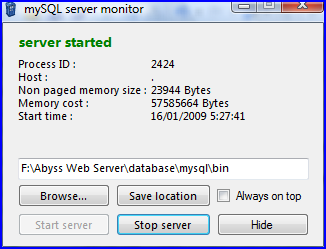
Introduction
This article is an example of monitoring a process. It will look for a running process and can start and stop the process, too.
Background
If you are using MySQL 5 as a database server, you already know that there are no icons that show whether the server is running or not. You can look at the task manager, but perhaps you want to shutdown the server because the development session is over and the server uses so much memory (about 50 MB). If you installed the server as a service, you can stop the service, but you must have administrator privileges. If MySQL is not run as a service, you can execute a program to start and stop the server and this article contains the code to easily do that.
Using the code
To use this code, you need the MySQL server software that can be downloaded from www.mysql.com[^], but in reality, any software will do. This just an example.
The program works by monitoring the existence of a running process that you can check with the Windows Task Manager.

As shown in the figure, the MySQL server process is named mysqld.exe. To monitor the process, this code is executed periodically with a Timer event as follows:
private void timer1_Tick(object sender, EventArgs e)
{
Process[] server = Process.GetProcessesByName("mysqld");
if (server.Length != 0)
{
bool stat = true;
if (serverStat != stat)
{
OnRaiseServerEvent(new serverEventArgs(true));
serverStat = stat;
}
}
else
{
bool stat = false ;
if (serverStat != stat)
{
OnRaiseServerEvent(new serverEventArgs(false));
serverStat = stat;
}
}
}
Starting the server is easy; just execute mysqld.exe and it's done. Unfortunately you can't simply stop the process to shutdown the server. Well, it could be done, but an internal error might occur inside the server. To stop the server, you should instead execute: mysqladmin.exe --user=root shutdown.
To start the server:
FileInfo fi = new FileInfo(appPath + "\\mysqld.exe");
if (fi.Exists)
    Process.Start(fi.FullName);
else
    errorProvider1.SetError(txtPath, "this isn't mysql installation directory");
Similarly, to stop the server:
FileInfo fi = new FileInfo (appPath + "\\mysqladmin.exe");
if (fi.Exists)
    Process.Start(fi.FullName, "--user=root shutdown");
else
    errorProvider1.SetError(txtPath, "this isn't mysql installation directory");
Points of Interest
This code is useful if you are running MySQL server. You can start and stop the server by clicking a button, rather than by typing from a command prompt. You can also click on a button installed in the system tray as shown in the following image.
I'm currently a student of Brawijaya University. I work on programming just for hobby. I learn programming since 2nd year of my college. That's when I first bought my PC on year 2004.



 General
  News
News  Suggestion
  Question
  Bug
Bug  Answer
  Joke
Joke  Praise
  Rant
Rant  Admin
Admin 


 Submit an article or tip


 Thanks for this.
