Introduction
This article will introduce you to a new Visual Studio 2005/2008 add-in that can be used for Web Parts generation based on a prepared ASCX control/template. The add-in should allow Web Part developers to easily make Web Parts using the Visual Studio HTML designer. It should save you a lot of time and make Web Part development an enjoying experience even for beginners.
This article is written in the form of a step-by-step tutorial. It will give beginners a chance to successfully make, deploy, and try their first Web Parts, and will save some time for advanced users as you can always run into challenges when working with SharePoint.
Background
A year ago, we released the first version of this Web Parts generator. The first version was made as a console application and its source code is hosted on CodePlex. I also posted an article here on CodeProject, explaining how that console application should be used for Web Parts generation (Base class for skinned Web Parts and generator tool).
I promised that we'll make a Visual Studio add-in to make the Web Parts development process even faster, and I kept my promise.
Using the add-in
This section will show how the add-in should be used for Web Parts generation, how a Visual Studio solution should be created before development starts, and how the developed solution can be deployed and tested.
Preparing a new Visual Studio solution
We will start by preparing a new Visual Studio solution. In order to be able to follow the steps from this section, you'll need to have a development environment with these installed:
- MOSS 2007
- Visual Studio 2005 with Service Pack 1 (or 2008)
- Visual Studio Extensions for Windows SharePoint Services (you can download it from here)
- The Visual Studio add-in that you can download from this page
Please follow these steps in order to prepare a new Visual Studio solution that will host Web Parts and their skins:
- Start Visual Studio and select "File" --> "New" --> "Project".
- Select the "Web Part" template from the list of available templates, as in this screenshot:

- Enter the name of your project, the name of your solution, select the "Create directory for solution" option, and click on the OK button. You will get a new solution with a "Web Part" project.
- You will notice that the "Web Part" template already created a Web Part with the same name as the name you entered for your Web Part project. We will now remove that Web Part as we want to use this project for multiple Web Parts. To remove the Web Part, you should right click on the sub-folder that holds the Web Part and choose "Delete" from the context menu as in the next screenshot:
- We will now add a new project to Visual Studio to hold the skins/templates for our Web Parts. To do that, select "File" --> "New" --> "Project". Then, select "Class Library" from the list of templates, enter a name for this new project, choose the "Add to Solution" option, and click on the "OK" button as in the next screenshot:
- Visual Studio will create a class called "Class1" because we selected the "Class Library" template. We will now delete that class and prepare it for skins/templates hosting. You should right click on "Class1.cs" and choose "Delete" from the context menu as shown:
- Now, right click on your "Class Library" project and choose "Add" --> "New Folder". Enter "Themes" for folder name, and then create a sub-folder below that folder and name it "default". You should now have a structure like in this screenshot:
Creating a skin/template for our Web Part
- We will now create our first skin/template for a new Web Part. Right click on the "default" folder and choose the "Add New Item" option. Choose "Text File", enter a name for the skin/template with the extension ASCX, and click on the "Add" button as in the next screenshot:
- You should now have a structure like in this screenshot:
- Double click your ASCX file and enter some HTML into it. The following screenshot shows a simple skin/template with a
Label, a TextBox, a Button, and a few more plain HTML controls:
Creating the initial version of the Web Part
We will first create a new Web Part that will be used only as a placeholder for the Web Part that will be generated later.
- To create a new Web Part, you should right click on your "Web Part" project and select "Add" --> "New Item":
- Then, choose "Web Part" from the list of templates, enter a name for your Web Part, and click on the "Add" button:
Please notice that although this is just a placeholder for the Web Part that will follow, you should enter the name of your Web Part as you want it to be named later.
At this point, you should have a structure like in this screenshot:
and the source code of the placeholder Web Part should be like this:
Web Part generation
We now have all the projects prepared and a placeholder Web Part ready. To generate your first Web Part based on a previously prepared skin/template, you should follow these steps:
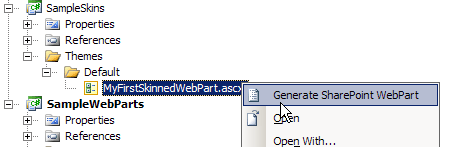
- Right click on your skin/template and choose "Generate SharePoint WebPart":
- Click on the "..." button to the right of the "Output WebPart file" field:
- Navigate to the Web Part placeholder that you created in one of the previous steps and select that file. You should see a warning message saying that you will overwrite an existing file. You should just confirm that you want to proceed:
- Enter the appropriate value for "Namespace" and click on the "Generate" button:
- Click on the "Web Part" project and then select the "Show All Files" option in Solution Explorer's toolbar:
- You should see a new file named the same way as your Web Part but with ".generated." in the file name. Right click on that file and choose the "Include In Project" option:
You should now have a structure like this:
You can optionally modify your project to have the ".generated." file be dependent on the original file. You can do that if you go to the file system, locate and edit the ".csproj" file for your "Web Part" project, and modify the "include" line for the ".generated." file. An example of a section that includes this file in my sample is:
and an example of a modified section is:
If you make it dependent, then the project structure should look like this:
Preparing for deployment and testing
Follow these steps to prepare an environment for deployment and testing:
- Download ASPNETLibrary.SharePoint.WebParts.dll from here.
- Right click on the solution in Solution Explorer and choose "Add" --> "New Solution Folder" as shown:
- Enter "ExternalLibraries" for the solution folder name:
- Open Windows Explorer, navigate to the solution folder on the file system, and create a folder with the same name in the root of the solution's folder:
- Extract the downloaded DLL into the "ExternalLibraries" folder on the file system.
- Go back to Visual Studio, right click on the solution folder, choose "Add" --> "Existing Item", navigate to th location where you downloaded ASPNETLibrary.SharePoint.WebParts.dll, and select the DLL. You should now have a structure in Visual Studio like this:
- Right click on the "References" node under your "Web Part" project and choose the "Add Reference" option:
- Select the "Browse" tab, navigate to the "ExternalLibraries" folder on the file ,system and choose the extracted DLL:
- You should now have ASPNetLibrary.SharePoint.WebParts.dll in the list of references. Check if your references list looks like this:
- Now, double click on the Web Part class file and enter some code. In this example, we will subscribe to the
Button.Click event of our single button, and will set some text into the text box when the button is clicked:
- Open Internet Explorer and navigate to the website where you'll deploy the Web Parts and test them.
- Click on "View All Site Content":
- Click on the "Create" button:
- Select "Document Library" from the list of definitions:
- Enter "Themes" for the document library name and click on the "Create" button:
- Click on "New" and then "Folder":
- Enter "default" as the folder name and click on "OK".
- Select the "default" folder:
- Select "Upload" and then the "Upload Document" option:
- Browse to the folder that holds your skin/template and select the skin/template that you previously created. You should now have the skin/template in the "Thems\default" folder:
- Go to the root folder of your MOSS IIS website and open the web.config file. This folder is usually here: "c:\inetpub\wwwroot\wss\VirtualDirectories\PORT" where PORT is the port number of your IIS website:
- Locate the "
SafeControls" section and add this line before the closing the "SafeControls" tag: <SafeControl Assembly="ASPNETLibrary.SharePoint.WebParts, Version=1.0.0.1, Culture=neutral, PublicKeyToken=fbf2c912531db231" Namespace="ASPNETLibrary.SharePoint.WebParts" TypeName="*" Safe="True" />. - You should now have the
SafeControls section in the web.config like this:
- Open Windows Explorer and navigate to "c:\Windows\Assembly". Open another Windows Explorer and navigate to your "ExternalLibraries" folder. Drag and drop "ASPNETLibrary.SharePoint.WebParts.dll" from "ExternalLibraries" to "c:\Windows\Assembly":
Deploying Web Parts
We are now ready to deploy our first Web Part. To do that, follow these steps:
- Right click on the "Web Part" project and choose the "Deploy" option:
- The deployment process will start and you should see the following messages in the left bottom corner of the Visual Studio window when the deployment is successfully completed:
- Open Internet Explorer and navigate to your MOSS website.
- Select "Site Actions" and then "Edit Page":
- Click on "Add a Web Part":
- Locate your Web Part in the list of Web Parts, select the check box next to it, and click on the "Add" button:
- You should now see your Web Part:
- To test its functionality, click on the "Submit" button, and if all the previous steps were performed correctly, then you should see a text box filled-in with the "Hello world!" message:
Source code and other resources
The complete source code for this add-in and the related DLLs is located on CodePlex.



 General
  News
News  Suggestion
  Question
  Bug
Bug  Answer
  Joke
Joke  Praise
  Rant
Rant  Admin
Admin 


 Submit an article or tip


