Introduction
This multipart series of articles is intended to help you get ramped up with SharePoint customizations. It's about modifying the default SharePoint user experience, list forms customization, branding, skinning SharePoint portals, etc. When I looked around the “SharePoint Landscape”, I noticed the lack of documented experiences in the SharePoint customization area, and thus this multipart series of articles was born.
Prerequisites
First, you need to have skills in .NET development and in particular ASP.NET development. You should also have basic understanding of JavaScript, SharePoint, and how to use it from the User Interface, and of course, you should have some experience in using the SharePoint customization tool (SharePoint Designer).
Trick #1 : Hiding the List View Toolbar Menu Items!
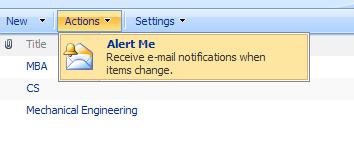
I've gone through SharePoint projects on different scales; a common requirement among most of these projects is hiding some menu items that are implemented by default within the framework of SharePoint. The obvious choice from the SDK is HideCustomAction! After digging through the web, I found out the following:
- The "HideCustomAction" feature can merely hide the items which have been rendered through the "CustomAction" framework features such as Site Actions and Site Setting etc.
- ECB (Context Menu) items are rendered by JavaScript from the Core.js file so we can't hide them via the "HideCustomAction" feature. However, you can add a new menu item in the ECB menu through the "CustomAction" feature and hide it again through the "HideCustomAction" feature. In other words, the "HideCustomAction" feature can be used to hide the ECB menu items that you created via CustomAction, but can't be used to hide the out of the box menu items.
- The ListViewWebPart menu items (New menu, Upload menu, Actions menu, … etc.) are rendered through a class library as a web control from the Microsoft.SharePoint.dll, so they can't be hidden through the "HideCustomAction" feature.
Hmm, I thought of delving back into the world of JavaScript, and I came up with some generic functions that can be used to hide any menu item in SharePoint, and I decided to share them with the community.
hideListViewToolbarItems("Edit in Datasheet", "export to Spreadsheet",
"view rss feed","settings:create view");
function hideListViewToolbarItems()
{
var menuItem;
var menuItemName;
var menuItemIndex=-1;
var menuItemNames=new Array("edit in datasheet",
"open with windows explorer",
"connect to outlook",'export to spreadsheet','view rss feed','alert me'
,"create column","settings:create view","list settings",
"document library settings","explorer view","all documents",
"all items","modify this view",
"view:create view","new document",
"new item","new folder","upload document",
"upload multiple documents");
var menuItems = new Array("EditInGridButton",
"OpenInExplorer","OfflineButton",
"ExportToSpreadsheet","ViewRSS",
"SubscribeButton","AddColumn",
"AddView","ListSettings","ListSettings",
"View1","DefaultView",
"DefaultView","ModifyView","CreateView",
"New0","New0",
"NewFolder","Upload","MultipleUpload");
var allMenuItems = document.getElementsByTagName('ie:menuitem');
for(var i = 0; i < hideListViewToolbarItems.arguments.length; i++ )
{
menuItemName= hideListViewToolbarItems.arguments[i].toLowerCase();
for (j=0; j < menuItemNames.length; j++)
{
if(menuItemNames[j]==menuItemName)
{
menuItemIndex = j;
break;
}
}
menuItem=menuItems[menuItemIndex];
for (var l = 0; l < allMenuItems.length; l++)
{
if(menuItemName.indexOf(":")!=-1)
{
menuItemName = menuItemName.split(":")[1];
}
if (allMenuItems[l].id.indexOf(menuItem)!=-1
&& allMenuItems[l].text.toLowerCase() == menuItemName)
{
var parentNodeOfMenuItem = allMenuItems[l].parentNode;
parentNodeOfMenuItem.removeChild(allMenuItems[l]);
break;
}
}
}
}
You can use this function to hide any menu item rendered in the ListViewWebPart toolbar which is used in the list view pages. Just call the function and pass the menu item names (comma separated) as they appear in the toolbar, ignoring the case. Only one exception to that: when you need to hide "Create View" which appears twice, once in "List Settings", and then in the view selector. In order to resolve this conflict, just call the function as follows: hideListViewToolbarItems("settings:create view") or hideListViewToolbarItems("view:create view").
Ayman El-Hattab is a Regional Technology Solution Professional focusing on helping software professionals and organizations build better SharePoint Solutions using Microsoft Application Lifecycle Management (ALM) technologies and tools. Ayman has been in this role since 2010 and has presented at many conferences all over the Middle East & Africa about ALM, SharePoint, C#, asp.net and Business Intelligence technologies. Ayman is also a Microsoft Most Valuable Professional [SharePoint MVP] , ALM Ranger, published author and an enthusiastic speaker who enjoys working with the online and offline developer communities all over the world. Ayman is the founder of MEA ALM Community & SharePoint4Arabs, community lead at Egypt SharePoint User Group and an organizer of several SharePoint Saturday events. Outside of work, Ayman can be found watching soccer games, playing xbox or watching documentary movies.



 General
  News
News  Suggestion
  Question
  Bug
Bug  Answer
  Joke
Joke  Praise
  Rant
Rant  Admin
Admin 


 Submit an article or tip


