Introduction
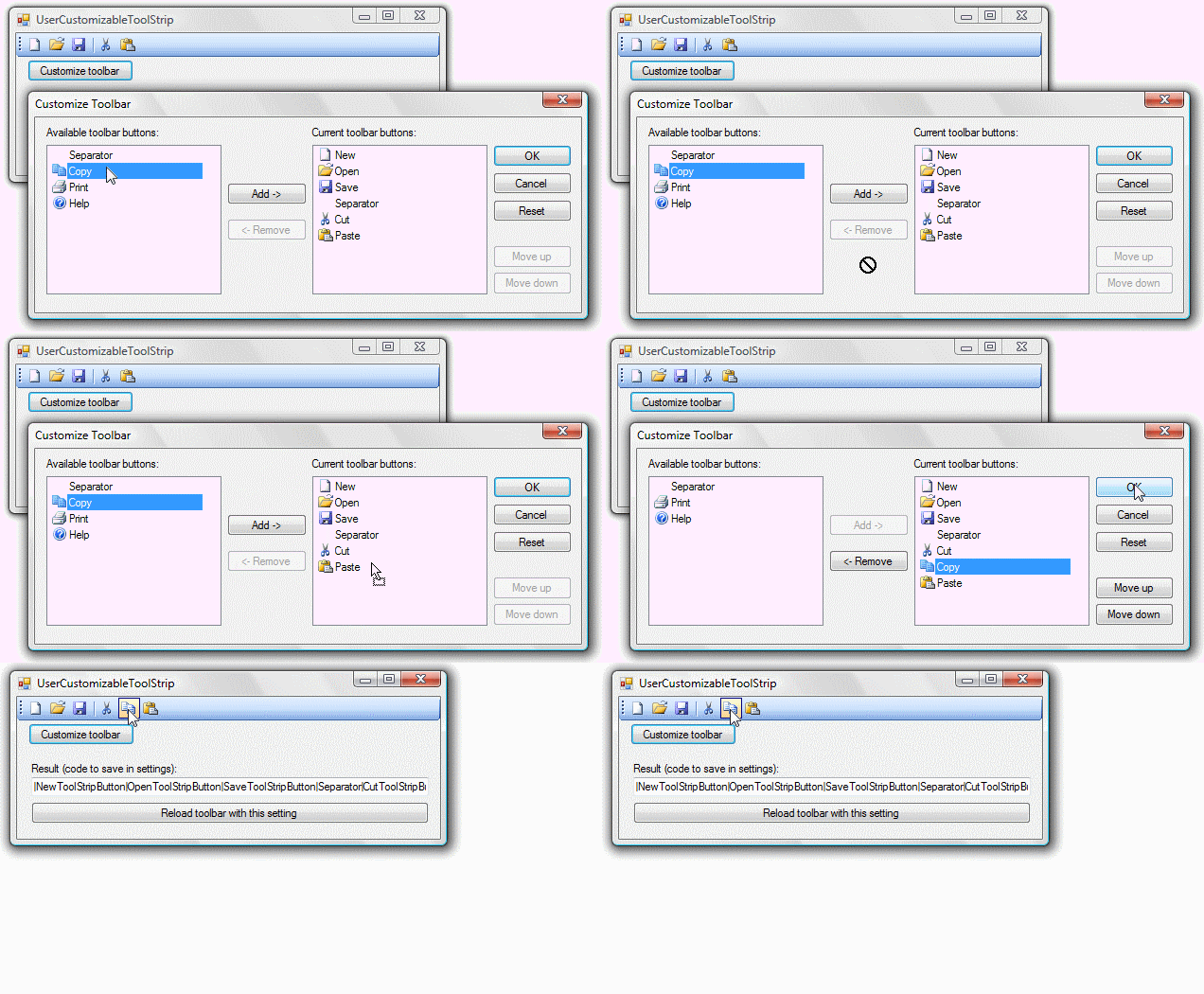
With this library, written in VB.NET, you can add a 'Customize Toolbar' function to your application.
Background
I needed a customize toolbar function in my application, but I really couldn't find any library for .NET to implement this. So, I decided to write my own and share it to help others.
Using the Code
Add a reference to the DLL file. In the DLL, there is a class named CustomizeToolStrip. To use the library, you should make an instance of this class. Then you can set three things:
ToolStrip - The ToolStrip you want a customize function forLanguageStrings - A Dictionary with strings used in the dialogDefaultSetting - A String containing the code which is used when the user clicks the Reset button
To show the customize dialog, use ShowDialog(). This is a function which returns a String which you can save in your settings.
The second function is to reload the ToolStrip if you have saved the result of the ShowDialog() function. The ToolStrip is reloaded with the buttons/separators as the code in the String says.
Implementing the Customize Toolbar Function
If you just want to add the functionality with the basic functions, this code will do the complete job. Add it to the handler of a button, for example.
Dim t As UserCustomizableToolStrip.CustomizeToolStrip
t.ToolStrip = ToolStrip1
Dim chosenSetting = t.ShowDialog()
Then, you can save chosenSetting in My.Settings, for example. When loading your application, you can reload the ToolStrip again (assuming your Setting is called ToolStripSetting):
Dim t As UserCustomizableToolStrip.CustomizeToolStrip
t.ToolStrip = ToolStrip1
t.UpdateToolStripWithString(My.Settings.ToolStripSetting)
Adding a DefaultSetting to Enable the Reset Button
If you wish to add a Reset button, you obviously need to supply a default value in case the Reset button is clicked. This is a code as described above.
Adding a LanguageStrings to Use Another Language
In case you need to change the wording in the dialog, you can set other Strings in the LanguageStrings, which is a Dictionary. For example, a Dutch version would be:
Dim lang As New Dictionary_
	(Of UserCustomizableToolStrip.CustomizableToolStripLanguageStrings, String)

lang.Add(UserCustomizableToolStrip.CustomizableToolStripLanguageStrings.Add, _
	"Toevoegen ->")

lang.Add(UserCustomizableToolStrip.CustomizableToolStripLanguageStrings._
	AvailableToolBarButtons, "Beschikbare items:")
lang.Add(UserCustomizableToolStrip.CustomizableToolStripLanguageStrings.Cancel, _
	"Annuleren")
lang.Add(UserCustomizableToolStrip.CustomizableToolStripLanguageStrings._
	CurrentToolBatButtons, "Huidige items:")

lang.Add_
    (UserCustomizableToolStrip.CustomizableToolStripLanguageStrings.MoveDown, "Omlaag")
lang.Add(UserCustomizableToolStrip.CustomizableToolStripLanguageStrings.MoveUp, "Omhoog")
lang.Add(UserCustomizableToolStrip.CustomizableToolStripLanguageStrings.OK, "OK")
lang.Add(UserCustomizableToolStrip.CustomizableToolStripLanguageStrings.Remove, _
	"<- Verwijderen")
lang.Add(UserCustomizableToolStrip.CustomizableToolStripLanguageStrings.Reset, _
	"Beginwaarden")
lang.Add(UserCustomizableToolStrip.CustomizableToolStripLanguageStrings.Separator, _
	"Scheidingsteken")
lang.Add(UserCustomizableToolStrip.CustomizableToolStripLanguageStrings.TitleBar, _
	"Werkbalk aanpassen")
lang.Add(UserCustomizableToolStrip.CustomizableToolStripLanguageStrings.WarningText, _
	"Weet u zeker dat u de werkbalk wilt herstellen naar de beginwaarden?")
lang.Add(UserCustomizableToolStrip.CustomizableToolStripLanguageStrings.WarningTitle, _
	"Werkbalk aanpassen")

t.LanguageStrings = lang
More About the Code of the Chosen Setting
The code that the ShowDialog function returns (and which you have to supply for the Reset button) has a very simple lay-out:
|Item1|Item2|Item3|...
Each item (Item1, ...) corresponds to either a ToolStripItem or equals the word Separator. The order of the items is the order of which the buttons and separators appear in the ToolStrip.
Points of Interest
I'm only 14 years old, and I'm happy I managed to write this code. If you use this component in your application, please let me know about it. I'd love to see my component in action.
Bugs/Notes/etc.
- Please do not use the word 'Separator' as the name of any of your
ToolStripItems - Not implemented - Nothing
References
History
- 21-05-2010
- Rewritten most of the code, enhancing the simplicity of the use
- 06-02-2009
- Reset button
.Name used instead of .Tag (you don't have to specify the .Tag properties anymore)- Fixed some issues with the demo
- 02-02-2009
This member has not yet provided a Biography. Assume it's interesting and varied, and probably something to do with programming.



 General
  News
News  Suggestion
  Question
  Bug
Bug  Answer
  Joke
Joke  Praise
  Rant
Rant  Admin
Admin 


 Submit an article or tip


 .
. I kind of thought you didn't know about it, 'cause i'm sure you would've used it otherwise.