Introduction
A few days ago
Tweety
asked me how you would go about rotating an Image object. The reply seemed
simple enough, use the Transform property of your Graphics object with a
Matrix object
having the appropriate Rotate method called on it. But I forgot about one
aspect regarding the transforms, while it is easy to rotate the Image, you have
to jump through hoops to get it to rotate correctly and still remain in somewhat
the same location.
Since I was disgusted from looking at the same non-working code for the past
two weeks this was a welcome vacation.
My first attempt
I wanted to take what seemed the obvious way to do this, so I started messing
around with the Rotate/RotateAt methods and trying to figure out what the
equation to create the proper translation should be. Unfortunately I could
never figure out the proper formula. Looking over my previous drawings
something did occur to me, I could figure out the size of the smallest possible
rectangle in which the rotated bitmap would fit, or the bounding box.
My second attempt or Ah ha!
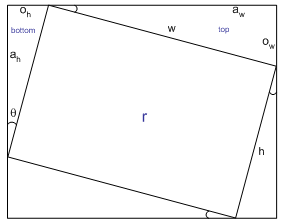
Given an angle of rotation, theta, and knowing the width and height of the
original bitmap I can figure out the size of the triangles of 'empty space'.
Some basic trig identities are used to calculate the lengths of the sides of
the triangles. Assuming a right triangle, then:
cos(theta) = length(adjacent)/length(hypotenuse)
sin(theta) = length(opposite)/length(hypotenuse)
Solving for the unknown you get:
length(adjacent) = cos(theta) * length(hypotenuse)
length(opposite) = sin(theta) * length(hypotenuse)
Since we have a known theta and hypotenuse we can calculate the
length of the other two sides of each triangle. To make it clear, the
length of the hypotenuse is either the width or the height of the original
rectangle, r.
Now looking at the diagram we can see that the width of the bounding box will
be oh + aw and the height of the bounding box will be ah
+ ow. I'll leave it as an exercise for the reader to come up
with the proof that shows why there are only at most two different sized
triangles for any rectangle r in the above diagram.
Also looking at the diagram it became obvious what the coordinates of each
corner of the bitmap would be for the rotation, now if only I had a way to
specify the coordinates of each corner when drawing an image...what do you know,
I do!
Graphics.DrawImage(Image image, Point[] destPoints);
destPoints is a 3 element array of Point objects, which defines
a parallelogram. The three points you need to pass in define where the
upper-left corner, the upper-right corner, and the lower-left corner of the
original image should be drawn. With this one method you can perform scales and
rotations easily.
The last part to take into consideration is that the above portions only work
when the angle of rotation is between 0 and 90 degrees, or 0 and PI/2 radians.
But handling rotations greater than that is easy, by using the absolute value of
the values of cos(theta) and sin(theta) the first rotation of 90
degrees will cause the return to go from 0 to 1 and the next rotation causes it
to go from 1 to 0, repeating forever which is the behavior we desire. The
only tricky part is that each time you rotate 90 degrees the height and width
need to switch, else you'll be calculating values based on the wrong hypotenuse.
While the bitmap is rotating, the points used differ for each quadrant theta
is in, so when calculating the points I had to break it up based on that
condition.
In the code snippet before 7 values are used, nWidth and
nHeight
are the width and height, respectively, of the bounding box/new
bitmap.
adjacentTop and
oppositeTop are the
lengths of the adjacent and opposite sides of the triangle labeled top in the
diagram. The same is true for
adjacentBottom and
oppositeBottom
except it uses the other triangle; the last value is of
course 0. Because the trig functions expect everything to be done in
radians (and I prefer radians anyway),
theta has been converted
from degrees to radians.
const double pi2 = Math.PI / 2.0;
if( theta >= 0.0 && theta < pi2 )
{
points = new Point[] {
new Point( (int) oppositeBottom, 0 ),
new Point( nWidth, (int) oppositeTop ),
new Point( 0, (int) adjacentBottom )
};
}
else if( theta >= pi2 && theta < Math.PI )
{
points = new Point[] {
new Point( nWidth, (int) oppositeTop ),
new Point( (int) adjacentTop, nHeight ),
new Point( (int) oppositeBottom, 0 )
};
}
else if( theta >= Math.PI && theta < (Math.PI + pi2) )
{
points = new Point[] {
new Point( (int) adjacentTop, nHeight ),
new Point( 0, (int) adjacentBottom ),
new Point( nWidth, (int) oppositeTop )
};
}
else
{
points = new Point[] {
new Point( 0, (int) adjacentBottom ),
new Point( (int) oppositeBottom, 0 ),
new Point( (int) adjacentTop, nHeight )
};
}
Intended usage
Rather than use the same bitmap for the rotation, I always create a new
bitmap to draw on. This is done for a couple reasons:
- Consistent behavior - since the point of this was to rotate a bitmap and
have it not get cut off, I would have to create a new bitmap if the one passed
in wasn't large enough.
- Consistent quality - if the same bitmap is rotated over and over again,
eventually all the extrapolating done would degrade the image quality.
So when you pass an Image in, you will get a new one out and it should be of
comparable quality to the original image.
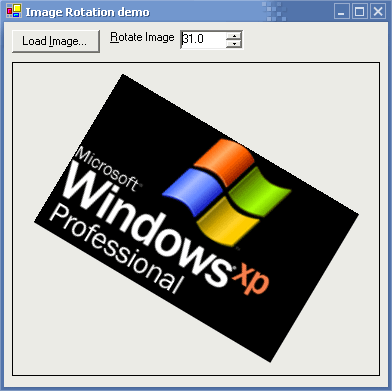
The demo program is extremely basic, the only interesting portion of it, is
that I made the NumericUpDown control wrap around using the next bit of code.
if( angle.Value > 359.9m )
{
    angle.Value = 0;
    return ;
}

if( angle.Value < 0.0m )
{
    angle.Value = 359.9m;
    return ;
}

pictureBox.Image = Utilities.RotateImage(img,
    (float) angle.Value );
After setting the new value I return from the method so that it can run again
because of the change I made.
Acknowledgments
- Tweety for asking the question which got me into writing the code and the
article
- Shog9 and PJ Arends for offering suggestions and pointing me in
the right direction while I was stuck with the code not working for non-square
images.
History
- December 7, 2002 - Initial posting



 General
  News
News  Suggestion
  Question
  Bug
Bug  Answer
  Joke
Joke  Praise
  Rant
Rant  Admin
Admin 


 Submit an article or tip


![Rose | [Rose]](https://www.codeproject.com/script/Forums/Images/rose.gif)

