Click here to Skip to main content

WPF HTML Supported TextBlock

By , 7 Feb 2009
 
  • Download source - 240.92 KB
mainscreen.jpg

Introduction

This article describes HtmlTextBlock which is a WPF TextBlock that can parse a limited set of HTML tags and display them.

Background

I was working on a custom progress dialog, which contains a Header, Message, Progress and some action buttons.

To make it look better, I want the message to support some text format, and I want it to be changeable at runtime, but it seems impossible using TextBlock.

background.jpg

I then Googled how to use HTML in WPF but most solutions told me to use WebBrowser, which is a bit of an overkill for my purpose.

Then I remembered an abandoned project I wrote a few years ago (mostly because I moved to WPF) , which tried to recreate FlowDocument in .NET 2, and load HTML document (my main purpose, the component was named QzMiniHtml2).

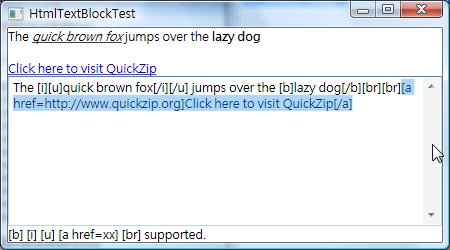
Surprisingly, with very few modifications (mostly using import), this .NET 2 project worked nicely with WPF, just as you can see above.

Because of this, the original project is included as well.

How to Use?

The control is similar to TextBlock except you set the HTML property instead of Text.
Remember to use [ ] bracket instead of < >.

<Window x:Class="HtmlTextBlockTestProj.Window1"
    xmlns="http://schemas.microsoft.com/winfx/2006/xaml/presentation"
    xmlns:x="http://schemas.microsoft.com/winfx/2006/xaml"
    xmlns:uc="http://www.quickzip.org/UserControls"
    Title="HtmlTextBlockTest" Height="250" Width="450">
    <DockPanel>
        <uc:HtmlTextBlock Html="{Binding Text, ElementName=tb}"
                 DockPanel.Dock="Top" Loaded="HtmlTextBlock_Loaded" />
        <TextBlock Text="[b] [i] [u] [a href=xx] [br] supported."
                 DockPanel.Dock="Bottom" />
        <TextBox TextWrapping="Wrap" AcceptsReturn="True"
                  VerticalScrollBarVisibility="Visible"
                  x:Name="tb"
        Text="The [i][u]quick brown fox[/i][/u] jumps over the [b]lazy dog[/b]" />
    </DockPanel>
</Window>		 

How It Works?

The component actually included an HTML parsing engine inside, which translates HTML string to WPF's Bold, Italic, Underline, Hyperlink, LineBreak Inline (more can be added in future, you can do it yourself easily, see below.)

The conversion part is simple.

1) private Inline UpdateElement(HtmlTag aTag)
2) {
3)   Inline retVal = null;

4)   switch (aTag.Name)
5)   {
6)     case "text" :
7)       retVal = new Run(aTag["value"]);
8)       if (currentState.Bold) retVal = new Bold(retVal);
9)       if (currentState.Italic) retVal = new Italic(retVal);
0)       if (currentState.Underline) retVal = new Underline(retVal);
A)       break;
B)     case "br" :
C)       retVal = new LineBreak();
D)       break;
E)   }

F)   if (currentState.HyperLink != null && currentState.HyperLink != "")
G)   {
H)     Hyperlink link = new Hyperlink(retVal);
I)     link.NavigateUri = new Uri(currentState.HyperLink);
J)     retVal = link;
K)   }
L)    return retVal;
M) }		 

First, please note that:

  • The input (aTag) is a Text or LineBreak(br), if the tag is a text, Tag["value"] is the text it holds.
    Bold, Italic, etc. can also be represented by HtmlTag, but they won't be executed here.
  • CurrentState holds the style affecting the TextTag, etc.

So if the tag is text (line 6):

  • it will generate a Run (which can contain format or unformat text, and unformat in this case) (line 7)
  • if it's bold, italic and underline, it will construct them, and using last Inline (Abstract class, Run, Bold, etc. inherited from it), so it contains the property.

When the Inline is returned (Line L):

  • It will be added to your HtmlTextBlock.Inlines collection.

History

  • 08-02-09 Initial version

License

This article, along with any associated source code and files, is licensed under The GNU Lesser General Public License (LGPLv3)

About the Author

Leung Yat Chun
Software Developer
Hong Kong Hong Kong
Member

Sign Up to vote   Poor Excellent
Add a reason or comment to your vote: x
Votes of 3 or less require a comment

Comments and Discussions

 
You must Sign In to use this message board.
Search this forum  
    Spacing  Noise  Layout  Per page   
GeneralMy vote of 1memberstarsky_chen6 Jan '13 - 5:16 
can't download
QuestionUnable to download the attached samplememberksvimalraj28 Jul '11 - 17:28 
Hi Leung,
 
I am unable to download the attached sample code. There is no hyperlink to download the sample.
 
Can you please make it available for us?
AnswerRe: Unable to download the attached samplememberLeung Yat Chun29 Jul '11 - 3:52 
Hello
 
The download link seems removed in Revision 2 of the article.
 
Please download it here:
http://www.codeproject.com/script/Articles/ArticleVersion.aspx?aid=33196&av=59425[^]
 
Regards
Joseph Leung

GeneralSmall bugmemberArlenFeldman25 Mar '11 - 14:55 
Very useful control! However, I did run into a slight problem. I'm using this with RSS, and it is not uncommon to have an anchor tag that just contains an image. In that circumstance, the updater tries to put a null value into the Hyperlink, which crashes at runtime.
 
A very minor change fixes the problem (in HtmlUpdater.UpdateElement):
 
...
 
if (currentState.HyperLink != null && currentState.HyperLink != "")
{
   // To prevent a crash if the contained tag was something like a stand-alone image
   if (retVal == null)
      retVal = new Run();

   Hyperlink link = new Hyperlink(retVal);
   try
   {
 
Thanks for the control - saved me a ton of time.
 
Arlen
GeneralThis is ...memberXmen W.K.2 Jul '10 - 5:25 
...what I was thinking, 5 from me.


TVMU^P[[IGIOQHG^JSH`A#@`RFJ\c^JPL>;"[,*/|+&WLEZGc`AFXc!L
%^]*IRXD#@GKCQ`R\^SF_WcHbORY87֦ʻ6ϣN8ȤBcRAV\Z^&SU~%CSWQ@#2
W_AD`EPABIKRDFVS)EVLQK)JKQUFK[M`UKs*$GwU#QDXBER@CBN%
R0~53%eYrd8mt^7Z6]iTF+(EWfJ9zaK-i’TV.C\y<pŠjxsg-b$f4ia>
-----------------------------------------------
128 bit encrypted signature, crack if you can

GeneralSaving me a lot of time!memberMember 324083012 Dec '09 - 5:01 
I was about to write something very similar to this - many many thanks indeed - this is a very useful and smart piece of code!
Generalimage in text blockmemberpathurun8 Sep '09 - 21:35 
Hi
Just wodnering if it is possible to display images also in Textblock.
Thanks.
GeneralRe: image in text blockmemberLeung Yat Chun15 Sep '09 - 0:56 
Since it's textblock (and inherited from TextBlock), it cannot embed image, e.g. the following doesnt work
 
HtmlUpdater.UpdateElement :
 
Image img = new Image();
BitmapImage bi = new BitmapImage(new Uri(@"c:\temp\picture.png"));
img.Source = bi;
retVal = new Figure(new BlockUIContainer(img));

 
To make it work the component have to be reworked to inherit from another component.
 

GeneralDoes not work if Html Text is assigned to the HtmlTextBlock during Bindingmemberazamsharp1 Jul '09 - 10:09 
Here is my code and it does not format the HTML.
 
<HtmlTextBlock:HtmlTextBlock TextAlignment="Left" Width="200" TextWrapping="Wrap" Margin="5" Html="{Binding Path=Description}" FontSize="12" FontStyle="Normal" />
 
Mohammad Azam
azamsharp@gmail.com
www.highoncoding.com
Houston, TEXAS

GeneralRe: Does not work if Html Text is assigned to the HtmlTextBlock during BindingmemberLeung Yat Chun2 Jul '09 - 7:06 
The following should fix the problem.
 

public class HtmlTextBlock : TextBlock
{
public static DependencyProperty HtmlProperty = DependencyProperty.Register("Html", typeof(string),
typeof(HtmlTextBlock), new UIPropertyMetadata("Html", new PropertyChangedCallback(OnHtmlChanged)));
 
public string Html { get { return (string)GetValue(HtmlProperty); } set { SetValue(HtmlProperty, value); } }
 
public override void OnApplyTemplate()
{
base.OnApplyTemplate();
Parse(Html);
}
 
private void Parse(string html)
{
Inlines.Clear();
HtmlTagTree tree = new HtmlTagTree();
HtmlParser parser = new HtmlParser(tree); //output
parser.Parse(new StringReader(html)); //input
 
HtmlUpdater updater = new HtmlUpdater(this); //output
updater.Update(tree);
}
 
public static void OnHtmlChanged(DependencyObject s, DependencyPropertyChangedEventArgs e)
{
HtmlTextBlock sender = (HtmlTextBlock)s;
sender.Parse((string)e.NewValue);
}
 
public HtmlTextBlock()
{

}
 
}


GeneralextensionsmemberLee_Nover20 Mar '09 - 15:11 
Hi.
I've extended your component to include a few additional options:
[s] - strikethrough
[font] - can have parameters: name, size and color. color can be a hex string or a name.
I've also modified the attribute parsing mechanism to support both quoted and nonquoted values
 
email me if you would like the new updates.
 
thank you for the component! Thumbs Up | :thumbsup:
GeneralRe: extensionsmemberLeung Yat Chun20 Mar '09 - 20:35 
Greetings
 
thanks, yes, I have implemented these as well.
 
I am currently having trouble implementing [sub] and [sup] tag, I created a implementation for that but it seems doesn't work, the following is my code :
 

retVal = new Run(aTag["value"]);
 
if (currentState.SubScript)
retVal.SetValue(Typography.VariantsProperty, FontVariants.Subscript);
if (currentState.SuperScript)
retVal.SetValue(Typography.VariantsProperty, FontVariants.Superscript);
if (currentState.Bold) retVal = new Bold(retVal);
if (currentState.Italic) retVal = new Italic(retVal);
if (currentState.Underline) retVal = new Underline(retVal);

if (currentState.Foreground.HasValue)
retVal.Foreground = new SolidColorBrush(currentState.Foreground.Value);

if (currentState.Font != null)
try { retVal.FontFamily = new FontFamily(currentState.Font); }
catch { } //Font name not found...
 
if (currentState.FontSize.HasValue)
retVal.FontSize = currentState.FontSize.Value;
 
break;

 
If you figure out what caused the problem, please drop me a note.
 
I am hopping to implement some WPF binding as well (at least the most basic one, without converter).
 
Regards
Joseph Leung
 

GeneralRe: extensionsmemberLee_Nover23 Mar '09 - 4:14 
after a quick search/read on the net, it seems sub/superscripts only work with OpenType fonts.
what would you like to bind?
GeneralRe: extensionsmemberLeung Yat Chun23 Mar '09 - 10:20 
I hope to implement something like the following :
e.g. <a href="{link}"><binding path="header" /></a>
Both link and header should able to return value like WPF.
 
I haven't implement this yet, but I think it will require :
- parse the new syntax (sure!)
- get the initial value (using reflection i guess)
- hook to datacontext's PropertyChanged event, and update the html when fired.
 
Regards
Joseph Leung
GeneralRe: extensionsmemberLee_Nover24 Mar '09 - 3:45 
so the link would be databound to some source.
in that case I'd use the same code as in xaml:
<a href="{Binding Path=URL}">{Binding Path=UrlName}</a>
a <binding> element, as in your example, would also be useful Smile | :)
this way you could catch the Binding part in the parse method and simply load it with b = new Binding(path)
then attach it to the tag's "link" property with this.SetBinding(HtmlTag.LinkProperty, new Binding(linkPath));
GeneralRe: extensionsmemberLeung Yat Chun25 Mar '09 - 9:20 
Ok, the second part is working now. (e.g. [binding path='Title']), I used reflection to get the variable as it seems easier.
 
I have upload the newest build here
http://sites.google.com/a/quickzip.org/code/Home/articles-1/htmltextblock[^]
 
Yes, using {Binding Path=URL} should be better, I will write some parsing code for this.
 
Regards
Joseph Leung
 

GeneralRe: extensionsmemberBob Ranck4 Apr '09 - 9:26 
Thanks, for addressing the subscript issue.
I tried the new example from your newest build and it did not work for me.
Could you illustrate an example with subscript please.
Thank you,
Bob Ranck
GeneralRe: extensionsmemberLeung Yat Chun5 Apr '09 - 20:45 
sorry, but it doesnt work yet. Frown | :(
 
Regards
Joseph Leung
QuestionFlow document?memberMember 17809897 Feb '09 - 21:32 
Nice article.
 
But why do not use flow documents? Is your solution any better?
AnswerRe: Flow document?memberLeung Yat Chun7 Feb '09 - 22:39 
Greetings
 
I believe if you use FlowDocument (correct me if I am wrong), you can write xaml code like this :
"<hyperlink>A Link</hyperlink>"
it works, however, you cannot change the content at runtime, unless you write a number of lines in code-behind, e.g :
"new Hyperlink(new Run("A Link"));"
 
Thats what my textblock does, and all you need is to bind the html property.
 
Regards
Joseph Leung
 
QuickZip
GeneralRe: Flow document?memberMember 17809898 Feb '09 - 22:38 
You can use XamlReader class to parse xaml string Wink | ;)
GeneralRe: Flow document?memberLeung Yat Chun9 Feb '09 - 9:04 
Greetings
 
You are right, I remembered I read this class before but it didn't came up to my mind when I designing the component. (I am still new to WPF anyway Smile | :) )
 
Anyway, as I ve completed the component, I will continue use it, are there similar class that can parse html string?
 
Thanks.
 
Regards
Joseph Leung
 

General General    News News    Suggestion Suggestion    Question Question    Bug Bug    Answer Answer    Joke Joke    Rant Rant    Admin Admin   

Permalink | Advertise | Privacy | Mobile
Web02 | 2.6.130516.1 | Last Updated 7 Feb 2009
Article Copyright 2009 by Leung Yat Chun
Everything else Copyright © CodeProject, 1999-2013
Terms of Use
Layout: fixed | fluid
