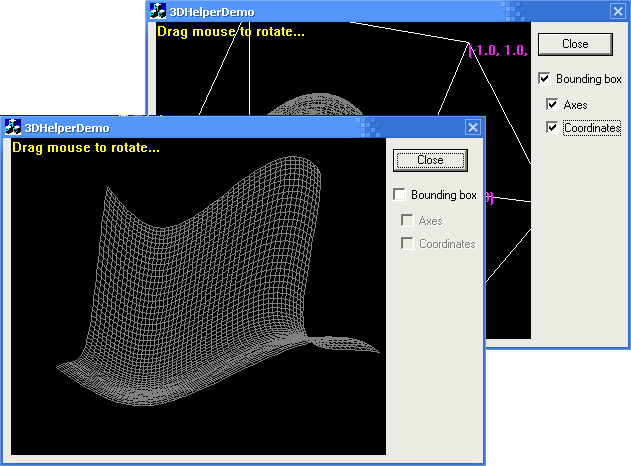
Introduction
Ever had the problem to display 3D-related data? E.g. to display a 3D-curve in a Windows dialog window? Don't like to implement a whole DirectX/OpenGL class hierarchy?
There is a solution: The 3DHelper class!
More tools can be found on my homepage.
Background
If you are familiar with 3D programming, you already might have used free/not so free libraries to perform the task of rendering 3D objects onto your screen.
The big (in my opinion!) drawback of that approach is: your code is getting more and more complicated to maintain and even understand. Not to mention portability.
Having just some files to be included into your project, performing all the necessary math-stuff to "get 3D" sounds too nice to be true? Now its real!
The Solution
The aim of the API described in this article is simply to help you to project 3D data into your 2D window.
Given a 3D point (e.g. a point being part of a nurbs-surface, a 3D function value, etc.) the API transforms this point and returns a coordinate pair representing a dot in your window.
And the best - there is no sophisticated OpenGL/DirectX stuff involved. This is a pure software solution.
Using the Code
To allow the API to help you, it needs some basic steps to be performed:
- Add a variable of type
CMF3DHelper to your project. - At start up (and after each resize event) call the
CMF3DHelper::Initialize() function of your variable. (see 1.)
This Initialize() function needs parameters:
- A pointer to the device context (DC) of your window (used to get the window size)
- The "cube" representing your data, represented by two vectors:
vmin and vmax.
All of your data points should lay inside that cube. Imagine something like a bounding cube, covering all your data points.
Example in 2D: you need to display a curve of form y=sin(x) where x is between [-PI] and [+PI]. The result of that function is in range of [-1] up to [+1].
Therefore you have to define the bounding box (2D!) using two corners:
(-1, -PI) which is top left and
(+1, +PI) similar to bottom right. - A flag (
bSupportTrackBall) to tell the API whether to perform rotation controlled by mouse or not.
- For each data point to be calculated, call the
RenderPoint() function. It returns the corresponding screen(=window) coordinates of your 3D data point.
The best to do is to check 3DHelperDemoSimple project. I reduced the code to the minimum (no checking code) to clarify the steps.
Open the 3DHelperDemoSimple project, and select the OnInitDialog method.
Only the lines below are added to the code generated by the wizard:
initialize();
The initialize function itself is implemented some lines below.
Steps performed:
- Initialize the API.
- Start the update timer, used to refresh the mouse (=rotation) information. In our case, the whole scene will be repainted each 25 milliseconds.
void CMy3DHelperDemoSimpleDlg::initialize()
{
CWnd *pTarget = GetDlgItem(IDC_STATIC_PLACEHOLDER);
m_c3DHelper.Initialize(pTarget->GetDC(), NeHe::Vector(-2.0f, -2.0f, -2.0f),
NeHe::Vector(2.0f,2.0f,2.0f), TRUE);
SetTimer(1, 25, NULL);
}
Triggered by the timer, every 25 ms the OnTimer function will be entered.
Inside, the trackball position will be updated (UpdateTrackBall, which again needs the current DC as parameter), and the scene will be redrawn (redraw()).
void CMy3DHelperDemoSimpleDlg::OnTimer(UINT nIDEvent)
{
if(nIDEvent == 1) {
KillTimer(nIDEvent); m_c3DHelper.UpdateTrackBall
(GetDlgItem(IDC_STATIC_PLACEHOLDER)->GetDC());
redraw();
SetTimer(1, 25, NULL); }
CDialog::OnTimer(nIDEvent);
}
Redraw again is trivial. Just take your data point per point, call RenderPoint() for each of them and display the result using e.g. SetPixel() function.
The 3DHelperDemo project implements a more complex example.
Points of Interest
I decided not to implement the whole math stuff by myself (think that is not a unique task...). So I have taken some matrix/vector code from NeHe (a GREAT site related to OpenGL, got my 5!).
To get a better idea on how OpenGL is implemented, I took a closer look at the free mesa implementation. This is a must for everyone interested in 3D implementation!
Notes
Any feedback would be appreciated!
See more tools and updates on SoftwareHive.
History
- 2009/02/14 - Initial release
This member has not yet provided a Biography. Assume it's interesting and varied, and probably something to do with programming.



 General
  News
News  Suggestion
  Question
  Bug
Bug  Answer
  Joke
Joke  Praise
  Rant
Rant  Admin
Admin 


 Submit an article or tip


 .
. 
 )
)


