Introduction
This is a LCD (MC20E2D-SYL) 8-bit 2x20 LCD module with Silabs 'toolstick dauther (F330)' updated with new firmware (in 'timer.zip' - LCD controller) and 'debug adapter(F321)' (also known as 'toolstick EK') made unit.
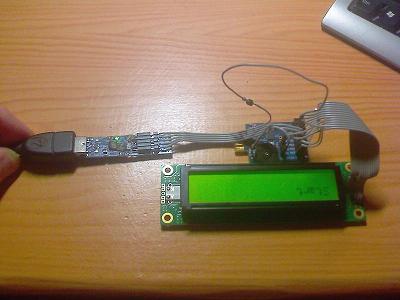
Prototype

With that, you can send text to display connected through USB debug adapter.
Prototype board:
To use 'usbhidio' you must update firmware for 'debug adapter'.
Toolstick --really is named 'Debug adapter' firmware in download section at the top
(to update use 'toolstick base adapter').
On desktop, run usbhidio2.exe (VB6) and type text on screen. Make sure that baud is 9600 and you are ready.
Software can be modified and run independently by supplying power.
Connections are seen on this page: http://www.8051projects.net/lcd-interfacing/introduction.php.
I made it like this:
<------------------ 'Toolstick F330'-----------------> <---Display--->
P1.0 to P1.7 P0.6 P0.7 P0.4(TX) P0.5(RX) VDD(3V) GRD&RW 5V
^ ^ ^ ^ ? ^ ^ ^ ^
DB0 to DB7 EN RS RX(25) TX(26) PIN6 GRD USB
<--------Display-------> <------------- 'Debug adapter F321'------------>
To adjust background, replace resistor 1,5K between GRD and VEE(PIN3) on LCD.
Also on LCD input RW(PIN5) is tied to GRD.
See the image below for connections:
This is a very small and accurate job - thus that can't solder- don't bother to.
Background
Take a look at the previous article Counter based c8051 and this CodeProject article LCD with parallel port.
Take a look at the next article USB IR with c8051.
Using the Code
On desktop application, just press enter on textbox to display data on LCD - For those that are interested in the code - here is the main routine:
void main (void)
{
uchar i;
uchar j;
uchar dummy;
PCA0MD &= ~0x40; Timer0_Init (); Port_Init (); UART0_Init();
EA = TRUE; LED=0;
LCD_RS = 0;
LCD_RW = 0;
TimerStart( SYS_TIMER, 500 ); while( !TimerReady( SYS_TIMER ));
LCD_init();
LCD_Home();
LCD_sendstring("Start");
while(1)
{
if(TX_Ready == 1 && UART_Buffer_Size != 0 && Byte == 13)
{
LCD_Clear();
j=0;
for(i = 0; i < (UART_Buffer_Size - 1); i++ ){ if(j>19)
{ move_to_specific(2, 1);
j -= 20; } LCD_senddata(UART_Buffer[i]); j++;
}
TX_Ready = 0; TI0 = 1; }
} }
Points of Interest
There are a lot of samples on the internet, but it is hard to find an article about displaying text through USB and using 8-bit LCD like MC20E2D-SYL.
History
- 27th February, 2009: Initial post
- 19th March, 2009: Article updated
This member has not yet provided a Biography. Assume it's interesting and varied, and probably something to do with programming.



 General
  News
News  Suggestion
  Question
  Bug
Bug  Answer
  Joke
Joke  Praise
  Rant
Rant  Admin
Admin 


 Submit an article or tip


