Background
This article follows on from the previous six Searcharoo samples:
Searcharoo 1 was a simple search engine that crawled the file system. Very rough.
Searcharoo 2 added a 'spider' to index web links and then search for multiple words.
Searcharoo 3 saved the catalog to reload as required; spidered FRAMESETs and added Stop words, Go words and Stemming.
Searcharoo 4 added non-text filetypes (e.g. Word, PDF and Powerpoint), better robots.txt support and a remote-indexing console app.
Searcharoo 5 runs in Medium Trust and refactored FilterDocument into DownloadDocument and its subclasses for indexing Office 2007 files.
Searcharoo 6 adds indexing of photos/images and geographic coordinates; and displaying search results on a map.
Introduction to Version 7
The following additions have been made:
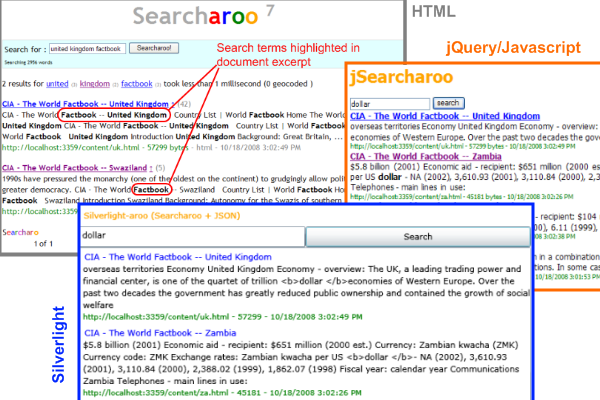
- Store the entire 'content' of each indexed document so the results page can show an excerpt of the text with search keywords highlighted.
- PDF indexing has been enhanced using iTextSharp to extract the document Title from metadata rather than just display the filename in results, and also to attempt to 'manually' index the PDF file even when the
IFilter fails (possibly due to Acrobat installation problems). - Handling 'default document' settings correctly, to prevent duplicate results where a 'page' has multiple accessible URLs because it is configured as the "default document" on a webserver (eg. default.htm or default.aspx in IIS; or index.html in many UNIX servers).
- Add a JSON result 'service' (similar to the Kml output in version 6)
- Add a jQuery-driven AJAX/HTML page that uses the JSON to provide nice, easily skinnable results page
- Add a Silverlight 2.0 client that uses the JSON to provide a richer search experience
- Bug fixes including:
- brad1213 found (and fixed) a bug where links in HTML comments were still followed
- brad1213 suggested fix to add a URL to the 'visited' collection after it has been redirected.
Storing the Complete Document Text During Indexing
Back in October '08, SMeledath asked how the description shown in the results could be taken from the page itself... I proposed an approach but did not have time to implement - until now.
In previous versions of Searcharoo, the index contains only a 'link' between each word and the URL of documents that contain it. The number of times that word appears or where that word appears is lost during the indexing process (see version 5 for discussion of the old catalog structure). This made it impossible to display an 'excerpt' on the results page since the index only stores the first 350 characters (or the META description tag) - mainly because it was much easier to program.
Version 7 significantly alters the 'structure' of the index to store more data: for each word-document pairing, we also store the positions of that word in the source document. For example: after parsing out punctuation and whitespace, each word is assigned an index, with the first word given position zero and each subsequent word adding one. We also store the complete text of the document and can therefore extract any given part of the text.
The key differences between the old and new catalog serialized file (called z_searcharoo.xml by default) are:

BUT there's more - there is a NEW file called z_searcharoo-cache.xml that contains the complete text of each document (including punctuation) which will enable us to display any part of the document text on the results page:
Highlighting Matches in Results
The majority of the code ignores the z_searcharoo-cache.xml file, since it is not required to perform the actual search. Only in the Search.cs GetResults() method is the cache used, after the results list has already been constructed to generate the document 'descriptions' with highlighted keywords.
Once we've loaded the file contents from the cache (into an array), we loop through it with some funky positioning to find the first matching word in the content, grab around 100 words around it, then loop through those 100 words and highlight ALL matches.
If it sounds like a hack: it is (kinda). Google results often identify multiple parts of the document where matches appear, and display more than one (separated by an ellipsis...) - but I will leave that for a future version (or someone else to try)...
Enhanced PDF Indexing
CodeProject user inspire90 asked about displaying the PDF 'title' in search results but I didn't really have a solution straight away. Another user brad1213 provided a working code snippet using iTextSharp. brad1213's code was added direct to Spider.cs.
Incorporating this behaviour into the object model required some refactoring of the PDF indexing process so that PDF documents are treated a little differently to other file types that require the IFilter interface. Previously the spidering process did not differentiate between PDFs and any other file it cannot 'parse' natively - it just handed off to the IFilterDocument.cs class.
Version 7 now has a PdfDocument that inherits from FilterDocument so that we can add the iTextSharp parsing to the GetResponse method.
There was a minor problem with this new subclass however - FilterDocument was not designed for extension... the FilterDocument.GetResponse() method did everything in a tightly coupled mess!
I can't believe I wrote that! To subclass this would basically require re-implementing GetResponse from scratch, because there are no 'hooks' to help the implementor 'inherit' any behaviour. I'm sure there are better approaches, but I chose to move most of the 'functionality' into a couple of *Core methods...
... so the PdfDocument could use them but do additional iTextSharp processing in the middle (using the same temporary file originally created just for passing to IFilter).
Although it's not perfect, the refactored code does allow the subclass to take advantage of FilterDocument's code to download and save a temporary copy of the file (and delete it afterwards), while still performing its own operations (using iTextSharp). I'm pretty confident there's a better pattern for this type of class relationship - if I find it, I will update the article.
'Default' Document Handling
Patrick Stuart asked about a problem he was having with 'duplicate' results - turned out to be the /default.aspx (or whatever your 'default' is) being indexed multiple times (when the URL ended with '/' OR '/default.aspx' for example).
To fix this problem, additional code has been added to manipulate the 'already visited' list - when a URL matches one of the 'default document' patterns, we add ALL possible 'default document' combinations to the _Visited collection. The three patterns that are handled are:
- http://searcharoo.net/SearcharooV7/ - default page with trailing slash
- http://searcharoo.net/SearcharooV7 - default page without slash or page name specified
- http://searcharoo.net/SearcharooV7/default.aspx - default page specified ("default.aspx" set in Searcharoo config)
As indexing progresses, any variation of the URL is 'already visited', thus prevent the duplication in the catalog (and the results).
The updated code looks like this (notice the three different "conditions" where a different URL can be pointing to the same 'default' page):
Set the default document for your website in app.config for the Indexer.exe to parse them correctly.
<add key="Searcharoo_DefaultDocument" value="default.aspx" />
A future/further enhancement could be for the code to be on the lookout for ANY case where a particular page has the exact same content as another page and do some automatic de-duplication... but for now, this URL comparison seems to fix the most common bug.
JSON Results 'service'
I saw this article about Silverlight-enabled Live Search and decided to try and enable Searcharoo in the same way. Unlike the article, I decided to try using JSON so I could build a jQuery front-end as well.
JSON (or JavaScript Object Notation) is a mechanism to represent data (like a serialized object graph) using just the JavaScript 'object literal' notation: it looks like a simple set of key-value pairs (with nesting and 'collections' grouped in []). Transforming the ResultFile class (used on the regular Results page) into JSON will look like this:
[
{"name":"CIA - The World Factbook -- United Kingdom"
,"description":"Tower Hamlets**, Trafford, Wakefield***
, Walsall, Waltham Forest**, Wandsworth**, Warrington
, Warwickshire*, West Berkshire****, Westminster***
, West Sussex*, Wigan, Wiltshire*, Windsor and Maidenhead******
, Wirral, Wokingham****, Wolverhampton, Worcestershire*
, �strong�York*****; ��strong�Northern Ireland - 24 districts
, 2 cities*, 6 counties**; Antrim, County Antrim**
, Ards, Armagh, County Armagh**, Ballymena, Ballymoney
, Banbridge, Belfast*, Carrickfergus, Castlereagh, Coleraine, "
,"url":"http://localhost:3359/content/uk.html"
,"tags":""
,"size":"57299"
,"date":"10/18/2008 3:02:49 PM"
,"rank":6
,"gps":"0,0"
},
{"name":"kilimanjaro"
,"description":"to pay US$40 Departure tax.
Check with your travel agent. Tanzania - Australian passport holders US$50
, British passport holders US$50, Canadian passport holders US$50
, �strong�New ��strong�Zealand passport holder US$50
Medical Information and Vaccinations: Vaccinations:
You must have an International Certificate of Yellow Fever
Vaccination if crossing borders within "
,"url":"http://localhost:3359/content/kilimanjaro.pdf"
,"tags":""
,"size":"182794"
,"date":"10/18/2008 3:01:53 PM"
,"rank":2
,"gps":"0,0"
}]
To create this output, we can use the same SearchPageBase base class as the KML output in version 6 -- creating the JSON output is simple as modifying the ASPX markup with {} : and "" instead of XML.
jQuery JSON 'client'
Given that JSON output (accessible via a simple URL, like /SearchJson/New%20York.js or /SearchJson.aspx?searchfor=New%20York), we can now very simply access the results using JavaScript, or the excellent jQuery library (now 'supported' by Microsoft). The HTML page below can consume the JSON (using jQuery): there is a text input and button which captures the search term and buids a URL, the jQuery $.getJSON() method retrieves the data, evals it into objects and the remaining code outputs HTML to the div on the page.
The result below might look similar to the 'standard' ASPX page - but as you can see from the HTML above, the page is almost entirely generated by jQuery using the JSON results. Look for the jSearcharoo.html file in the Web.UI project in the download.
Silverlight 2.0 JSON 'client'
The JSON 'service' can also supply results to a Silverlight 2.0 application, using the JsonArray and JsonObject classes described on MSDN. First, we'll design a simple XAML user-interface using a simple Grid with a TextBox, Button and ListBox to contain the results. We will be binding a class to the ListBox that looks very similar (if not identical) to the JSON format shown above, so the ListBox.ItemTemplate DataTemplate consists of simple controls in a StackPanel, databound to the same field names (url, name, description).
The C# code is shown below. The important elements are:
- Constructing the JSON URL with the query text
- Using
WebClient to start an asynchronous request for the results - Using
JsonArray to parse the JSON and loop through array to populate our SearchResult objects - 'bind' the
SearchResults to the UI via ItemsSource - the DataTemplate takes care of the formatting for us.
(Note: You need to manually Add References to System.Json, System.Runtime.Serialization, System.Runtime.Serialization.Json.)
private void Search_Click(object sender, RoutedEventArgs e)
{
string host = Application.Current.Host.Source.Host;
if (Application.Current.Host.Source.Port != 80)
host = host + ":" + Application.Current.Host.Source.Port;
Uri serviceUri = new Uri("http://"+host+"/SearchJson.aspx?searchfor=" + query.Text);
WebClient downloader = new WebClient();
downloader.OpenReadCompleted +=
new OpenReadCompletedEventHandler(downloader_OpenReadCompleted);
downloader.OpenReadAsync(serviceUri);
}
void downloader_OpenReadCompleted(object sender, OpenReadCompletedEventArgs e)
{
if (e.Error == null)
{
using (Stream responseStream = e.Result)
{
JsonArray resultStream = (JsonArray)JsonArray.Load(responseStream);
var results = from result in resultStream
select result;
List<SearchResult> list = new List<SearchResult>();
foreach (JsonObject r in results)
{
var result = new SearchResult
{
name = r["name"] ,description = r["description"]
,url = r["url"],size = r["size"],date = r["date"]
};
list.Add(result);
}
resultList.ItemsSource = list;
}
}
}
And this is what the resulting Silverlight 2.0 application looks like (with a search for dollar results showing). Because we used the Silverlight HyperlinkButton, the document titles are clickable-links to the search result page.
The Silverlight 2.0 project is a separate download that can be opened with Visual Web Developer 2008 Express (the rest of the Searcharoo code is still .NET 2.0 and can be opened in Visual Studio or Express 2005). Look for the Silverlight.html and Silverlightaroo.XAP files in the Web.UI project in the download.
Bug Fixes
Possible Duplicate Indexing When Page is Redirected
brad1213 (who has contributed to Searcharoo a couple of times) helped out with an additional 'error condition' related to the _Visited handling discussed above - when a page redirects to another location, the resulting HTML is indexed BUT only the 'original' URL is marked as 'visited (possibly leading to duplicates in the catalog). His solution is simply to add the URL after redirects have been followed to the _Visited list.
Follows Links in HTML that have been Commented Out
brad1213 also identified a solution to the problem of links inside HTML comments (i.e. within <!-- -->) that probably should be ignored. The fix is to add this regular expression replacement in HtmlDocument (line 295):
htmlData = Regex.Replace(htmlData , @"<!--.*?[^" +
Preferences.IgnoreRegionTagNoIndex + "]-->" , "" ,
RegexOptions.IgnoreCase | RegexOptions.Singleline);
Surrogate Pair Error (PDF Indexing)
Member 4130814 reporting an error serializing the catalog after indexing PDFs. I was able to reproduce it and (I think) fix it with this simple statement to remove 'nulls' from the string.
this.All += sb.ToString().Replace('\0', ' ');
Not 100% sure why those nulls were creeping into the searched text though.
Conclusion
This article has been a mix of 'requested features' (keyword highlighting, duplicate removal) and 'new toys' (JSON, jQuery and Silverlight). You can learn more about jQuery, and why JSON is an alternative to XML on the web.
Updates



 General
  News
News  Suggestion
  Question
  Bug
Bug  Answer
  Joke
Joke  Praise
  Rant
Rant  Admin
Admin 


 Submit an article or tip


![Rose | [Rose]](https://codeproject.global.ssl.fastly.net/script/Forums/Images/rose.gif)