Introduction
This article is useful for the following reasons:
- To create a List Definition template using Visual Studio .NET 2005/2008 extension for WSS
- To create a custom hyperlink column using schema.xml where the hyperlink will be built dynamically depending on the value of another field (in this example, I used Issue status column)
- To customize the edit form (EditForm.aspx) and also new form (NewForm.aspx)
- To make more than one edit form for different issue item status
When you want to enter an edit item into, let’s say, your Issue Tracker list, SharePoint calls upon the EditForm.aspx page for that list. The page contains a customized List Form Web Part which cannot be edited within the web part, so in order to accomplish this, I use SharePoint Designer 2007 tool and Visual Studio .NET extension for SharePoint List Definition Template. Also I explain how to make different Edit form and depending on the list status, the edit link will redirect in different edit page. Here is the technique to do it.
Background
During my Bug Tracker website development on MOSS platform, one of the tasks was how to customize the edit view of issue tracker list for the user of the site and also make different edit form for different issue status. EditForm.aspx page contains a List Form Web Part which displays default columns associated with the Issue Tracker list properties. The first problem was to customize edit form because of default webpart and the second problem was to make a different edit view depending on status. Also the last problem was to link different edit view for different status. I solved the problem one after another with the help of other online articles and my colleague.
To Create and Customize Custom Edit/New Forms for SharePoint Lists
- Open your site into SharePoint Designer.
- Go to your target list and open the 'NewForm.aspx' web form.
- Go File > Save As... and give the form a new name such as 'NewForm2.aspx'.
- Delete the default List Form Web Part from the page.
- Go Insert > SharePoint Controls > Custom List Form.
- In the List or Document Library Form dialog, select the appropriate list, content type and type of form.
- Click OK and a new Data Form Web Part is added with controls representing all the fields from the list.
- Now, you can do your customization such as rearranging the fields according to your need.
- Save the site.
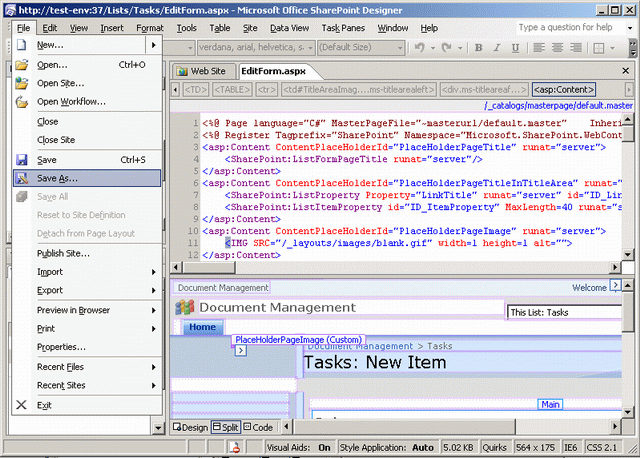

Create a List Definition Template
You have to create a List Definition project of your specific list type (task, issue) for which you want to customize. Here, we will create Issue Tracking typelist definition using VS.NET Extension for WSS.
File > New > Project
- Select Visual C# (From the Dialog)
- Select Empty project
- OK (Give project name “
ListDefinitionDemo”) - Add New Item (
IssueListDemo) - Select Issue Tracking from the List Definition Settings Dialog.
- OK.
- Build the project.
- If the build succeeds, go to Project Properties -> Debug.
- Provide site URL in “Start Browser With URL” under Set Action.
e.g. http://servername:port/websitedemo - Deploy Solution.
If your deployment is successful, then the next step is to customize schema.xml file for custom column.
Note: The list will be deployed in the following location: C:\Program Files\Common Files\Microsoft Shared\web server extensions\12\TEMPLATE\FEATURES.
Create Custom Hyperlink Column
After creating the solution using Visual Studio .NET, it is necessary to add customize edit column in schema.xml to build dynamic hyperlink so that the user can see the actual edit form layout (different edit page, e.g. EditPage1.aspx) depending on the item status. Add a new hyperlink column and build a dynamic href link in the following way:
<view url="MyItems.aspx" webpartzoneid="Main" type="HTML" baseviewid="2">
        <viewfields>
            <fieldref name="Attachments">
            </fieldref>
            .    .    .
            <fieldref name="CustomEdit">
            </fieldref>
        </viewfields>
        .     .    .
</view>
The sample code would look like this which you have to add inside <!--<fields>…</fields> -->: Put new GUID id for field ID using guidgen.exe tool from VS.NET command tool.
<fields>
    .    .    .
<field id="{CEA7C7CF-238E-48c1-8DEA-F1ED2D038C0E}" name="CustomEdit"
        type="Computed" hidden="FALSE" readonly="TRUE" displaceonupgrade="TRUE"
        displayname="Modify" classinfo="Menu"
        sourceid="http://schemas.microsoft.com/sharepoint/v3" staticname="CustomEdit"
        frombasetype="TRUE">
        <fieldrefs>
          <fieldref name="ID">
          <fieldref name="Status">
        </fieldrefs>
        <displaypattern>
        </displaypattern>
      </field>
</fields>
Ferdous has industry level experience with SharePoint and has done several presentations and workshops on SharePoint. He also worked as SharePoint Consultant (CREDEM Italy, Robi etc) and Trainer (BASIS, JAXARA IT, LEADS Co.). He is currently working as SharePoint Architect at BrainStation-23. He also worked as Technical Project Manager for Congral LLC for managing revolutionizing Patient Centric Healthcare applications at the same company since 2009.
He worked on many international projects during his professional life. The major projects are included below:
Internal Enterprise Portal for Robi, Dhaka
nVision Solution for nSales A/S, Denmark
Shared Care Plan for Congral LLC, USA
Internet Banking Portal for the Bank of CREDEM, Italy
Document Management (DMS) for the Bank of CREDEM, Italy
MES solution for Rockwell Automation, Italy
Tourism for Travel Curve Inc., USA
and so on...
He is the author of several technical articles with over 49 articles published on http://mrbool.com where he is the Technical Author for the site and author of mssharepointtips.com as well. He is also founder of SharePoint Expert group.
Looking for a Offshore Development or partnership.............. in any development in Dot.Net & Sharepoint 2007,2010 Platform.
Search him in google by 'MJ Ferdous' to get all links, articles, profile etc
Contact him: ferdouscs@gmail.com mjferdous@live.com
Blog: http://geekswithblogs.net/ferdous
Specialties
===========
Production troubleshooting, maintainability and scalability
SharePoint 2007/2010
Dot.Net Application
Project Management
Document Management Solution



 General
  News
News  Suggestion
  Question
  Bug
Bug  Answer
  Joke
Joke  Praise
  Rant
Rant  Admin
Admin 


 Submit an article or tip


