Downloads
Introduction
This tutorial introduces a new NUnit
Addin able to record execution time of unit tests and generate XML, CSV, HTML performances reports with charts and history tracking.
The development is still active, and the project will evolve during the next months with new features and integrations into other frameworks like CruiseControl.NET, mbUnit and Gallio
Background
The use-case described below, is the one that driven me to the solution
described, but the tool developed for this specific application
can be fully recycled and applied to any other project that needs for
benchmarking capabilities.
Some times ago I started the development of a CMS project that needed, and still currently needs, for constant and accurate performance benchmarking.
Its contents database is totally file-system based into xml files, and its whole architecture has become very complex due to the mandatory flexibility of the plugins subsystem.
Due to these two factors, the performances mainly depends on:
- the overall algorithmic complexity
- the xml IO timings.
The algorithmic complexity can be estimated (since it's deterministic by definition) but estimating it in a complex workflow is a pain.
The xml IO timings are even more difficult to forecast.
These two factors combined together made the performances optimization a blood bath, and at some point I realized that theory was not enough: I needed for real-case benchmarks.
Prerequisites formalization
On the features side, to tweak performances and evaluate possible optimization strategies I need for a tool able to:
- measure the execution timings of every high-level and mid-level functionality in the system every time I make a meaningful modifications in the code base
- keep a chronological tracking of every measurement taken, and visually compare the measurements in a way that makes me able to determine if a certain modification improves the system performances or not.
Going more in deep with the prerequisites analysis, other features spontaneously emerge on the surface, and the final prerequisites asset needs the tool to be also:
- money and license free
- fully customizable in terms of benchmarks visual layout
- fully customizable in terms of benchmarks parametrization
- not intrusive in native code or unit tests code
- "smart" enough to automatically suggest ways to improve the code.
The solution
Since all the project code is covered by NUnit tests, I decided to search for a tool able to integrate into NUnit and execute the performances benchmarks in the easy-to-manage shape of unit tests.
Unfortunately, no one of the tools I tested satisfied all the requirements I needed, so I decided to develop a tool on my own based on the extensibility features embedded in NUnit.
After some documentations and samples digging, i decided to develop my new Addin so it would:
- be driven by the smallest possible chunk of code into the test method to benchmark. I decided to follow the general NUnit extension strategy, developing a brand new attribute (
NJC_TestPerformanceRecorderAttribute) able to instruct the Addin without affecting the code inside the test and so without touching its execution flow. - track the test execution info with a descriptor (
NJC_TestPerformanceDescriptor) initialized through the parameters declared in the tracking attribute NJC_TestPerformanceRecorderAttribute - connect to the NUnit infrastructure through the EventListener interface
- Makes the architecture extensible enough to makes me able to generate useful data reports reusable in external environments. The current implementation supports 3 types of output report formats:
- Csv: Write a CSV file, where every row is a single benchmark with the description values written in is columns
- Xml: Write an XML file, where every child node of the root is a single benchmark
- Html: Writes both an XML file and an HTML file generated by the transformation of the XML file with the embedded. The HTML report contains graphs and visual aids that helps reading the benchmarks results and taking further decisions about tweaks to adopt.
Global architecture
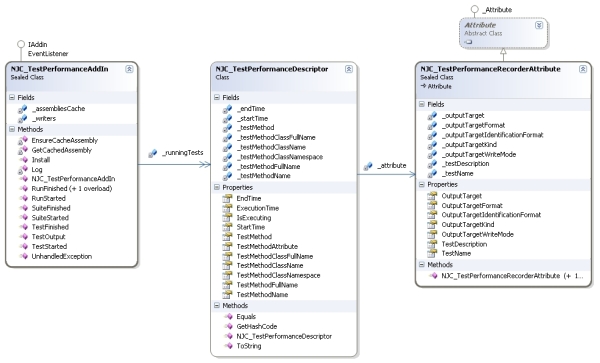
Here below there is a simplified diagram that shows the global architecture of the AddIn.
As stated above, the main components are the main AddIn class (
NJC_TestPerformanceAddIn), the execution descriptor class (
NJC_TestPerformanceDescriptor) and the test attribute class (
NJC_TestPerformanceRecorderAttribute)
The attribute NJC_TestPerformanceRecorderAttribute
The attribute used to define the behaviour of the benchmarking workflow has a really simple structure, so let's jump directly to it's usage demonstration and the meaning of every parameter:
[Test]
[NJC_TestPerformanceRecorder(
TestName = "Test 1",
TestDescription = "Test description",
OutputTargetWriteMode = NJC_TestPerformanceTargetWriteMode.Append,
OutputTargetKind = NJC_TestPerformanceTargetKind.FileSystem,
OutputTargetFormat = NJC_TestPerformanceTargetFormat.Csv | NJC_TestPerformanceTargetFormat.Xml,
OutputTarget = TARGET_FOLDER,
OutputTargetIdentificationFormat = NJC_TestPerformanceTargetIdentificationFormat.ClassFullNameAndMethodName
)]
public void My_Method_Test_That_Needs_For_Benchmarking()
{
}
Here there is a representation of the internal structure of the
NJC_TestPerformanceRecorderAttribute attribute with the enumeration associated to the configuration properties

The descriptor NJC_TestPerformanceDescriptor
The performance descriptor implemented in the class NJC_TestPerformanceDescriptor is just an information and parameters holder, which only functionality is to represent the timing and execution state of a NJC_TestPerformanceRecorderAttribute applied to a test method.
Due to this motivations all its properties and private members are exposed to the public environment as read-only.
The only exception is the EndTime property, that's used to implements the time-tracking functionality of the instance, exposed by the readonly property ExecutionTime.
The EventListenter interface
The EventListener interface is very useful because it makes custom code able to transparently connect to the NUnit environment events in an asynchronous way: every method in the interface implementor is called by the framework without waiting its execution to end.
It's definition is (in NUnit 2.4.4) declared as follows:
public interface EventListener
{
	void RunStarted( string name, int testCount );
	void RunFinished( TestResult result );
	void RunFinished( Exception exception );
	void TestStarted(TestName testName);
	void TestFinished(TestCaseResult result);
	void SuiteStarted(TestName testName);
	void SuiteFinished(TestSuiteResult result);
	void UnhandledException( Exception exception );
	void TestOutput(TestOutput testOutput);
}
For simplicity and clearness in code writing, I created the core of the NJC_TestPerformanceAddIn directly implementing the IAddin interface (needed by NUnit to recognize the class as an Addin) and the EventListener interface (that drives the connection implementation of the Addin into the NUnit infrastructure)
[NUnitAddin(Name = "NinjaCross Test Performance Extension")]
public sealed class NJC_TestPerformanceAddIn : IAddin, EventListener
{
...
}
The AddIn NJC_TestPerformanceAddIn and its workflow
The workflow of the Addin is controlled by the sequential invocation of these methods implementations:
Step 1) NJC_TestPerformanceAddIn.RunStarted and/or NJC_TestPerformanceAddIn.SuiteStarted
load the tests executing assembly
public void RunStarted(string name, int testCount)
{
if (Debugger.IsAttached)
Log("RunStarted", name, testCount);
EnsureCacheAssembly(name);
}
public void SuiteStarted(TestName testName)
{
if (Debugger.IsAttached)
Log("SuiteStarted", testName.FullName, testName.Name, testName.RunnerID, testName.TestID, testName.UniqueName);
EnsureCacheAssembly(testName.FullName);
}
private Assembly EnsureCacheAssembly(String fullName)
{
try
{
Assembly a = GetCachedAssembly(fullName);
if (a != null)
return a;
if (fullName.EndsWith(".dll", StringComparison.CurrentCultureIgnoreCase) || fullName.EndsWith(".exe", StringComparison.CurrentCultureIgnoreCase))
{
Assembly asm = Assembly.LoadFile(fullName);
_assembliesCache.Add(asm);
return asm;
}
else
{
return null;
}
}
catch (Exception exc)
{
Log("AddSession", exc);
return null;
}
}
Step 2) NJC_TestPerformanceAddIn.TestStarted
Check the existence of the NJC_TestPerformanceRecorderAttribute attribute into the test method decorations.
If it exists, the method is a suitable benchmarking candidate, so acquires the description and output information/parameters defined in the attribute, and store them into an execution descriptor of type NJC_TestPerformanceDescriptor.
The execution start time is set into NJC_TestPerformanceDescriptor.StartTime using the DateTime.Now value.
public void TestStarted(TestName testName)
{
if (Debugger.IsAttached)
Log("TestStarted", testName.FullName, testName.Name, testName.RunnerID, testName.TestID, testName.UniqueName);
MethodInfo method = NJC_TestPerformanceUtils.GetMethodInfo(testName.FullName, _assembliesCache);
if (method != null)
{
if (NJC_TestPerformanceUtils.GetPerformanceAttribute(method) != null)
{
NJC_TestPerformanceDescriptor descriptor = new NJC_TestPerformanceDescriptor(method);
_runningTests.Add(descriptor);
}
}
}
Step 3) NJC_TestPerformanceAddIn.TestFinished
Stop the timer for the currently running test setting NJC_TestPerformanceDescriptor.EndTime to DateTime.Now, and write the output in the way specified by the NJC_TestPerformanceRecorderAttribute, that was stored inside the execution descriptor NJC_TestPerformanceDescriptor.
The descriptor serialization is delegated to a specific set of classes, also known as "writers" (see next paragraph)
public void TestFinished(TestResult result)
{
if (Debugger.IsAttached)
Log("TestFinished", result.FullName, result.HasResults, result.AssertCount, result.Description, result.Executed, result.FailureSite);
if (result.Executed)
{
MethodInfo method = NJC_TestPerformanceUtils.GetMethodInfo(result.FullName, _assembliesCache);
if (method != null)
{
NJC_TestPerformanceDescriptor descriptor = _runningTests.GetItem(method);
if (descriptor != null)
{
descriptor.EndTime = DateTime.Now;
foreach (KeyValuePair<NJC_TestPerformanceTargetFormat, NJC_TestPerformanceDescriptorWriter> writerKVP in _writers)
{
if ((descriptor.TestMethodAttribute.OutputTargetFormat & writerKVP.Key) == writerKVP.Key)
{
writerKVP.Value.Write(descriptor);
}
}
_runningTests.Remove(method);
}
}
}
}
Output writers
As previously stated, the last step of the workflow is the storage of the output information related to the test, in the way specified by the NJC_TestPerformanceRecorder attribute parameters.
To do this, every test-execution descriptor (NJC_TestPerformanceDescriptor) is serialized into a target file using a specific "writer" that implements the suitable business logic to serialize the descriptor data in the appropriate format.
The Addin selects the suitable writer to use looking at the value of the NJC_TestPerformanceRecorder.OutputTargetFormat (of type NJC_TestPerformanceTargetFormat).
Every value of the enumeration NJC_TestPerformanceTargetFormat is mapped one-on-one in a "writers list" inside the NJC_TestPerformanceAddIn class.
The writers list is declared as class member...
private NJC_TestPerformanceDescriptorWriterList _writers = new NJC_TestPerformanceDescriptorWriterList();
... and is initialized in the constructor with an instance for every avaiable writer.
public NJC_TestPerformanceAddIn()
{
 _writers.Add(NJC_TestPerformanceTargetFormat.Xml, new NJC_TestPerformanceDescriptorWriterXml());
 _writers.Add(NJC_TestPerformanceTargetFormat.Csv, new NJC_TestPerformanceDescriptorWriterCsv());
 _writers.Add(NJC_TestPerformanceTargetFormat.Html, new NJC_TestPerformanceDescriptorWriterHTML());
}
Every writer extends the base class NJC_TestPerformanceDescriptorWriter
public abstract class NJC_TestPerformanceDescriptorWriter
{
public abstract void Write(NJC_TestPerformanceDescriptor descriptor);
public abstract String FileExtension
{
get;
}
}
Here there is a representation of the inheritance tree of the supported/mentioned writers
As already mentioned, the available output formats are 3 (one for each writer extended from NJC_TestPerformanceDescriptorWriter) and they can be generated only into the file system (OutputTargetKind = NJC_TestPerformanceTargetKind.FileSystem).
The output file names are composed using the pattern
<output_folder>\<file_name>.<file_extension>
where:
<output_folder> =
NJC_TestPerformanceRecorder.OutputTarget value, or the test assembly folder if no value was specified
<file_name> = A name based on the format specified in
NJC_TestPerformanceRecorder.OutputTargetIdentificationFormat. The available values are MethodName, ClassNameAndMethodName, ClassFullNameAndMethodName.
<file_extension> = A file extension based on the
NJC_TestPerformanceRecorder.OutputTargetFormat flag values
- "csv" for
NJC_TestPerformanceTargetFormat.Csv - "xml" for
NJC_TestPerformanceTargetFormat.Xml - "html" for
NJC_TestPerformanceTargetFormat.Html. For this working mode is generated also an "xml" file, that's used as an incremental repository for the NJC_TestPerformanceTargetWriteMode.Append "mode" of the NJC_TestPerformanceTargetFormat.Html option.
Including the writers classes into the global diagram, the resulting "big picture" is as follows:
Usage samples
Here below there are some usage samples of the NJC_TestPerformanceRecorderAttribute.
Considering that all the parameters of the
NJC_TestPerformanceRecorderAttribute are optional and have a default value, only the ones that should have different values from their default must be specified.
Sample 1
Track a test...
- into the filesystem (default choice, no need to specify attribute parameter
OutputTargetKind) - into an XML file as tracking repository
- named with the test method name"MyTestMethod.xml"
- into the destination folder "C:\MyProjects\MyTests\PerformanceRepository"
- overwriting previously recorded timings
- without specifing a name
- without specifing a description
[Test]
[NJC_TestPerformanceRecorder
(
OutputTargetFormat = NJC_TestPerformanceTargetFormat.Xml,
OutputTargetIdentificationFormat = NJC_TestPerformanceTargetIdentificationFormat.MethodName,
OutputTarget="C:\MyProjects\MyTests\PerformanceRepository",
OutputTargetWriteMode = NJC_TestPerformanceTargetWriteMode.OverWrite
)]
public void MyTestMethod()
{
}
Sample 2
Track a test...
- into the filesystem (default choice, no need to specify attribute parameter
OutputTargetKind) - into an XHTML file as visual report
- and an XML file used as tracking repository
- named with the class full name and test method name "MyTestNameSpace.MyTestClass.MyTestMethod.html"
- into the destination folder "C:\MyProjects\MyTests\PerformanceRepository"
- appending the new tracking to previously recorded timings
- without specifing a name
- without specifing a description
[Test]
[NJC_TestPerformanceRecorder
(
OutputTargetFormat = NJC_TestPerformanceTargetFormat.Html,
OutputTargetIdentificationFormat = NJC_TestPerformanceTargetIdentificationFormat.ClassFullNameAndMethodName,
OutputTarget="C:\MyProjects\MyTests\PerformanceRepository",
OutputTargetWriteMode = NJC_TestPerformanceTargetWriteMode.Append
)]
public void MyTestMethod()
{
}
Sample 3
Track a test...
- into the filesystem (default choice, no need to specify attribute parameter
OutputTargetKind) - into a CSV file as visual report and tracking repository
- named with the class and test method name "MyTestClass.MyTestMethod.csv"
- into the destination folder "C:\MyProjects\MyTests\PerformanceRepository"
- appending the new tracking to previously recorded timings
- Specifing a name
- Specifing a description
[Test]
[NJC_TestPerformanceRecorder
(
Name = "Performance test 1",
Description = "This is a unit test used as performance tracking element",
OutputTargetFormat = NJC_TestPerformanceTargetFormat.Csv,
OutputTargetIdentificationFormat = NJC_TestPerformanceTargetIdentificationFormat.ClassNameAndMethodName,
OutputTarget="C:\MyProjects\MyTests\PerformanceRepository",
OutputTargetWriteMode = NJC_TestPerformanceTargetWriteMode.Append
)]
public void MyTestMethod()
{
}
Outputs samples
Here below there are some samples generated by the AddIn.
CSV file content:
The first row contains the columns header, the following rows contains the test executions data
start;startTicks;end;endTicks;elapsed;elapsedTicks
lun, 06 apr 2009 13:20:49 GMT;633746208497456374;lun, 06 apr 2009 13:20:50 GMT;633746208500267866;00:00:00.2811492;2811492
lun, 06 apr 2009 13:21:14 GMT;633746208741743790;lun, 06 apr 2009 13:21:14 GMT;633746208744555282;00:00:00.2811492;2811492
lun, 06 apr 2009 13:21:20 GMT;633746208806408106;lun, 06 apr 2009 13:21:20 GMT;633746208809688180;00:00:00.3280074;3280074
lun, 06 apr 2009 13:21:27 GMT;633746208878569734;lun, 06 apr 2009 13:21:28 GMT;633746208881693614;00:00:00.3123880;3123880
XML file content:
The node testExecutionHistory contains a set of testExecution children nodes.
Every child node represent a test execution.
The testExecution nodes contains dates and time spans in both in RFC1123 format (see http://www.isi.edu/in-notes/rfc1123.txt or http://www.faqs.org/rfcs/rfc1123.html) and ticks count (where a tick is one hundred nanoseconds or one ten-millionth of a second, as stated in MSDN documentation)
="1.0"="UTF-8"
<testExecutionHistory
ns="NinjaCross.Classes.Nunit.TestPerformance"
className="NJC_TestPerformanceRecorderAttributeTest"
methodName="Test_Success_WriteModeAppend_TargetKindFileSystem_TargetFormatCsvXml"
testName="Test 1"
testDescription="Test description">
<testExecution>
<start>lun, 06 apr 2009 13:20:50 GMT</start>
<startTicks>633746208500424060</startTicks>
<end>lun, 06 apr 2009 13:20:50 GMT</end>
<endTicks>633746208504328910</endTicks>
<elapsed>00:00:00.3904850</elapsed>
<elapsedTicks>3904850</elapsedTicks>
</testExecution>
<testExecution>
<start>lun, 06 apr 2009 13:21:14 GMT</start>
<startTicks>633746208744711476</startTicks>
<end>lun, 06 apr 2009 13:21:14 GMT</end>
<endTicks>633746208748460132</endTicks>
<elapsed>00:00:00.3748656</elapsed>
<elapsedTicks>3748656</elapsedTicks>
</testExecution>
<testExecution>
<start>lun, 06 apr 2009 13:21:20 GMT</start>
<startTicks>633746208809844374</startTicks>
<end>lun, 06 apr 2009 13:21:21 GMT</end>
<endTicks>633746208812655866</endTicks>
<elapsed>00:00:00.2811492</elapsed>
<elapsedTicks>2811492</elapsedTicks>
</testExecution>
<testExecution>
<start>lun, 06 apr 2009 13:21:28 GMT</start>
<startTicks>633746208881849808</startTicks>
<end>lun, 06 apr 2009 13:21:28 GMT</end>
<endTicks>633746208885442270</endTicks>
<elapsed>00:00:00.3592462</elapsed>
<elapsedTicks>3592462</elapsedTicks>
</testExecution>
</testExecutionHistory>
HTML file content:
This is the most important and interesting report format.
It contains every available information related to the test executions in terms of raw data and in terms of data analysis/trend.
Using a grid-based graphical/data representation of the execution time, coupled with a line-chart generated with Google Chart API is possible to visually evaluate the performances trends of the tracked method along it's development lifetime.
Here there are some explanations about the visual features:
- Test identification and info
- The "name" field inside the "Test identification and info" appears only if the
NJC_TestPerformanceRecorderAttribute.TestName is given in the attribute declaration - The "description" field inside the "Test identification and info" appears only if the
NJC_TestPerformanceRecorderAttribute.TestDescription is given in the attribute declaration - If the XSL stylesheet detect that there's at least one record with
elapsedTicks==0,
the report shows a warning message that states that the benchmark is
not useful, since the timer cannot measure meaningful time spans.
- Test stats and tests performances tracking boxes
- The red bars represents the executions with worst performances.
- The green bars represents the executions with best performances.
- The yellow bars represents the executions with performances that are not classified as "best" nor "worst".
- Test performances evolution
- If the XSL stylesheet detect that there's only one record for a given test, the Google lines chart is not rendered into the report since it would not be meaningfull.
- The lines chart shows also min, max and average values for execution times, so the working range and characteristic behaviour are clearly visible and ponderable.
- The x axis represents the tests execution dimension. At the origin there is the first execution date and on the right side there is the last execution date. The dates are shown in RFC1123 format
- The y axis represent the execution time expressed in seconds.
- Both axis auto-size themselves to contain the last 100 executions of the test
Visual Studio 2005 solution and installation instructions
To use this addin you must first copy its compiled assembly inside the "addins" subfolder of NUnit installation path.
The compiled assembly can be obtained in two ways:
If you want to compile it by yourself, you can download the the attached solution that contains 2 projects:
- The AddIn project, with all the classes described above. This project has a post-build event that copies the output DLL into the default NUnit installation folder (mine is "C:\Programmi\NUnit 2.5\bin\net-2.0\addins" for the 2.5 version). If your NUnit installation is on another path, just change it and recompile the project. If you want to manually manage the AddIn installation (i.e. to don't interfere with already running instances), just remove the post-build event.
- An NUnit project useful to test the functionalities implemented in the AddIn. The total coverage is not the highest possible, but the included tests (51) are enough to ensure a good code stability.
Every project in the solution needs for valid
NUnit references.
Final words and next developments
This tool fully satisfied my requirements so even if it's not a state-of-the-art project, it's anyway a good start point for further developments and extensions.
I hope in the future to add new functionalities, like:
- Visual integration into CruiseControl.NET
- Visual integration in the NUnit GUI
- Generation of an indexing document that links to all the HTML reports
- Support for external xsl stylesheets able to generate HTML reports with different visual layouts and advanced performance evaluation functionalities
- Support for conditional recording conditions, that could allow to specify the rules that decide whether or not record data on target file after a test execution (i.e. not recording performances when a test is not successful)
- Support for integration into mbUnit
- Support for integration into Gallio Framework
References
Development history (dd/mm/yyyy)
- 15/05/2009 - Version 1.0.0.0: This project has been moved to its official web site www.firebenchmarks.com
- 15/05/2009 - Version 1.0.0.0: Extended installation instructions inside the tutorial
- 12/05/2009 - Version 1.0.0.0: Fixed VS2005 download package
- 21/04/2009 - Version 1.0.0.0: Added code samples to the tutorial
- 08/04/2009 - Version 1.0.0.0: First release
I'm a senior developer in .NET, COM & Win32 and I work for an Italian company involved in e-learning and competency-analisys systems.
My work is also my main hobby, and I spend a lot of my spare time writing tutorials and codes for video games and multimedia-related arguments.



 General
  News
News  Suggestion
  Question
  Bug
Bug  Answer
  Joke
Joke  Praise
  Rant
Rant  Admin
Admin 


 Submit an article or tip


