 |
|
 |
hi,
I've down the source code and it work perfectly.
My question is how to capture the event when the user click the “X” button in the dialog or use other method to create the popup window replacing the “ok” with “X” .
I’ ll really appreciate your help,thanks.
Para.
-- modified at 3:51 Tuesday 27th December, 2005
|
|
|
|
 |
|
 |
paraGOD wrote: I've down the source code and it work perfectly.
Great!
paraGOD wrote: My question is how to capture the event when the user click the “X” button in the dialog or use other method to create the popup window replacing the “ok” with “X” .
The "X" you see there does not belong to the dialog, but to the popup itself. Dialogs will always show an "ok" button unless you tell them to hide it. You handle that button theough the WM_COMMAND messages with IDOK as the command.
Regards,
João Paulo Figueira
Embedded MVP
|
|
|
|
 |
|
 |
Yes ,you are right and thanks for your souce code and help. And now my question how to capture "X" in the popup itself?
Para
|
|
|
|
 |
|
|
 |
|
 |
I use your supported link and solve my problem.
Thank you so much.
Para
|
|
|
|
 |
|
 |
Hi,
Excellent code (thanks!), but I am running into a small problem with (possibly) the color picker.
To replicate, insert about 10 CColourPicker instances into a CPropertyPageEx-derived page, and close and open the property sheet a few times. Eventually an access violation exception in MFC shows up:
---> CPlex::FreeDataChain(CPlex * 0x0000ff00) line 44 + 4 bytes
CMapPtrToPtr::RemoveAll() line 94
CHandleMap::DeleteTemp(__POSITION * 0x00000000) line 242
AfxUnlockTempMaps(int 1) line 55
CWinThread::OnIdle(long 1) line 615
If the CColourPicker page is never shown (or CColourPicker's are commented out), the problem immediately disappears. Identical code works fine on desktop, so this might be something Windows Mobile-port specific.
Any ideas??
Thanks...
Gary
|
|
|
|
 |
|
 |
The truth is that I never tested the code under Win Mobile 2003 and this OS is known to reveal bugs that 2002 never bothered to show... Well, I'm queuing this one up!
Regards,
João Paulo Figueira
Embedded MVP
|
|
|
|
 |
|
 |
Hi,
I traced one possible source of the problem to DDX_ColourPicker(). The only deviation from "regular" MFC DDX sources in that function is the cast from temp CWnd instance back to CColourPicker:
CColourPicker* pColourPicker = (CColourPicker*) CWnd::FromHandle(hWndCtrl);
So, I switched getting/setting colors from method-based to message-based:
ColourPicker.h:
#define CPM_GETCOLOUR WM_USER + 1006
#define CPM_SETCOLOUR WM_USER + 1007
afx_msg LRESULT OnGetColour(WPARAM, LPARAM);
afx_msg LRESULT OnSetColour(WPARAM, LPARAM);
ColourPicker.cpp:
ON_MESSAGE(CPM_GETCOLOUR, OnGetColour)
ON_MESSAGE(CPM_SETCOLOUR, OnSetColour)
LRESULT CColourPicker::OnGetColour(WPARAM wParam, LPARAM)
{
ASSERT(wParam);
*((COLORREF*) wParam) = GetColour();
return 0;
}
LRESULT CColourPicker::OnSetColour(WPARAM wParam, LPARAM)
{
ASSERT(sizeof COLORREF <= sizeof WPARAM);
SetColour((COLORREF) wParam);
return 0;
}
... and, finally, modified DDX_ColourPicker():
void AFXAPI DDX_ColourPicker(CDataExchange *pDX, int nIDC, COLORREF& crColour)
{
HWND hWndCtrl = pDX->PrepareCtrl(nIDC);
ASSERT (hWndCtrl != NULL);
if (pDX->m_bSaveAndValidate)
{
::SendMessage(hWndCtrl, CPM_GETCOLOUR, (WPARAM) &crColour, 0);
}
else // initializing
{
::SendMessage(hWndCtrl, CPM_SETCOLOUR, (WPARAM) crColour, 0);
}
}
So far the mod seems to be working (no more crashes), but I will keep testing.
What do you think?
Gary
|
|
|
|
 |
|
 |
Can you pl post an example how to use it. It would be great if you post the application shown in screenshot.
Thanks
|
|
|
|
 |
|
 |
biswa wrote:
Can you pl post an example how to use it.
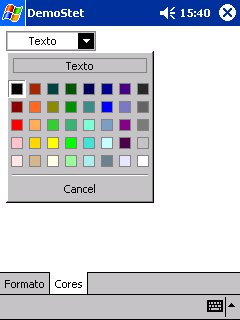
What is shown in the screenshot is part of a framework for formatting columns in a CListCtrl. I'll present here the code segments that will allow you to recreate that. In order to display the control in a dialog or property page, create a simple pushbutton. Using the class wizard, map the button to a normal CButton control. Go to the dialog header and change the declarations to:
CColourPicker m_btnText;
CColourPicker m_btnBack;
CColourPicker m_btnNegn;
The implementation code is:
void CPropListColColor::DoDataExchange(CDataExchange* pDX)
{
CPropertyPage::DoDataExchange(pDX);
DDX_Control(pDX, OIDC_CLR_TEXT, m_btnText);
DDX_Control(pDX, OIDC_CLR_BACK, m_btnBack);
DDX_Control(pDX, OIDC_CLR_NEGN, m_btnNegn);
}
BEGIN_MESSAGE_MAP(CPropListColColor, CPropertyPage)
ON_MESSAGE(CPN_SELENDOK, OnSelEndOK)
END_MESSAGE_MAP()
BOOL CPropListColColor::OnInitDialog()
{
ASSERT(m_pCol);
CPropertyPage::OnInitDialog();
m_btnText.SetDefaultText (_T("Text"));
m_btnText.SetSelectionMode (CP_MODE_TEXT);
m_btnText.SetColour (m_pCol->GetColorText());
m_btnText.SetBkColour (m_pCol->GetColorBack());
m_btnBack.SetDefaultText (_T("Background"));
m_btnBack.SetSelectionMode (CP_MODE_BK);
m_btnBack.SetColour (m_pCol->GetColorBack());
m_btnBack.SetTextColour (m_pCol->GetColorText());
m_btnNegn.SetDefaultText (_T("Negatives"));
m_btnNegn.SetSelectionMode (CP_MODE_TEXT);
m_btnNegn.SetColour (m_pCol->GetColorNeg());
m_btnNegn.SetBkColour (m_pCol->GetColorBack());
return TRUE; }
LRESULT CPropListColColor::OnSelEndOK(WPARAM wParam, LPARAM lParam)
{
COLORREF crBack,
crText,
crNegn;
ASSERT(m_pCol);
crText = m_btnText.GetColour();
crBack = m_btnBack.GetColour();
crNegn = m_btnNegn.GetColour();
m_btnText.SetBkColour(crBack);
m_btnNegn.SetBkColour(crBack);
m_btnBack.SetTextColour(crText);
m_pCol->SetColorText (crText);
m_pCol->SetColorBack (crBack);
m_pCol->SetColorNeg (crNegn);
return TRUE;
}
Hope this helps.
|
|
|
|
 |
|
 |
It works great.
Thanks.
|
|
|
|
 |
|
 |
Hi Paulo,
Is it possible to add a demo program for this color picker. i'm still not sure how to add it to my dialog box. Sorry for troubling you.
Thanks
Love for peace on earth
|
|
|
|
 |
|
 |
In MFC Way:
In Dialog Resource Editor, Put a Button Control onto Dialog.
And Name it IDC_TEXTCOLOR or something.
In ClassWizard, Add a Variable to IDC_TEXTCOLOR as m_ctlTextColor, it must be a CButton variable.
In Header file of Dialog Class, Change CButton to CColourPicker as below.
CColourPicker m_ctlTextColor;
Then run it, just you can see This Great Things.
Of course, you must add some codes to set or get color values from control.
But you can catch it from Paulo's Source Codes easily.
|
|
|
|
 |
|
 |
Thanks!
Daniel
---------------------------
Never change a running system!
|
|
|
|
 |
