Description
This article discusses about two user controls written in ASP.NET. Working on a project recently, I needed to develop a custom DropDown control with multiselect options in the form of CheckBox. I searched around for something simple, yet useful for my needs, and I wasn't able to find anything, so I developed my own control. Later, I reused the code to create a regular DropDown control (no multiselect checkbox options). The two controls can be merged into one, but I might do that at a later stage. On to the controls.
DropDown
This control can be bound to a IListSource to fetch data to be populated, in addition to the regular Items collection that can be populated from the asp. Here are a few examples of how this control can be used in ASPX.
<%@ Register Src="Controls/DropDown.ascx" TagName="DropDown" TagPrefix="thp" %>

<thp:DropDown ID="DropDown1" runat="server" Width="200">
     <Items>
          <asp:ListItem Text="Some text" Value="0" Selected="True" />
          <asp:ListItem Text="Another option" Value="1" />
     </Items>
</thp:DropDown>
<thp:DropDown ID="DropDown2" runat="server" Width="200" DataSourceID="DataSource1"
            DataTextField="Name" DataValueField="Id" />
<thp:DropDown ID="DropDown3" runat="server" Width="200"
	OnNeedDataSource="DropDown3_NeedDataSource"
         DataTextField="Name" DataValueField="Id" OnClientChange="onDropDownChange" />
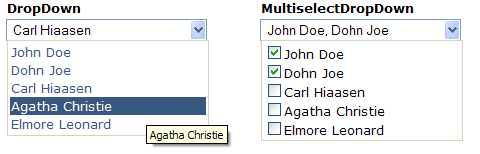
Here's a screenshot of what the above code would render:

Both controls support the following data events:
ItemDataBound - Fired after the object has been bound to an Item. The argument passes both the bound object (DataObject) and the ListItem.NeedDataSource - Fired when there's no DataSourceID specified. This event is helpful when you want to manually populate the controls with your data. See the source code provided for specifics on this, you can use either Items collection or create custom list source (or both).
MultiselectDropDown
The code and usage is exactly as the DropDown control. Here's a screenshot of all of the above scenarios:
The styling in the attached project uses .skin files in the default theme. You can easily modify these to fit your needs. Everything can be styled.
I hope you find this code useful. I recommend this to anyone that wants to start developing custom controls as it has very important features implemented, such as the IPostBackDataHandler interface to pass data between postbacks in a custom manner. It also features some nice DataBinding examples and how you can use and modify these to perform specific tasks.
History
- 6th May, 2009: Initial post
This member has not yet provided a Biography. Assume it's interesting and varied, and probably something to do with programming.



 General
  News
News  Suggestion
  Question
  Bug
Bug  Answer
  Joke
Joke  Praise
  Rant
Rant  Admin
Admin 


 Submit an article or tip


